<?xml version="1.0" encoding="utf-8"?>
<feed xmlns="http://www.w3.org/2005/Atom">
    <id>https://www.tv-hub.org/blog/</id>
    <title>TradingView Hub Blog</title>
    <updated>2026-07-03T00:00:00.000Z</updated>
    <generator>https://github.com/jpmonette/feed</generator>
    <link rel="alternate" href="https://www.tv-hub.org/blog/"/>
    <subtitle>Trading automation insights, product updates, and tutorials</subtitle>
    <icon>https://www.tv-hub.org/favicon.ico</icon>
    <rights>Copyright © 2026 TradingView Hub.</rights>
    <entry>
        <title type="html"><![CDATA[How to Connect Bybit to TradingView (Webhooks)]]></title>
        <id>https://www.tv-hub.org/blog/how-to-connect-bybit-to-tradingview/</id>
        <link href="https://www.tv-hub.org/blog/how-to-connect-bybit-to-tradingview/"/>
        <updated>2026-07-03T00:00:00.000Z</updated>
        <summary type="html"><![CDATA[Connect Bybit to TradingView in under 10 minutes: create a read-write API key, paste one JSON webhook, and automate trades. Full setup, payload, and fixes.]]></summary>
        <content type="html"><![CDATA[<p>Bybit doesn't have a native TradingView integration. You connect the two with a webhook: a TradingView alert posts a JSON message to TradingView Hub, which holds your Bybit API key and places the order for you. This guide walks the whole setup, from the API key to your first demo trade, in under 10 minutes.</p>
<div class="summary-box"><h2 class="anchor anchorTargetStickyNavbar_Vzrq" id="quick-summary">Quick summary<a href="https://www.tv-hub.org/blog/how-to-connect-bybit-to-tradingview/#quick-summary" class="hash-link" aria-label="Direct link to Quick summary" title="Direct link to Quick summary" translate="no">​</a></h2><ul>
<li class="">Bybit connects to TradingView through <strong>webhook alerts</strong>, not a native integration. TradingView posts a JSON message to TradingView Hub, which routes the order to Bybit.</li>
<li class="">You need a <strong>paid TradingView plan</strong>. TradingView's free plan doesn't include webhook notifications, so it can't fire automated orders; webhook delivery starts on the Essential tier.</li>
<li class=""><strong>TV-Hub itself is free</strong> when you open your Bybit account through the <a href="https://partner.bybit.com/b/tvhub" target="_blank" rel="noopener noreferrer" class="">referral link</a>. Already have a Bybit account? Subscriptions start at $23/month.</li>
<li class="">Setup is three steps: create a Bybit <strong>read-write API key</strong> (third-party bind to tv-hub.org, no IP whitelist), add it to TradingView Hub, then paste the webhook URL and JSON into a TradingView alert.</li>
<li class=""><strong>Test on Bybit Demo first</strong> (one checkbox, free) before you go live.</li>
</ul></div>
<p>Bybit ranks as the third-largest crypto derivatives exchange by open interest (<a href="https://www.coingecko.com/en/exchanges/derivatives" target="_blank" rel="noopener noreferrer" class="">CoinGecko</a>, accessed July 2026), so it's a common target for automated TradingView strategies. Here's how the connection actually works, and how to wire it up without the usual mistakes.</p>
<h2 class="anchor anchorTargetStickyNavbar_Vzrq" id="how-does-connecting-bybit-to-tradingview-actually-work">How does connecting Bybit to TradingView actually work?<a href="https://www.tv-hub.org/blog/how-to-connect-bybit-to-tradingview/#how-does-connecting-bybit-to-tradingview-actually-work" class="hash-link" aria-label="Direct link to How does connecting Bybit to TradingView actually work?" title="Direct link to How does connecting Bybit to TradingView actually work?" translate="no">​</a></h2>
<p>Bybit and TradingView have no native integration. You bridge them with a webhook: TradingView posts a JSON alert to TradingView Hub, which holds your Bybit API key and places the order. The webhook path delivers in seconds, against the roughly 60-second email fallback (<a class="" href="https://www.tv-hub.org/docs/pine-script/alert-message-format/">TradingView Hub docs</a>, 2026).</p>
<p>So there are always three parts in the chain, and it helps to picture them before you start.</p>
<figure class="blog-figure" role="img" aria-label="Flow diagram showing a TradingView alert posting a JSON message to TradingView Hub at alerts.tv-hub.org, which then places the matching order on Bybit."><svg viewBox="0 0 640 180" xmlns="http://www.w3.org/2000/svg"><rect x="16" y="54" width="176" height="72" rx="12" fill="none" stroke="#44a4cd" stroke-width="2"></rect><text x="104" y="86" text-anchor="middle" fill="#f7fff7" font-size="16" font-weight="600">TradingView</text><text x="104" y="107" text-anchor="middle" fill="#ced4da" font-size="12">alert fires (JSON)</text><line x1="198" y1="90" x2="236" y2="90" stroke="#ced4da" stroke-width="2"></line><polygon points="236,84 250,90 236,96" fill="#ced4da"></polygon><rect x="252" y="54" width="176" height="72" rx="12" fill="none" stroke="#ff6b6b" stroke-width="2"></rect><text x="340" y="82" text-anchor="middle" fill="#f7fff7" font-size="15" font-weight="600">TradingView Hub</text><text x="340" y="103" text-anchor="middle" fill="#ced4da" font-size="12">alerts.tv-hub.org</text><line x1="434" y1="90" x2="472" y2="90" stroke="#ced4da" stroke-width="2"></line><polygon points="472,84 486,90 472,96" fill="#ced4da"></polygon><rect x="488" y="54" width="136" height="72" rx="12" fill="none" stroke="#4ade80" stroke-width="2"></rect><text x="556" y="86" text-anchor="middle" fill="#f7fff7" font-size="16" font-weight="600">Bybit</text><text x="556" y="107" text-anchor="middle" fill="#ced4da" font-size="12">order placed</text></svg><figcaption>The webhook path: TradingView posts your JSON alert to TradingView Hub, which holds your Bybit key and places the order. No native Bybit-to-TradingView link is involved.</figcaption></figure>
<p>TradingView never touches your funds; it only sends a message. Sizing, leverage, and order type all live in that JSON, and TradingView Hub turns it into a real Bybit order. The <a class="" href="https://www.tv-hub.org/blog/webhook-anatomy/">webhook anatomy post</a> breaks down what each value means.</p>
<h2 class="anchor anchorTargetStickyNavbar_Vzrq" id="what-do-you-need-before-you-connect">What do you need before you connect?<a href="https://www.tv-hub.org/blog/how-to-connect-bybit-to-tradingview/#what-do-you-need-before-you-connect" class="hash-link" aria-label="Direct link to What do you need before you connect?" title="Direct link to What do you need before you connect?" translate="no">​</a></h2>
<p>Three things: a Unified Trading Account on Bybit, a paid TradingView plan, and a TradingView Hub account. TradingView's free plan doesn't include webhook notifications, so it can't send orders to Bybit; webhook delivery starts on the Essential tier (<a href="https://www.tradingview.com/pricing/" target="_blank" rel="noopener noreferrer" class="">TradingView pricing</a>, accessed July 2026).</p>
<p>The TradingView Hub account is the one you can get for free. If you don't have a Bybit account yet, create it through our <a href="https://partner.bybit.com/b/tvhub" target="_blank" rel="noopener noreferrer" class="">referral link</a> and the bot stays free for as long as you use it. Bybit pays us a commission on that signup, and that commission is what funds the free access. Already trading on Bybit? Paid subscriptions start at $23/month, with discounts on longer terms.</p>
<p>New Bybit accounts default to "Classic" mode. TradingView Hub expects the <strong>Unified Trading Account (UTA)</strong>, which keeps Spot, Futures, and Options under one balance. Activate UTA from your Bybit account settings before you create the API key, or the key won't have the right trading scope.</p>
<h3 class="anchor anchorTargetStickyNavbar_Vzrq" id="which-tradingview-plan-do-you-need-for-webhooks">Which TradingView plan do you need for webhooks?<a href="https://www.tv-hub.org/blog/how-to-connect-bybit-to-tradingview/#which-tradingview-plan-do-you-need-for-webhooks" class="hash-link" aria-label="Direct link to Which TradingView plan do you need for webhooks?" title="Direct link to Which TradingView plan do you need for webhooks?" translate="no">​</a></h3>
<p>TradingView's free plan doesn't include webhook notifications, which is the mechanism this whole setup relies on. As of July 2026, the free plan includes 3 active price alerts, so you can watch a strategy by hand, but you can't fire an automated order from it. Webhook delivery starts on the Essential tier. There's no way around it: no webhook, no automated Bybit order.</p>
<h2 class="anchor anchorTargetStickyNavbar_Vzrq" id="how-to-create-a-bybit-api-key-for-tradingview">How to create a Bybit API key for TradingView<a href="https://www.tv-hub.org/blog/how-to-connect-bybit-to-tradingview/#how-to-create-a-bybit-api-key-for-tradingview" class="hash-link" aria-label="Direct link to How to create a Bybit API key for TradingView" title="Direct link to How to create a Bybit API key for TradingView" translate="no">​</a></h2>
<p>Creating the key takes about two minutes. Log in to Bybit, open API, create a system-generated key, and bind it to tv-hub.org as a third-party app with Read-Write permission. Because it's third-party bound, no IP whitelist is needed, and Bybit expires the key after 90 days (<a href="https://bybit-exchange.github.io/docs/" target="_blank" rel="noopener noreferrer" class="">Bybit API docs</a>, accessed July 2026).</p>
<!-- -->
<p>Most competitor how-tos still show the old IP-whitelist flow. Bybit's third-party binding replaced that for supported apps, so the current steps look like this.</p>
<ol>
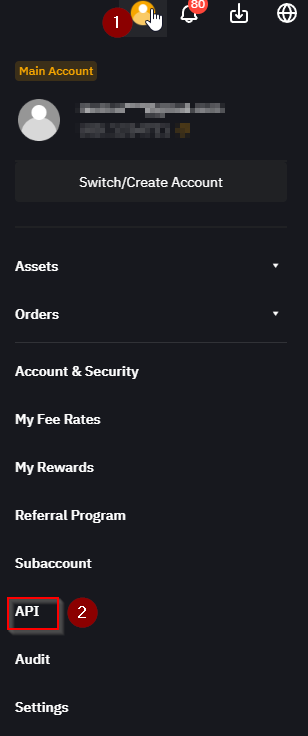
<li class="">Log in at bybit.com, click your account icon in the top right, and open <strong>API</strong>.</li>
</ol>
<p><img decoding="async" loading="lazy" alt="The Bybit account menu open with the API entry highlighted near the bottom." src="https://www.tv-hub.org/assets/images/bybit-account-api-menu-10b125dc55dc24cd7367e6cdd473e1c2.png" width="308" height="736" class="img_ev3q"></p>
<ol start="2">
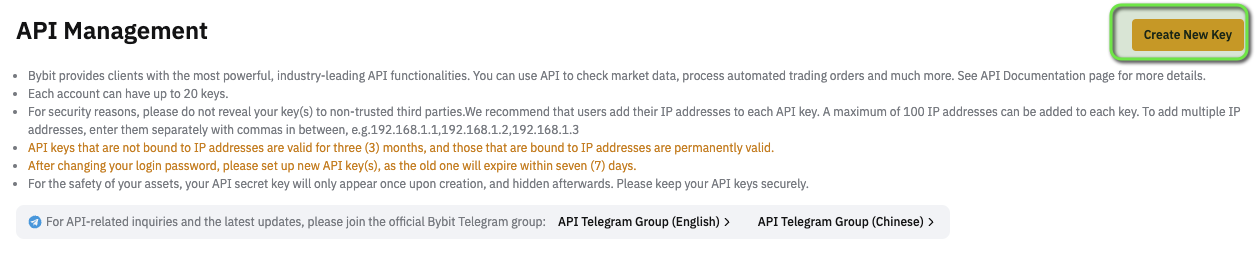
<li class="">Click <strong>Create New Key</strong>, then choose <strong>System-generated API Keys</strong>.</li>
</ol>
<p><img decoding="async" loading="lazy" alt="The Bybit API Management page with the Create New Key button highlighted in the top right." src="https://www.tv-hub.org/assets/images/bybit-create-new-key-edd4d5400581a22f0d5936667f39cb6c.png" width="1256" height="255" class="img_ev3q"></p>
<ol start="3">
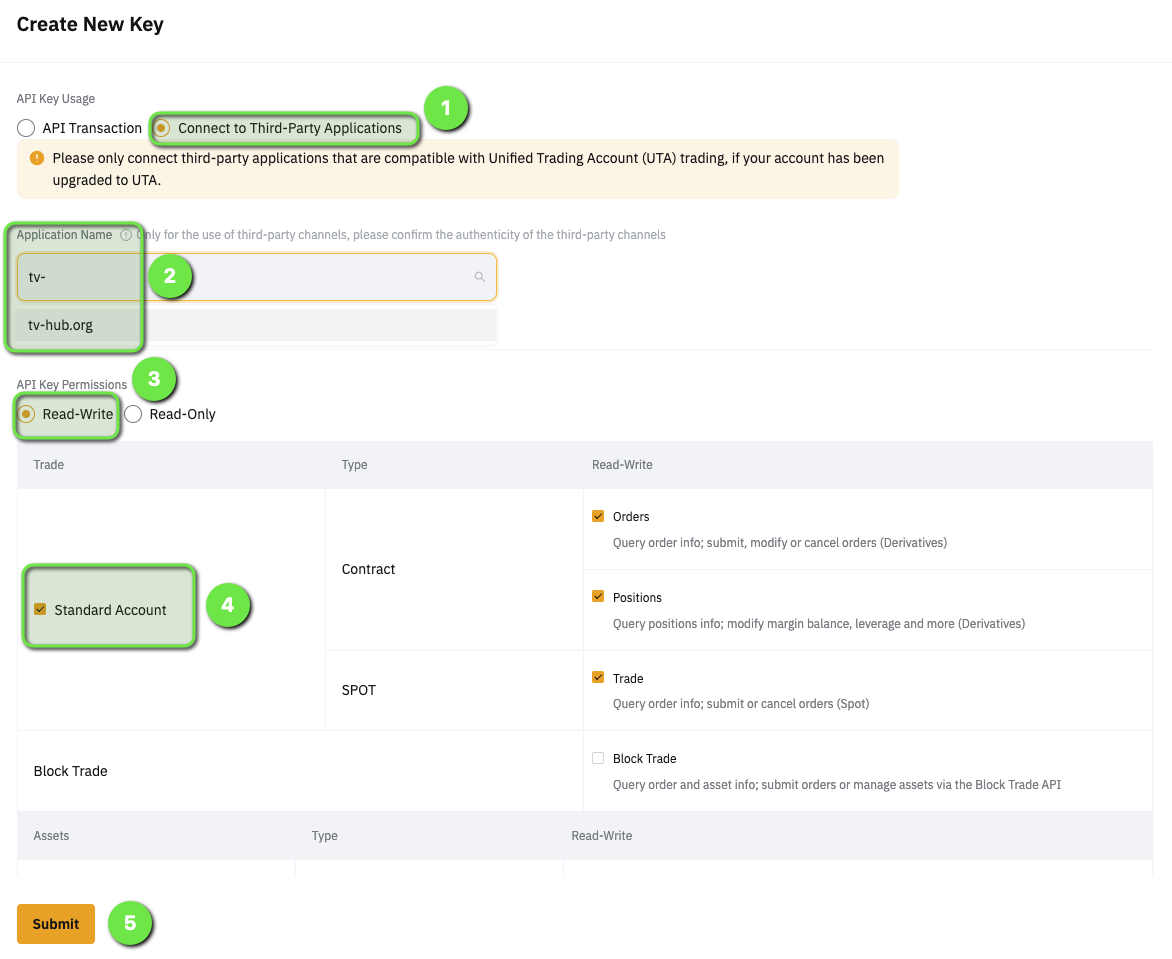
<li class="">On the key form, select <strong>Connect to Third-Party Applications</strong>, type <strong>tv-hub.org</strong> in the application name field and pick it from the list, set permissions to <strong>Read-Write</strong> (Unified Trading, Contract and Spot trade), leave withdrawals off, then submit.</li>
</ol>
<p><img decoding="async" loading="lazy" alt="The Bybit Create New Key form with third-party application set to tv-hub.org, Read-Write permission selected, and the trade checkboxes enabled." src="https://www.tv-hub.org/assets/images/bybit-third-party-read-write-5c23cb6f4ff345e48da6449776e68614.png" width="1172" height="959" class="img_ev3q"></p>
<p>Bybit's own note on that page confirms the timing: keys not bound to an IP address stay valid for three months. That 90-day TTL matters later, because TradingView Hub doesn't auto-rotate the key and your alerts start failing the day it lapses (the rejections show up in the Activity Log). Copy the key and secret (Bybit shows the secret once) for the next step.</p>
<h2 class="anchor anchorTargetStickyNavbar_Vzrq" id="how-do-you-send-your-first-bybit-webhook-from-tradingview">How do you send your first Bybit webhook from TradingView?<a href="https://www.tv-hub.org/blog/how-to-connect-bybit-to-tradingview/#how-do-you-send-your-first-bybit-webhook-from-tradingview" class="hash-link" aria-label="Direct link to How do you send your first Bybit webhook from TradingView?" title="Direct link to How do you send your first Bybit webhook from TradingView?" translate="no">​</a></h2>
<p>A working Bybit webhook needs only two TradingView fields: the <strong>Webhook URL</strong> (<code>https://alerts.tv-hub.org</code>) and a one-line JSON <strong>Message</strong> carrying your token, exchange, pair, and the order. In our own testing, the alert reaches TradingView Hub within seconds of the trigger. First, hand the key to TradingView Hub.</p>
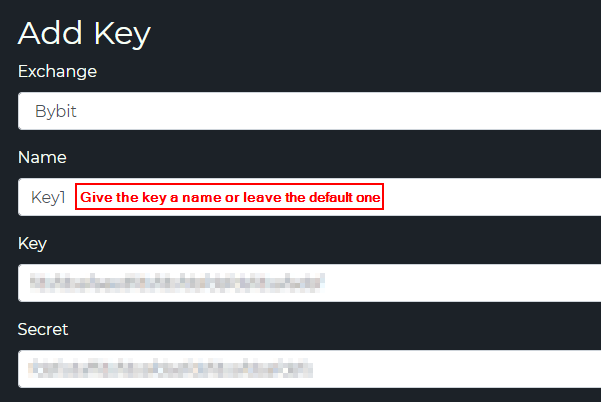
<p>Open <strong>Account, Settings, API Keys</strong> in TradingView Hub, pick Bybit, and paste the key and secret you just copied.</p>
<p><img decoding="async" loading="lazy" alt="The TradingView Hub Add Key form with Bybit selected and the key and secret fields filled in." src="https://www.tv-hub.org/assets/images/bybit-add-key-to-tvh-8fa61e0760c8814d38a0b29f16c08753.png" width="601" height="402" class="img_ev3q"></p>
<p>Now build the alert. In TradingView, create an alert, paste <code>https://alerts.tv-hub.org</code> into the Webhook URL box (need the exact endpoint? see <a class="" href="https://www.tv-hub.org/docs/webhook-urls-and-ip/">which webhook URL to use</a>), and drop the JSON into the Message box.</p>
<h3 class="anchor anchorTargetStickyNavbar_Vzrq" id="the-minimal-bybit-webhook-payload-annotated">The minimal Bybit webhook payload (annotated)<a href="https://www.tv-hub.org/blog/how-to-connect-bybit-to-tradingview/#the-minimal-bybit-webhook-payload-annotated" class="hash-link" aria-label="Direct link to The minimal Bybit webhook payload (annotated)" title="Direct link to The minimal Bybit webhook payload (annotated)" translate="no">​</a></h3>
<!-- -->
<p>This is the smallest market-order payload that does something real on Bybit. It's the exact schema from our <a class="" href="https://www.tv-hub.org/docs/exchanges/bybit/">Bybit API key setup and payload reference</a>, not a legacy example.</p>
<div class="language-json codeBlockContainer_Ckt0 theme-code-block" style="--prism-color:#9CDCFE;--prism-background-color:#1E1E1E"><div class="codeBlockContent_QJqH"><pre tabindex="0" class="prism-code language-json codeBlock_bY9V thin-scrollbar" style="color:#9CDCFE;background-color:#1E1E1E"><code class="codeBlockLines_e6Vv"><div class="token-line" style="color:#9CDCFE"><span class="token punctuation" style="color:rgb(212, 212, 212)">{</span><span class="token plain"></span><br></div><div class="token-line" style="color:#9CDCFE"><span class="token plain">  </span><span class="token property">"token"</span><span class="token operator" style="color:rgb(212, 212, 212)">:</span><span class="token plain"> </span><span class="token string" style="color:rgb(206, 145, 120)">"your-tvh-token"</span><span class="token punctuation" style="color:rgb(212, 212, 212)">,</span><span class="token plain"></span><br></div><div class="token-line" style="color:#9CDCFE"><span class="token plain">  </span><span class="token property">"exchange"</span><span class="token operator" style="color:rgb(212, 212, 212)">:</span><span class="token plain"> </span><span class="token string" style="color:rgb(206, 145, 120)">"bybit"</span><span class="token punctuation" style="color:rgb(212, 212, 212)">,</span><span class="token plain"></span><br></div><div class="token-line" style="color:#9CDCFE"><span class="token plain">  </span><span class="token property">"pair"</span><span class="token operator" style="color:rgb(212, 212, 212)">:</span><span class="token plain"> </span><span class="token string" style="color:rgb(206, 145, 120)">"BTCUSDT"</span><span class="token punctuation" style="color:rgb(212, 212, 212)">,</span><span class="token plain"></span><br></div><div class="token-line" style="color:#9CDCFE"><span class="token plain">  </span><span class="token property">"isMarket"</span><span class="token operator" style="color:rgb(212, 212, 212)">:</span><span class="token plain"> </span><span class="token boolean">true</span><span class="token punctuation" style="color:rgb(212, 212, 212)">,</span><span class="token plain"></span><br></div><div class="token-line" style="color:#9CDCFE"><span class="token plain">  </span><span class="token property">"isBuy"</span><span class="token operator" style="color:rgb(212, 212, 212)">:</span><span class="token plain"> </span><span class="token boolean">true</span><span class="token punctuation" style="color:rgb(212, 212, 212)">,</span><span class="token plain"></span><br></div><div class="token-line" style="color:#9CDCFE"><span class="token plain">  </span><span class="token property">"units"</span><span class="token operator" style="color:rgb(212, 212, 212)">:</span><span class="token plain"> </span><span class="token number" style="color:rgb(181, 206, 168)">50</span><span class="token punctuation" style="color:rgb(212, 212, 212)">,</span><span class="token plain"></span><br></div><div class="token-line" style="color:#9CDCFE"><span class="token plain">  </span><span class="token property">"unitsType"</span><span class="token operator" style="color:rgb(212, 212, 212)">:</span><span class="token plain"> </span><span class="token string" style="color:rgb(206, 145, 120)">"percentBalance"</span><span class="token punctuation" style="color:rgb(212, 212, 212)">,</span><span class="token plain"></span><br></div><div class="token-line" style="color:#9CDCFE"><span class="token plain">  </span><span class="token property">"leverage"</span><span class="token operator" style="color:rgb(212, 212, 212)">:</span><span class="token plain"> </span><span class="token number" style="color:rgb(181, 206, 168)">5</span><span class="token punctuation" style="color:rgb(212, 212, 212)">,</span><span class="token plain"></span><br></div><div class="token-line" style="color:#9CDCFE"><span class="token plain">  </span><span class="token property">"marginType"</span><span class="token operator" style="color:rgb(212, 212, 212)">:</span><span class="token plain"> </span><span class="token string" style="color:rgb(206, 145, 120)">"cross"</span><span class="token plain"></span><br></div><div class="token-line" style="color:#9CDCFE"><span class="token plain"></span><span class="token punctuation" style="color:rgb(212, 212, 212)">}</span><br></div></code></pre></div></div>
<table><thead><tr><th>Field</th><th>What it does</th></tr></thead><tbody><tr><td><code>token</code></td><td>Your personal TradingView Hub token, which authenticates the alert</td></tr><tr><td><code>exchange</code></td><td>Routing target, <code>bybit</code> for the UTA futures identifier</td></tr><tr><td><code>pair</code></td><td>Exchange-native symbol, <code>BTCUSDT</code> and not <code>BTC/USDT</code></td></tr><tr><td><code>isMarket</code></td><td><code>true</code> sends a market order; <code>false</code> needs a <code>price</code></td></tr><tr><td><code>isBuy</code></td><td><code>true</code> opens a long; use <code>isSell: true</code> for a short</td></tr><tr><td><code>units</code></td><td>The size number, read together with <code>unitsType</code></td></tr><tr><td><code>unitsType</code></td><td><code>percentBalance</code> means <code>units</code> is a percent of your balance</td></tr><tr><td><code>leverage</code></td><td>Leverage applied to the futures position</td></tr><tr><td><code>marginType</code></td><td><code>cross</code> or <code>isolated</code> margin</td></tr></tbody></table>
<p>One field isn't in the payload above: <code>apiKey</code>. If you've stored a single Bybit key in TradingView Hub, it's selected automatically. Once you keep more than one Bybit key, add <code>apiKey</code> with the name you gave the key in the dashboard so the order routes to the account you mean.</p>
<p>TradingView strips newlines from the Message field, so compact JSON on one line is fine. For how the JSON message field works, the <a class="" href="https://www.tv-hub.org/docs/pine-script/alert-message-format/">alert message format docs</a> go deeper. Bybit has a few quirks of its own too, like the separate take-profit-attach flags for market versus limit entries and UTA-wide sizing, all covered in the <a class="" href="https://www.tv-hub.org/docs/exchanges/bybit/">Bybit exchange reference</a>.</p>
<div class="guide-cta"><h3 class="anchor anchorTargetStickyNavbar_Vzrq" id="ready-to-send-your-first-live-bybit-order">Ready to send your first live Bybit order?<a href="https://www.tv-hub.org/blog/how-to-connect-bybit-to-tradingview/#ready-to-send-your-first-live-bybit-order" class="hash-link" aria-label="Direct link to Ready to send your first live Bybit order?" title="Direct link to Ready to send your first live Bybit order?" translate="no">​</a></h3><p>Wire up a TradingView alert to your Bybit account and let the webhook do the rest.</p><a class="btn-cta" href="https://www.tv-hub.org/Identity/Account/Register">Start Free Trial</a><a class="btn-cta-outline" href="https://www.tv-hub.org/docs/exchanges/bybit">Read the Bybit docs</a></div>
<h2 class="anchor anchorTargetStickyNavbar_Vzrq" id="how-do-you-test-safely-on-bybit-demo-first">How do you test safely on Bybit Demo first?<a href="https://www.tv-hub.org/blog/how-to-connect-bybit-to-tradingview/#how-do-you-test-safely-on-bybit-demo-first" class="hash-link" aria-label="Direct link to How do you test safely on Bybit Demo first?" title="Direct link to How do you test safely on Bybit Demo first?" translate="no">​</a></h2>
<p>Test on Bybit's Demo Account before you risk real money. It mirrors live prices behind a single checkbox, with no separate site or login, so you can validate the full alert-to-order path on paper. TradingView Hub demo trading is always free, including the prop-firm demo, with no referral required (<a class="" href="https://www.tv-hub.org/docs/demo-accounts/bybit/">TradingView Hub docs</a>, 2026).</p>
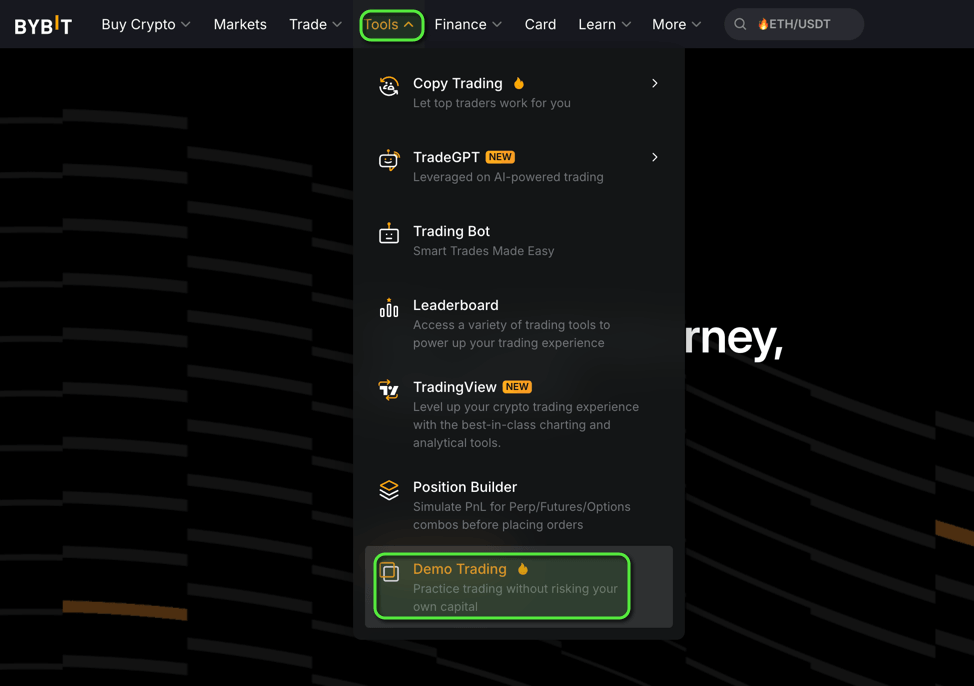
<p>On bybit.com, open the <strong>Tools</strong> menu and switch on <strong>Demo Trading</strong>. Generate a demo API key the same way you made the live one, add it to TradingView Hub, and fire the same alert. The round trip is identical, just on paper.</p>
<p><img decoding="async" loading="lazy" alt="The Bybit Tools menu open with the Demo Trading option highlighted." src="https://www.tv-hub.org/assets/images/bybit-demo-trading-toggle-64cc1e45706476e6a130fc90cb4d8be2.png" width="974" height="686" class="img_ev3q"></p>
<p>Run your alert on demo and watch the orders land. Only swap in the live key once you've seen the full path work. If you want the difference between demo and the separate testnet spelled out, that's covered in a companion post on Bybit testnet vs demo. </p>
<h2 class="anchor anchorTargetStickyNavbar_Vzrq" id="how-do-you-run-a-free-bybit-trading-bot">How do you run a free Bybit trading bot?<a href="https://www.tv-hub.org/blog/how-to-connect-bybit-to-tradingview/#how-do-you-run-a-free-bybit-trading-bot" class="hash-link" aria-label="Direct link to How do you run a free Bybit trading bot?" title="Direct link to How do you run a free Bybit trading bot?" translate="no">​</a></h2>
<p>You run a free Bybit trading bot by opening your Bybit account through TradingView Hub's <a href="https://partner.bybit.com/b/tvhub" target="_blank" rel="noopener noreferrer" class="">referral link</a>. Do that, and the full bot stays free for as long as you keep trading, with no separate subscription needed for the live connection.</p>
<p>Free here means the complete product: live webhook trading on Bybit, every exchange feature, and no time limit or trial clock. Bybit pays TradingView Hub a commission on that referred signup, and that commission is what covers your access, so the cost lands on the exchange, not on you. Already have a Bybit account you don't want to replace? You can run the same bot on a paid plan instead, starting at $23/month with discounts on longer terms. And demo trading stays free for everyone regardless, referral or not, so you can validate a strategy on paper before any of this matters.</p>
<h2 class="anchor anchorTargetStickyNavbar_Vzrq" id="why-isnt-my-bybit-webhook-firing">Why isn't my Bybit webhook firing?<a href="https://www.tv-hub.org/blog/how-to-connect-bybit-to-tradingview/#why-isnt-my-bybit-webhook-firing" class="hash-link" aria-label="Direct link to Why isn't my Bybit webhook firing?" title="Direct link to Why isn't my Bybit webhook firing?" translate="no">​</a></h2>
<p>The most common Bybit webhook failure is an expired or wrong-permission API key that Bybit rejects. Bybit keys lapse after 90 days and TradingView Hub doesn't auto-rotate them (<a href="https://bybit-exchange.github.io/docs/" target="_blank" rel="noopener noreferrer" class="">Bybit API docs</a>, accessed July 2026). Check the <a class="" href="https://www.tv-hub.org/docs/activity-log/">Activity Log</a> first: it records every inbound alert and the exchange's response, so it usually tells you exactly what broke. The <a class="" href="https://www.tv-hub.org/docs/trade-command/debug-a-failed-alert/">Debug a Failed Trade Alert guide</a> maps the common log entries to their fixes.</p>
<!-- -->
<blockquote>
<p>When we tested this on Bybit Demo, the first order that failed was almost always a Read-only key or an un-activated UTA. The table below is ordered by how often each one actually bit us, not alphabetically.</p>
</blockquote>
<table><thead><tr><th>Symptom</th><th>Likely cause</th><th>Fix</th></tr></thead><tbody><tr><td>Alert fires, no order appears</td><td>API key expired (90-day TTL) or Read-only, rejected by Bybit</td><td>Recreate a Read-Write key; check the rejection in the Activity Log</td></tr><tr><td>Order rejected on a permission error</td><td>UTA not activated, or key lacks trade scope</td><td>Activate UTA in Bybit settings; recreate the key as Read-Write</td></tr><tr><td>429 rate-limit response</td><td>Too many alerts firing too fast</td><td>Space alerts out; the retry backs off automatically</td></tr><tr><td>Nothing routes, "invalid symbol"</td><td>Wrong <code>pair</code> or <code>exchange</code> value</td><td>Use <code>BTCUSDT</code> (no slash) and <code>bybit</code>, lowercase</td></tr><tr><td>Nothing happens at all</td><td>Wrong webhook URL, or you're on the Free plan</td><td>Use <code>https://alerts.tv-hub.org</code>; upgrade to a paid TradingView plan</td></tr><tr><td>A limit order sits unfilled</td><td>Bybit's post-only default on limit entries</td><td>Expect maker-only behavior; adjust the price or use a market entry</td></tr></tbody></table>
<p>Work top to bottom. Nine times out of ten it's the key.</p>
<h2 class="anchor anchorTargetStickyNavbar_Vzrq" id="from-a-first-trade-to-a-full-strategy">From a first trade to a full strategy<a href="https://www.tv-hub.org/blog/how-to-connect-bybit-to-tradingview/#from-a-first-trade-to-a-full-strategy" class="hash-link" aria-label="Direct link to From a first trade to a full strategy" title="Direct link to From a first trade to a full strategy" translate="no">​</a></h2>
<p>Once your first Bybit order lands from a TradingView alert, the hard part is done. From here you can layer on stops, take-profits, and multiple alerts, all through the same webhook. When you're ready to move past a single manual setup, the landing page on how to <a class="" href="https://www.tv-hub.org/tradingview-to-bybit/">automate Bybit trades with TradingView</a> covers the strategy side and the trade-command builder.</p>
<p>Keep testing on demo whenever you change the payload. The full referral walkthrough, with the fee schedule and signup screenshots, lives in a dedicated post. </p>
<div class="faq-box"><div class="faq-header"><div class="faq-icon">?</div><h3 class="faq-title">Frequently asked questions</h3></div><details open="" class="details_lb9f alert alert--info details_b_Ee" data-collapsed="false"><summary>Do I need a paid TradingView plan to connect Bybit?</summary><div><div class="collapsibleContent_i85q"><p>Yes. Webhook alerts require a paid TradingView plan. The free plan doesn't include webhook notifications, so it can't send orders to Bybit; webhook delivery starts on the Essential tier. As of July 2026, the free plan includes 3 active price alerts, which is enough to watch a strategy by hand but not to automate it.</p></div></div></details><details class="details_lb9f alert alert--info details_b_Ee" data-collapsed="true"><summary>Is TradingView Hub free to use with Bybit?</summary><div><div class="collapsibleContent_i85q"><p>It can be. Open your Bybit account through our <a href="https://partner.bybit.com/b/tvhub" target="_blank" rel="noopener noreferrer" class="">referral link</a> and the bot is free for as long as you trade, because Bybit pays us a commission that covers your access. If you already have a Bybit account, paid plans start at $23/month. Either way, demo and paper trading stay free.</p></div></div></details><details class="details_lb9f alert alert--info details_b_Ee" data-collapsed="true"><summary>Does Bybit have a native TradingView integration?</summary><div><div class="collapsibleContent_i85q"><p>No. You connect them with a webhook. TradingView posts a JSON alert to TradingView Hub, which holds your Bybit API key and places the order. TradingView itself never touches your funds or your key.</p></div></div></details><details class="details_lb9f alert alert--info details_b_Ee" data-collapsed="true"><summary>Is it safe to give TradingView Hub my Bybit API key?</summary><div><div class="collapsibleContent_i85q"><p>You create a Read-Write key bound to tv-hub.org with withdrawals disabled, so it can trade but never move funds off Bybit. Because it uses third-party binding, no IP whitelist is required.</p></div></div></details><details class="details_lb9f alert alert--info details_b_Ee" data-collapsed="true"><summary>Can I test before risking real money?</summary><div><div class="collapsibleContent_i85q"><p>Yes. Use Bybit's free Demo Account, which is one checkbox with real market prices. TradingView Hub demo and paper trading are always free too, including the prop-firm demo, with no referral needed.</p></div></div></details><details class="details_lb9f alert alert--info details_b_Ee" data-collapsed="true"><summary>Why isn't my Bybit webhook firing?</summary><div><div class="collapsibleContent_i85q"><p>Most often it's an expired or Read-only API key that Bybit rejects, an un-activated UTA, or being on the TradingView Free plan. Open the Activity Log first; it logs every alert and the exchange response.</p></div></div></details><details class="details_lb9f alert alert--info details_b_Ee" data-collapsed="true"><summary>How long does a Bybit API key last?</summary><div><div class="collapsibleContent_i85q"><p>Bybit keys expire after 90 days unless re-confirmed. TradingView Hub doesn't auto-rotate them, so re-create the key before it lapses; otherwise every alert fails on the rejected key until you swap it.</p></div></div></details></div>
<script type="application/ld+json">{"@context":"https://schema.org","@type":"FAQPage","mainEntity":[{"@type":"Question","name":"Do I need a paid TradingView plan to connect Bybit?","acceptedAnswer":{"@type":"Answer","text":"Yes. Webhook alerts require a paid TradingView plan. The free plan doesn't include webhook notifications, so it can't send orders to Bybit; webhook delivery starts on the Essential tier. As of July 2026, the free plan includes 3 active price alerts, which is enough to watch a strategy by hand but not to automate it."}},{"@type":"Question","name":"Is TradingView Hub free to use with Bybit?","acceptedAnswer":{"@type":"Answer","text":"It can be. Open your Bybit account through our referral link and the bot is free for as long as you trade, because Bybit pays us a commission that covers your access. If you already have a Bybit account, paid plans start at $23/month. Either way, demo and paper trading stay free."}},{"@type":"Question","name":"Does Bybit have a native TradingView integration?","acceptedAnswer":{"@type":"Answer","text":"No. You connect them with a webhook. TradingView posts a JSON alert to TradingView Hub, which holds your Bybit API key and places the order. TradingView itself never touches your funds or your key."}},{"@type":"Question","name":"Is it safe to give TradingView Hub my Bybit API key?","acceptedAnswer":{"@type":"Answer","text":"You create a Read-Write key bound to tv-hub.org with withdrawals disabled, so it can trade but never move funds off Bybit. Because it uses third-party binding, no IP whitelist is required."}},{"@type":"Question","name":"Can I test before risking real money?","acceptedAnswer":{"@type":"Answer","text":"Yes. Use Bybit's free Demo Account, which is one checkbox with real market prices. TradingView Hub demo and paper trading are always free too, including the prop-firm demo, with no referral needed."}},{"@type":"Question","name":"Why isn't my Bybit webhook firing?","acceptedAnswer":{"@type":"Answer","text":"Most often it's an expired or Read-only API key that Bybit rejects, an un-activated UTA, or being on the TradingView Free plan. Open the Activity Log first; it logs every alert and the exchange response."}},{"@type":"Question","name":"How long does a Bybit API key last?","acceptedAnswer":{"@type":"Answer","text":"Bybit keys expire after 90 days unless re-confirmed. TradingView Hub doesn't auto-rotate them, so re-create the key before it lapses; otherwise every alert fails on the rejected key until you swap it."}}]}</script>
<p>That's the full path: a webhook, a read-write key bound to tv-hub.org, one JSON message, and a demo run first. Get it working once, and every future Bybit strategy is just a change to the payload.</p>]]></content>
        <author>
            <name>TradingView Hub Team</name>
            <uri>https://www.tv-hub.org</uri>
        </author>
        <category label="bybit" term="bybit"/>
        <category label="webhooks" term="webhooks"/>
        <category label="setup" term="setup"/>
    </entry>
    <entry>
        <title type="html"><![CDATA[TradingView Webhook Format: Every Payload Field Explained]]></title>
        <id>https://www.tv-hub.org/blog/webhook-anatomy/</id>
        <link href="https://www.tv-hub.org/blog/webhook-anatomy/"/>
        <updated>2026-07-03T00:00:00.000Z</updated>
        <summary type="html"><![CDATA[A field-by-field guide to the TradingView Hub webhook payload: the 4 required fields, direction booleans, sizing, and the mistakes that stop a trade.]]></summary>
        <content type="html"><![CDATA[<p>Every order TradingView Hub places on an exchange begins as a JSON payload sitting in the Message field of a TradingView alert. That payload is the core of an automated trading setup: your alert fires on TradingView, and TV-Hub acts as the bridge that turns it into a real order on your exchange. This post walks the payload field by field, using the real camelCase schema, so the example you copy actually executes instead of landing as an error entry in your Activity Log.</p>
<p>If you're building your first auto-trading setup from scratch, start with the <a class="" href="https://www.tv-hub.org/guide/tradingview-automation/">TradingView automation guide</a>, which covers the whole flow including a video tutorial. This post is the payload reference behind that setup.</p>
<div class="summary-box"><h2 class="anchor anchorTargetStickyNavbar_Vzrq" id="tldr">TL;DR<a href="https://www.tv-hub.org/blog/webhook-anatomy/#tldr" class="hash-link" aria-label="Direct link to TL;DR" title="Direct link to TL;DR" translate="no">​</a></h2><p>Four fields are required in every payload:</p><ul>
<li class=""><code>exchange</code>: which exchange adapter receives the order</li>
<li class=""><code>pair</code>: the exchange-native ticker, like <code>BTCUSDT</code></li>
<li class=""><code>token</code>: your TVH user token, a GUID that says who you are</li>
<li class=""><code>apiKey</code>: the name of the exchange key that says which account to trade</li>
</ul><p>Direction (<code>isBuy</code> / <code>isSell</code> / <code>isClose</code>) and order type (<code>isMarket</code> / <code>isLimit</code>) are booleans, not strings. Everything else, from <code>leverage</code> to <code>stopLossPercent</code> to the <code>targets</code> array, is optional and stacks on top.</p></div>
<h2 class="anchor anchorTargetStickyNavbar_Vzrq" id="what-does-a-tradingview-hub-webhook-payload-look-like">What does a TradingView Hub webhook payload look like?<a href="https://www.tv-hub.org/blog/webhook-anatomy/#what-does-a-tradingview-hub-webhook-payload-look-like" class="hash-link" aria-label="Direct link to What does a TradingView Hub webhook payload look like?" title="Direct link to What does a TradingView Hub webhook payload look like?" translate="no">​</a></h2>
<p>A valid payload is a flat JSON object with four required fields plus one direction flag. TradingView posts the contents of an alert's Message field to your webhook URL, as described in <a href="https://www.tradingview.com/support/solutions/43000529348-about-webhooks/" target="_blank" rel="noopener noreferrer" class="">TradingView's webhook docs</a> (accessed July 2026). The full TradeCommand exposes 84 properties, but a working order needs only a handful.</p>
<p>Here's the smallest payload that actually fills on an exchange:</p>
<div class="language-json codeBlockContainer_Ckt0 theme-code-block" style="--prism-color:#9CDCFE;--prism-background-color:#1E1E1E"><div class="codeBlockContent_QJqH"><pre tabindex="0" class="prism-code language-json codeBlock_bY9V thin-scrollbar" style="color:#9CDCFE;background-color:#1E1E1E"><code class="codeBlockLines_e6Vv"><div class="token-line" style="color:#9CDCFE"><span class="token punctuation" style="color:rgb(212, 212, 212)">{</span><span class="token plain"></span><br></div><div class="token-line" style="color:#9CDCFE"><span class="token plain">  </span><span class="token property">"exchange"</span><span class="token operator" style="color:rgb(212, 212, 212)">:</span><span class="token plain"> </span><span class="token string" style="color:rgb(206, 145, 120)">"bybit"</span><span class="token punctuation" style="color:rgb(212, 212, 212)">,</span><span class="token plain"></span><br></div><div class="token-line" style="color:#9CDCFE"><span class="token plain">  </span><span class="token property">"pair"</span><span class="token operator" style="color:rgb(212, 212, 212)">:</span><span class="token plain"> </span><span class="token string" style="color:rgb(206, 145, 120)">"BTCUSDT"</span><span class="token punctuation" style="color:rgb(212, 212, 212)">,</span><span class="token plain"></span><br></div><div class="token-line" style="color:#9CDCFE"><span class="token plain">  </span><span class="token property">"isBuy"</span><span class="token operator" style="color:rgb(212, 212, 212)">:</span><span class="token plain"> </span><span class="token boolean">true</span><span class="token punctuation" style="color:rgb(212, 212, 212)">,</span><span class="token plain"></span><br></div><div class="token-line" style="color:#9CDCFE"><span class="token plain">  </span><span class="token property">"isMarket"</span><span class="token operator" style="color:rgb(212, 212, 212)">:</span><span class="token plain"> </span><span class="token boolean">true</span><span class="token punctuation" style="color:rgb(212, 212, 212)">,</span><span class="token plain"></span><br></div><div class="token-line" style="color:#9CDCFE"><span class="token plain">  </span><span class="token property">"unitsType"</span><span class="token operator" style="color:rgb(212, 212, 212)">:</span><span class="token plain"> </span><span class="token string" style="color:rgb(206, 145, 120)">"percent"</span><span class="token punctuation" style="color:rgb(212, 212, 212)">,</span><span class="token plain"></span><br></div><div class="token-line" style="color:#9CDCFE"><span class="token plain">  </span><span class="token property">"unitsPercent"</span><span class="token operator" style="color:rgb(212, 212, 212)">:</span><span class="token plain"> </span><span class="token number" style="color:rgb(181, 206, 168)">1</span><span class="token punctuation" style="color:rgb(212, 212, 212)">,</span><span class="token plain"></span><br></div><div class="token-line" style="color:#9CDCFE"><span class="token plain">  </span><span class="token property">"apiKey"</span><span class="token operator" style="color:rgb(212, 212, 212)">:</span><span class="token plain"> </span><span class="token string" style="color:rgb(206, 145, 120)">"bybit-demo"</span><span class="token punctuation" style="color:rgb(212, 212, 212)">,</span><span class="token plain"></span><br></div><div class="token-line" style="color:#9CDCFE"><span class="token plain">  </span><span class="token property">"token"</span><span class="token operator" style="color:rgb(212, 212, 212)">:</span><span class="token plain"> </span><span class="token string" style="color:rgb(206, 145, 120)">"YOUR_TOKEN"</span><span class="token plain"></span><br></div><div class="token-line" style="color:#9CDCFE"><span class="token plain"></span><span class="token punctuation" style="color:rgb(212, 212, 212)">}</span><br></div></code></pre></div></div>
<p>Paste that into your alert's Message field, drop your webhook URL into the Webhook URL box, and the alert is wired. When the condition fires, a 1% market buy hits Bybit. Two endpoints exist: Binance markets (<code>binance</code>, <code>binance-futures</code>, <code>binance-futures-coin</code>) post to <code>https://binance.tv-hub.org</code>, and every other exchange posts to <code>https://alerts.tv-hub.org</code>. The <a class="" href="https://www.tv-hub.org/docs/quickstart/">quickstart</a> runs this same flow against a demo account so you can test with zero risk, and the full field list lives in the <a class="" href="https://www.tv-hub.org/docs/for-llms/canonical-schema/">canonical schema</a> built for pasting into an LLM.</p>
<figure class="blog-figure" role="img" aria-label="Flow diagram: a TradingView alert posts its Message field as JSON over HTTPS to a TradingView Hub endpoint, which then places the order on the exchange."><svg viewBox="0 0 720 130" xmlns="http://www.w3.org/2000/svg"><rect x="10" y="35" width="180" height="60" rx="8" fill="#252931" stroke="#404245" stroke-width="1"></rect><text x="100" y="62" text-anchor="middle" fill="#f7fff7" font-size="14" font-family="Montserrat" font-weight="500">TradingView alert</text><text x="100" y="80" text-anchor="middle" fill="#ced4da" font-size="11" font-family="Montserrat">Message field (JSON)</text><rect x="270" y="35" width="180" height="60" rx="8" fill="#252931" stroke="#404245" stroke-width="1"></rect><text x="360" y="62" text-anchor="middle" fill="#f7fff7" font-size="14" font-family="Montserrat" font-weight="500">TVH endpoint</text><text x="360" y="80" text-anchor="middle" fill="#ced4da" font-size="11" font-family="Montserrat">alerts.tv-hub.org</text><rect x="530" y="35" width="180" height="60" rx="8" fill="#252931" stroke="#404245" stroke-width="1"></rect><text x="620" y="62" text-anchor="middle" fill="#f7fff7" font-size="14" font-family="Montserrat" font-weight="500">Exchange</text><text x="620" y="80" text-anchor="middle" fill="#ced4da" font-size="11" font-family="Montserrat">order placed</text><line x1="192" y1="65" x2="258" y2="65" stroke="#44a4cd" stroke-width="2"></line><polygon points="258,60 268,65 258,70" fill="#44a4cd"></polygon><text x="229" y="28" text-anchor="middle" fill="#44a4cd" font-size="11" font-family="Montserrat">HTTPS POST</text><line x1="452" y1="65" x2="518" y2="65" stroke="#44a4cd" stroke-width="2"></line><polygon points="518,60 528,65 518,70" fill="#44a4cd"></polygon><text x="489" y="28" text-anchor="middle" fill="#44a4cd" font-size="11" font-family="Montserrat">REST API</text></svg><figcaption>How a payload travels: TradingView posts the alert's Message field to a TVH endpoint, which places the order on the exchange.</figcaption></figure>
<p>One caveat before you build this. Webhooks are a paid TradingView feature. The free plan doesn't include webhook delivery, so it can't fire automated webhook orders; that starts with the Essential tier. As of July 2026, the free plan includes 3 active price alerts, which is enough to test a single strategy by hand. <a href="https://www.tradingview.com/support/solutions/43000520149-how-to-create-an-alert/" target="_blank" rel="noopener noreferrer" class="">TradingView's alert docs</a> (accessed July 2026) cover how to attach the Message and the URL. If you're wiring Bybit specifically, the <a class="" href="https://www.tv-hub.org/tradingview-to-bybit/">TradingView to Bybit guide</a> covers the account side, and there's a step-by-step walkthrough to <a class="" href="https://www.tv-hub.org/blog/how-to-connect-bybit-to-tradingview/">connect Bybit to TradingView</a> with screenshots and troubleshooting.</p>
<h2 class="anchor anchorTargetStickyNavbar_Vzrq" id="the-four-fields-every-payload-requires">The four fields every payload requires<a href="https://www.tv-hub.org/blog/webhook-anatomy/#the-four-fields-every-payload-requires" class="hash-link" aria-label="Direct link to The four fields every payload requires" title="Direct link to The four fields every payload requires" translate="no">​</a></h2>
<p>Four fields carry a required flag in the schema: <code>exchange</code>, <code>pair</code>, <code>token</code>, and <code>apiKey</code>. The <a class="" href="https://www.tv-hub.org/docs/trade-command/core-parameters/">core parameters reference</a> marks all four as mandatory. Miss <code>token</code> and TVH rejects the request before it even looks at the order. Miss <code>apiKey</code> and TVH can't tell which exchange account to route to. Both failures show up as error entries in the Activity Log, and the <a class="" href="https://www.tv-hub.org/docs/trade-command/debug-a-failed-alert/">Debug a Failed Trade Alert guide</a> maps each entry to its fix.</p>
<table><thead><tr><th>Field</th><th>Type</th><th>Required</th><th>What it does</th></tr></thead><tbody><tr><td><code>exchange</code></td><td>string</td><td>yes</td><td>Selects the exchange adapter. Lowercase, hyphenated (<code>binance-futures</code>, <code>bybit</code>, <code>okx</code>).</td></tr><tr><td><code>pair</code></td><td>string</td><td>yes</td><td>Exchange-native ticker (<code>BTCUSDT</code>, not <code>BTC/USDT</code>).</td></tr><tr><td><code>token</code></td><td>string</td><td>yes</td><td>Your TVH user token, a GUID. Authenticates who you are.</td></tr><tr><td><code>apiKey</code></td><td>string</td><td>yes</td><td>The name you gave an exchange key in the dashboard. Selects the account.</td></tr></tbody></table>
<p>The last two are the ones people confuse. <code>token</code> authenticates the caller: it's a GUID from your account settings that answers who you are. <code>apiKey</code> is the name you gave an exchange key in the dashboard, and it answers which account the order runs on. Every payload needs both, and they're never interchangeable.</p>
<h2 class="anchor anchorTargetStickyNavbar_Vzrq" id="how-do-you-set-direction-order-type-and-price">How do you set direction, order type, and price?<a href="https://www.tv-hub.org/blog/webhook-anatomy/#how-do-you-set-direction-order-type-and-price" class="hash-link" aria-label="Direct link to How do you set direction, order type, and price?" title="Direct link to How do you set direction, order type, and price?" translate="no">​</a></h2>
<p>Direction and order type are booleans, not string enums. Set <code>isBuy: true</code> or <code>isSell: true</code> for entries, <code>isClose: true</code> to flatten. Pair that with <code>isMarket: true</code> for a market order, or <code>isLimit: true</code> plus a <code>price</code> for a limit. The <a class="" href="https://www.tv-hub.org/docs/trade-command/anatomy/">trade command anatomy</a> explains how the receiver maps these flags.</p>
<p>This is where most hand-written payloads go wrong, so it's worth stressing. There is no <code>side: "buy"</code> and no <code>type: "market"</code> in the schema. Direction is three mutually exclusive booleans, <code>isBuy</code>, <code>isSell</code>, and <code>isClose</code>. Order type is two more, <code>isMarket</code> and <code>isLimit</code>. Send <code>isLimit: true</code> and TVH reads the <code>price</code> field as your limit price. Send <code>isMarket: true</code> and <code>price</code> is ignored.</p>
<p>There's one string field that looks like direction but isn't. <code>orderType</code> exists only to map TradingView's <code>{{strategy.order.action}}</code> placeholder inside strategy alerts. For a normal hand-built webhook, stick with the booleans and leave <code>orderType</code> out.</p>
<h2 class="anchor anchorTargetStickyNavbar_Vzrq" id="how-do-you-size-a-position">How do you size a position?<a href="https://www.tv-hub.org/blog/webhook-anatomy/#how-do-you-size-a-position" class="hash-link" aria-label="Direct link to How do you size a position?" title="Direct link to How do you size a position?" translate="no">​</a></h2>
<p>Sizing runs through <code>units</code> plus <code>unitsType</code>, which accepts six values: <code>absolute</code>, <code>percent</code>, <code>percentBalance</code>, <code>percentWallet</code>, <code>percentPosition</code>, and <code>risk</code>. The <a class="" href="https://www.tv-hub.org/docs/trade-command/parameter-reference/">parameter reference</a> lists each. Note that <code>units</code> is never a quote-currency amount, so a fixed dollar size uses a separate mechanism.</p>
<p>For most alerts you'll send <code>unitsType: "percent"</code> with <code>unitsPercent</code> set to the share of balance you want to commit, exactly like the minimal example above. <code>absolute</code> means a raw base-asset quantity, so <code>units: 0.5</code> on <code>BTCUSDT</code> is half a Bitcoin. <code>risk</code> derives the size from your stop distance instead.</p>
<!-- -->
<p>Here's the precedence rule that trips people up. If you want to spend a fixed quote amount, say exactly 250 USDT, do not put 250 in <code>units</code>. There is no <code>unitsType: "quote"</code>. Instead, set <code>useFixedSize: true</code> and <code>fixedQuoteSize: 250</code>, which overrides <code>units</code> and <code>unitsType</code> entirely. Getting this wrong is the difference between a $250 order and a 250-coin order the exchange rejects.</p>
<h2 class="anchor anchorTargetStickyNavbar_Vzrq" id="how-do-you-attach-a-stop-loss-and-take-profit">How do you attach a stop-loss and take-profit?<a href="https://www.tv-hub.org/blog/webhook-anatomy/#how-do-you-attach-a-stop-loss-and-take-profit" class="hash-link" aria-label="Direct link to How do you attach a stop-loss and take-profit?" title="Direct link to How do you attach a stop-loss and take-profit?" translate="no">​</a></h2>
<p>Stop-loss is a top-level field: <code>stopLossPercent</code> with <code>stopLossType: "percent"</code>, or <code>stopLoss</code> for an absolute price. Take-profit is not a single field. It lives in a <code>targets</code> array, where each entry carries a <code>takeProfitPercent</code> and an <code>amount</code>. The <a class="" href="https://www.tv-hub.org/docs/trade-command/parameter-reference/">parameter reference</a> documents both, along with the <code>targetType</code> switch.</p>
<p>Send the stop and targets in the same payload as the entry. TVH places them as native exchange orders where the exchange supports it, so they keep working even if your dashboard or connection drops. A 5% entry with a 2% stop and a 4% target looks like this:</p>
<div class="language-json codeBlockContainer_Ckt0 theme-code-block" style="--prism-color:#9CDCFE;--prism-background-color:#1E1E1E"><div class="codeBlockContent_QJqH"><pre tabindex="0" class="prism-code language-json codeBlock_bY9V thin-scrollbar" style="color:#9CDCFE;background-color:#1E1E1E"><code class="codeBlockLines_e6Vv"><div class="token-line" style="color:#9CDCFE"><span class="token punctuation" style="color:rgb(212, 212, 212)">{</span><span class="token plain"></span><br></div><div class="token-line" style="color:#9CDCFE"><span class="token plain">  </span><span class="token property">"exchange"</span><span class="token operator" style="color:rgb(212, 212, 212)">:</span><span class="token plain"> </span><span class="token string" style="color:rgb(206, 145, 120)">"bybit"</span><span class="token punctuation" style="color:rgb(212, 212, 212)">,</span><span class="token plain"></span><br></div><div class="token-line" style="color:#9CDCFE"><span class="token plain">  </span><span class="token property">"pair"</span><span class="token operator" style="color:rgb(212, 212, 212)">:</span><span class="token plain"> </span><span class="token string" style="color:rgb(206, 145, 120)">"BTCUSDT"</span><span class="token punctuation" style="color:rgb(212, 212, 212)">,</span><span class="token plain"></span><br></div><div class="token-line" style="color:#9CDCFE"><span class="token plain">  </span><span class="token property">"isBuy"</span><span class="token operator" style="color:rgb(212, 212, 212)">:</span><span class="token plain"> </span><span class="token boolean">true</span><span class="token punctuation" style="color:rgb(212, 212, 212)">,</span><span class="token plain"></span><br></div><div class="token-line" style="color:#9CDCFE"><span class="token plain">  </span><span class="token property">"isMarket"</span><span class="token operator" style="color:rgb(212, 212, 212)">:</span><span class="token plain"> </span><span class="token boolean">true</span><span class="token punctuation" style="color:rgb(212, 212, 212)">,</span><span class="token plain"></span><br></div><div class="token-line" style="color:#9CDCFE"><span class="token plain">  </span><span class="token property">"unitsType"</span><span class="token operator" style="color:rgb(212, 212, 212)">:</span><span class="token plain"> </span><span class="token string" style="color:rgb(206, 145, 120)">"percent"</span><span class="token punctuation" style="color:rgb(212, 212, 212)">,</span><span class="token plain"></span><br></div><div class="token-line" style="color:#9CDCFE"><span class="token plain">  </span><span class="token property">"unitsPercent"</span><span class="token operator" style="color:rgb(212, 212, 212)">:</span><span class="token plain"> </span><span class="token number" style="color:rgb(181, 206, 168)">5</span><span class="token punctuation" style="color:rgb(212, 212, 212)">,</span><span class="token plain"></span><br></div><div class="token-line" style="color:#9CDCFE"><span class="token plain">  </span><span class="token property">"stopLossType"</span><span class="token operator" style="color:rgb(212, 212, 212)">:</span><span class="token plain"> </span><span class="token string" style="color:rgb(206, 145, 120)">"percent"</span><span class="token punctuation" style="color:rgb(212, 212, 212)">,</span><span class="token plain"></span><br></div><div class="token-line" style="color:#9CDCFE"><span class="token plain">  </span><span class="token property">"stopLossPercent"</span><span class="token operator" style="color:rgb(212, 212, 212)">:</span><span class="token plain"> </span><span class="token number" style="color:rgb(181, 206, 168)">2</span><span class="token punctuation" style="color:rgb(212, 212, 212)">,</span><span class="token plain"></span><br></div><div class="token-line" style="color:#9CDCFE"><span class="token plain">  </span><span class="token property">"targetType"</span><span class="token operator" style="color:rgb(212, 212, 212)">:</span><span class="token plain"> </span><span class="token string" style="color:rgb(206, 145, 120)">"percent"</span><span class="token punctuation" style="color:rgb(212, 212, 212)">,</span><span class="token plain"></span><br></div><div class="token-line" style="color:#9CDCFE"><span class="token plain">  </span><span class="token property">"targets"</span><span class="token operator" style="color:rgb(212, 212, 212)">:</span><span class="token plain"> </span><span class="token punctuation" style="color:rgb(212, 212, 212)">[</span><span class="token plain"></span><br></div><div class="token-line" style="color:#9CDCFE"><span class="token plain">    </span><span class="token punctuation" style="color:rgb(212, 212, 212)">{</span><span class="token plain"> </span><span class="token property">"takeProfitPercent"</span><span class="token operator" style="color:rgb(212, 212, 212)">:</span><span class="token plain"> </span><span class="token number" style="color:rgb(181, 206, 168)">4</span><span class="token punctuation" style="color:rgb(212, 212, 212)">,</span><span class="token plain"> </span><span class="token property">"amount"</span><span class="token operator" style="color:rgb(212, 212, 212)">:</span><span class="token plain"> </span><span class="token number" style="color:rgb(181, 206, 168)">100</span><span class="token plain"> </span><span class="token punctuation" style="color:rgb(212, 212, 212)">}</span><span class="token plain"></span><br></div><div class="token-line" style="color:#9CDCFE"><span class="token plain">  </span><span class="token punctuation" style="color:rgb(212, 212, 212)">]</span><span class="token punctuation" style="color:rgb(212, 212, 212)">,</span><span class="token plain"></span><br></div><div class="token-line" style="color:#9CDCFE"><span class="token plain">  </span><span class="token property">"apiKey"</span><span class="token operator" style="color:rgb(212, 212, 212)">:</span><span class="token plain"> </span><span class="token string" style="color:rgb(206, 145, 120)">"bybit-demo"</span><span class="token punctuation" style="color:rgb(212, 212, 212)">,</span><span class="token plain"></span><br></div><div class="token-line" style="color:#9CDCFE"><span class="token plain">  </span><span class="token property">"token"</span><span class="token operator" style="color:rgb(212, 212, 212)">:</span><span class="token plain"> </span><span class="token string" style="color:rgb(206, 145, 120)">"YOUR_TOKEN"</span><span class="token plain"></span><br></div><div class="token-line" style="color:#9CDCFE"><span class="token plain"></span><span class="token punctuation" style="color:rgb(212, 212, 212)">}</span><br></div></code></pre></div></div>
<p>The <code>targets</code> array is what lets you build a laddered exit. Add more entries, each with its own <code>takeProfitPercent</code> and its share of the position in <code>amount</code>. Set <code>targetAmountInPercent: true</code> when those amounts are percentages of the position rather than base-asset quantities.</p>
<p>For futures, <code>leverage</code> is a separate field, and its ceiling isn't a fixed number. TVH sets the exchange-side leverage only when your requested value differs from the current setting, and the maximum is derived per exchange and per symbol. Both Bybit and Binance cap leverage by symbol tier, documented in <a href="https://bybit-exchange.github.io/docs/v5/position/leverage" target="_blank" rel="noopener noreferrer" class="">Bybit's leverage endpoint</a> and <a href="https://developers.binance.com/docs/derivatives/usds-margined-futures/trade/rest-api/Change-Initial-Leverage" target="_blank" rel="noopener noreferrer" class="">Binance's change-leverage docs</a> (both accessed July 2026). Sending <code>leverage: 0</code> tells TVH to use the symbol's maximum.</p>
<h2 class="anchor anchorTargetStickyNavbar_Vzrq" id="common-webhook-mistakes-to-avoid">Common webhook mistakes to avoid<a href="https://www.tv-hub.org/blog/webhook-anatomy/#common-webhook-mistakes-to-avoid" class="hash-link" aria-label="Direct link to Common webhook mistakes to avoid" title="Direct link to Common webhook mistakes to avoid" translate="no">​</a></h2>
<p>The mistakes that generate the most support tickets are predictable: a chart-formatted pair, a missing <code>token</code>, and a close alert without <code>reduceOnly</code>. The <a class="" href="https://www.tv-hub.org/docs/trade-command/gotchas/">15 common mistakes</a> doc catalogs the full list. Most are a one-character fix once you know the exact field the receiver expects.</p>
<!-- -->
<h3 class="anchor anchorTargetStickyNavbar_Vzrq" id="using-btcusdt-instead-of-the-exchange-native-pair">Using <code>BTC/USDT</code> instead of the exchange-native pair<a href="https://www.tv-hub.org/blog/webhook-anatomy/#using-btcusdt-instead-of-the-exchange-native-pair" class="hash-link" aria-label="Direct link to using-btcusdt-instead-of-the-exchange-native-pair" title="Direct link to using-btcusdt-instead-of-the-exchange-native-pair" translate="no">​</a></h3>
<p>TradingView chart tickers use a slash. Most exchange APIs don't. Bybit wants <code>BTCUSDT</code>, OKX wants <code>BTC-USDT-SWAP</code>, BitMEX wants <code>XBTUSD</code>. TVH doesn't normalize pair names across exchanges, so copy the format from the exchange, not from your chart. In our experience this is the single most common cause of a rejected order.</p>
<h3 class="anchor anchorTargetStickyNavbar_Vzrq" id="forgetting-token-or-apikey">Forgetting <code>token</code> or <code>apiKey</code><a href="https://www.tv-hub.org/blog/webhook-anatomy/#forgetting-token-or-apikey" class="hash-link" aria-label="Direct link to forgetting-token-or-apikey" title="Direct link to forgetting-token-or-apikey" translate="no">​</a></h3>
<p>No <code>token</code> and the request is rejected before the order is even considered. A wrong <code>apiKey</code> name, even a stray capital letter, means TVH can't find the credentials and the order never reaches the exchange. Both are case-sensitive, so copy them exactly as they appear in your dashboard.</p>
<h3 class="anchor anchorTargetStickyNavbar_Vzrq" id="closing-a-position-without-reduceonly">Closing a position without <code>reduceOnly</code><a href="https://www.tv-hub.org/blog/webhook-anatomy/#closing-a-position-without-reduceonly" class="hash-link" aria-label="Direct link to closing-a-position-without-reduceonly" title="Direct link to closing-a-position-without-reduceonly" translate="no">​</a></h3>
<p>If a reversal signal fires a close or opposite-direction alert on a flat book, and you haven't marked it <code>reduceOnly: true</code>, you can accidentally open a fresh position in the opposite direction instead of just closing. On futures, set <code>reduceOnly: true</code> on any exit-only alert so it can only shrink a position, never grow one.</p>
<div class="guide-cta"><h3 class="anchor anchorTargetStickyNavbar_Vzrq" id="ready-to-send-your-first-payload">Ready to send your first payload?<a href="https://www.tv-hub.org/blog/webhook-anatomy/#ready-to-send-your-first-payload" class="hash-link" aria-label="Direct link to Ready to send your first payload?" title="Direct link to Ready to send your first payload?" translate="no">​</a></h3><p>Start on a demo account, paste one JSON block, and watch it fill in your Activity Log.</p><a class="btn-cta" href="https://www.tv-hub.org/Identity/Account/Register">Start Free Trial</a><a class="btn-cta-outline" href="https://www.tv-hub.org/docs/trade-command/parameter-reference/">See all 84 fields</a></div>
<h2 class="anchor anchorTargetStickyNavbar_Vzrq" id="faq">FAQ<a href="https://www.tv-hub.org/blog/webhook-anatomy/#faq" class="hash-link" aria-label="Direct link to FAQ" title="Direct link to FAQ" translate="no">​</a></h2>
<div class="faq-box"><div class="faq-header"><div class="faq-icon">?</div><h3 class="faq-title">Frequently asked questions</h3></div><details open="" class="details_lb9f alert alert--info details_b_Ee" data-collapsed="false"><summary>Do I need both <code>token</code> and <code>apiKey</code> in every payload?</summary><div><div class="collapsibleContent_i85q"><p>Yes. <code>token</code> is a GUID that authenticates you, the caller. <code>apiKey</code> is the name of the exchange key in your dashboard that selects which account the order runs on. Both are required in every payload.</p></div></div></details><details class="details_lb9f alert alert--info details_b_Ee" data-collapsed="true"><summary>Why didn't my alert produce a trade?</summary><div><div class="collapsibleContent_i85q"><p>Start with the <a class="" href="https://www.tv-hub.org/docs/activity-log/">Activity Log</a>: it shows the parsed payload, the exchange response, and an error entry when something is rejected. The most common causes are a missing or mistyped <code>token</code> and an <code>apiKey</code> that doesn't match your dashboard label. The <a class="" href="https://www.tv-hub.org/docs/trade-command/debug-a-failed-alert/">Debug a Failed Trade Alert guide</a> maps each log entry to its fix.</p></div></div></details><details class="details_lb9f alert alert--info details_b_Ee" data-collapsed="true"><summary>Can one alert send more than one order?</summary><div><div class="collapsibleContent_i85q"><p>One alert equals one payload equals one order. If you need a batch, fire multiple alerts on the same condition, each with its own payload. TVH rate-limits per webhook to stop runaway loops.</p></div></div></details><details class="details_lb9f alert alert--info details_b_Ee" data-collapsed="true"><summary>Does <code>leverage</code> work on spot markets?</summary><div><div class="collapsibleContent_i85q"><p>No. <code>leverage</code> applies to futures and other derivatives only. On a spot market it has no effect. Use a futures exchange ID like <code>binance-futures</code> when you want leverage.</p></div></div></details><details class="details_lb9f alert alert--info details_b_Ee" data-collapsed="true"><summary>What's the difference between <code>units</code> and <code>fixedQuoteSize</code>?</summary><div><div class="collapsibleContent_i85q"><p><code>units</code> is interpreted by <code>unitsType</code>, so it's a base-asset quantity or a percentage, never a dollar figure. To spend a fixed quote amount like 250 USDT, set <code>useFixedSize: true</code> and <code>fixedQuoteSize: 250</code>, which overrides <code>units</code> entirely.</p></div></div></details></div>
<script type="application/ld+json">{"@context":"https://schema.org","@type":"FAQPage","mainEntity":[{"@type":"Question","name":"Do I need both token and apiKey in every payload?","acceptedAnswer":{"@type":"Answer","text":"Yes. token is a GUID that authenticates you, the caller. apiKey is the name of the exchange key in your dashboard that selects which account the order runs on. Both are required in every payload."}},{"@type":"Question","name":"Why didn't my alert produce a trade?","acceptedAnswer":{"@type":"Answer","text":"Start with the Activity Log: it shows the parsed payload, the exchange response, and an error entry when something is rejected. The most common causes are a missing or mistyped token and an apiKey that doesn't match your dashboard label. The Debug a Failed Trade Alert guide maps each log entry to its fix."}},{"@type":"Question","name":"Can one alert send more than one order?","acceptedAnswer":{"@type":"Answer","text":"One alert equals one payload equals one order. If you need a batch, fire multiple alerts on the same condition, each with its own payload. TVH rate-limits per webhook to stop runaway loops."}},{"@type":"Question","name":"Does leverage work on spot markets?","acceptedAnswer":{"@type":"Answer","text":"No. leverage applies to futures and other derivatives only. On a spot market it has no effect. Use a futures exchange ID like binance-futures when you want leverage."}},{"@type":"Question","name":"What's the difference between units and fixedQuoteSize?","acceptedAnswer":{"@type":"Answer","text":"units is interpreted by unitsType, so it's a base-asset quantity or a percentage, never a dollar figure. To spend a fixed quote amount like 250 USDT, set useFixedSize: true and fixedQuoteSize: 250, which overrides units entirely."}}]}</script>
<p>Get the four required fields right, use booleans instead of string enums, and the rest of the schema is just optional fields you add as your strategy grows. When a payload bounces back, the <a class="" href="https://www.tv-hub.org/docs/trade-command/gotchas/">gotchas</a> page is the fastest way to find the field you missed.</p>]]></content>
        <author>
            <name>TradingView Hub Team</name>
            <uri>https://www.tv-hub.org</uri>
        </author>
        <category label="webhooks" term="webhooks"/>
        <category label="reference" term="reference"/>
    </entry>
</feed>