Bybit — Futures (UTA), Spot, Demo Account
Bybit's Unified Trading Account (UTA) keeps Spot, Futures, and Options under a single balance. TVH supports both the futures and spot identifiers, plus the cleanest Demo experience of any exchange we connect to — one checkbox, no separate website.
- 4 exchange identifiers:
bybit,bybit-testnet,bybit-spot,bybit-spot-testnet - Demo Account checkbox works for both Spot and Futures
- Hedge Mode works when your Bybit account is set to it —
buy/sellopen each side automatically, nohedgeModeparam needed - Three Bybit-only TP-attach fields:
setTpToPosition(limit-entry path),targetAssignedToPosition(market-entry path), anduseEntireAccountBalance(UTA-wide sizing) - All variants use
https://alerts.tv-hub.org
Bybit demo is the cleanest paper-trading path we support — one checkbox, no separate site, real market prices. Full setup: Demo Accounts → Bybit.
Variants
- Futures (UTA)
- Spot
- Testnets
Bybit Futures (Unified Trading Account)
| Field | Value |
|---|---|
| Exchange identifier | bybit |
| Webhook URL | https://alerts.tv-hub.org |
| Symbol format | BTCUSDT (linear/USDT-margined perpetuals) |
| Max leverage | 100× (cumulative across UTA) |
| Permissions | Read + Derivatives Trade (Unified Trading) |
| Sub-account support | ✅ via named apiKey field (one TVH key per UTA sub-account) |
| Demo support | ✅ Demo Account checkbox |
Webhook URL:
Example payload (UTA-wide sizing):
{
  "token": "your-tvh-token",
  "exchange": "bybit",
  "pair": "BTCUSDT",
  "isMarket": true,
  "isBuy": true,
  "units": 50,
  "unitsType": "percentBalance",
  "leverage": 5,
  "marginType": "cross",
  "useEntireAccountBalance": true
}
useEntireAccountBalance — UTA-only
Setting "useEntireAccountBalance": true tells TVH to size against the entire UTA balance (Spot + Derivatives combined), not just the perpetuals wallet. Useful when you keep most of your collateral as spot USDT and want futures sizing to account for it.
This flag is Bybit-only. Other exchanges ignore it.
setTpToPosition and targetAssignedToPosition — Bybit-only TP-attach flags
Bybit uses two separate flags depending on the entry type. They are distinct fields in the trade-command schema:
| Field | Order type |
|---|---|
targetAssignedToPosition | Market entries — attach a single TP to the position at order time |
setTpToPosition | Limit entries — attach a single TP to the position once the limit fills |
Both require targets.length === 1. They are not interchangeable — using the wrong flag for your entry type silently degrades to the default behaviour (separate reduce-only TP orders).
Limit-order example (uses setTpToPosition):
{
  "exchange": "bybit",
  "pair": "BTCUSDT",
  "isBuy": true,
  "isMarket": false,
  "price": 60000,
  "units": 0.1,
  "stopLoss": 58000,
  "stopLossType": "absolute",
  "targetType": "absolute",
  "targetAmountInPercent": true,
  "targets": [{ "price": 65000, "amount": 100 }],
  "setTpToPosition": true,
  "apiKey": "bybit-demo",
  "token": "YOUR_TOKEN"
}
Market-order example (uses targetAssignedToPosition):
{
  "exchange": "bybit",
  "pair": "BTCUSDT",
  "isBuy": true,
  "isMarket": true,
  "units": 0.1,
  "stopLoss": 58000,
  "stopLossType": "absolute",
  "targetType": "absolute",
  "targetAmountInPercent": true,
  "targets": [{ "price": 65000, "amount": 100 }],
  "targetAssignedToPosition": true,
  "apiKey": "bybit-demo",
  "token": "YOUR_TOKEN"
}
Pros (both flags): one fewer pending order, no race condition between the entry fill and the reduce-only TP. Cons: single TP only.
API key creation
Bybit supports third-party binding — you authorise TVH directly when creating the key, so no IP whitelist is needed.
-
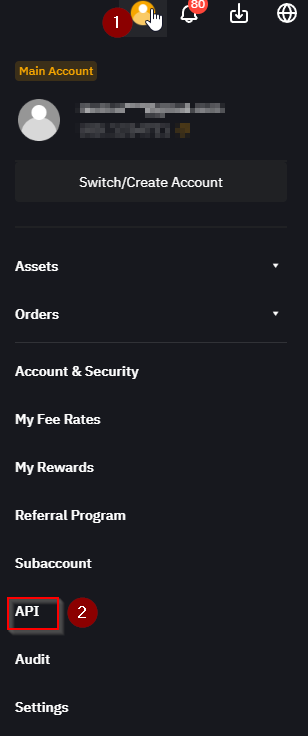
Log in at bybit.com → top-right account icon → API.
-
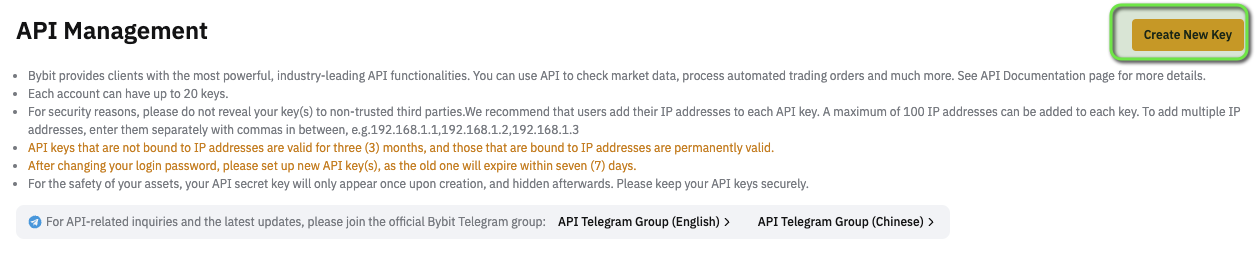
Click Create New Key → System-generated API Keys.
-
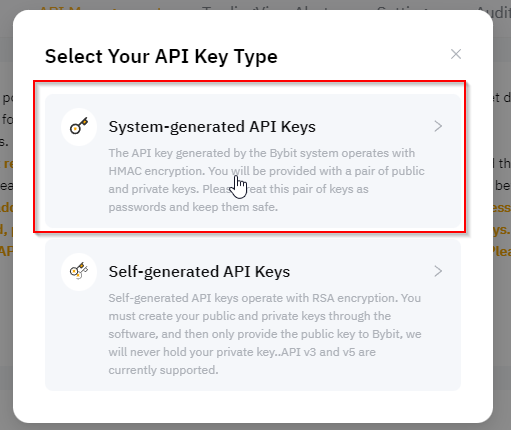
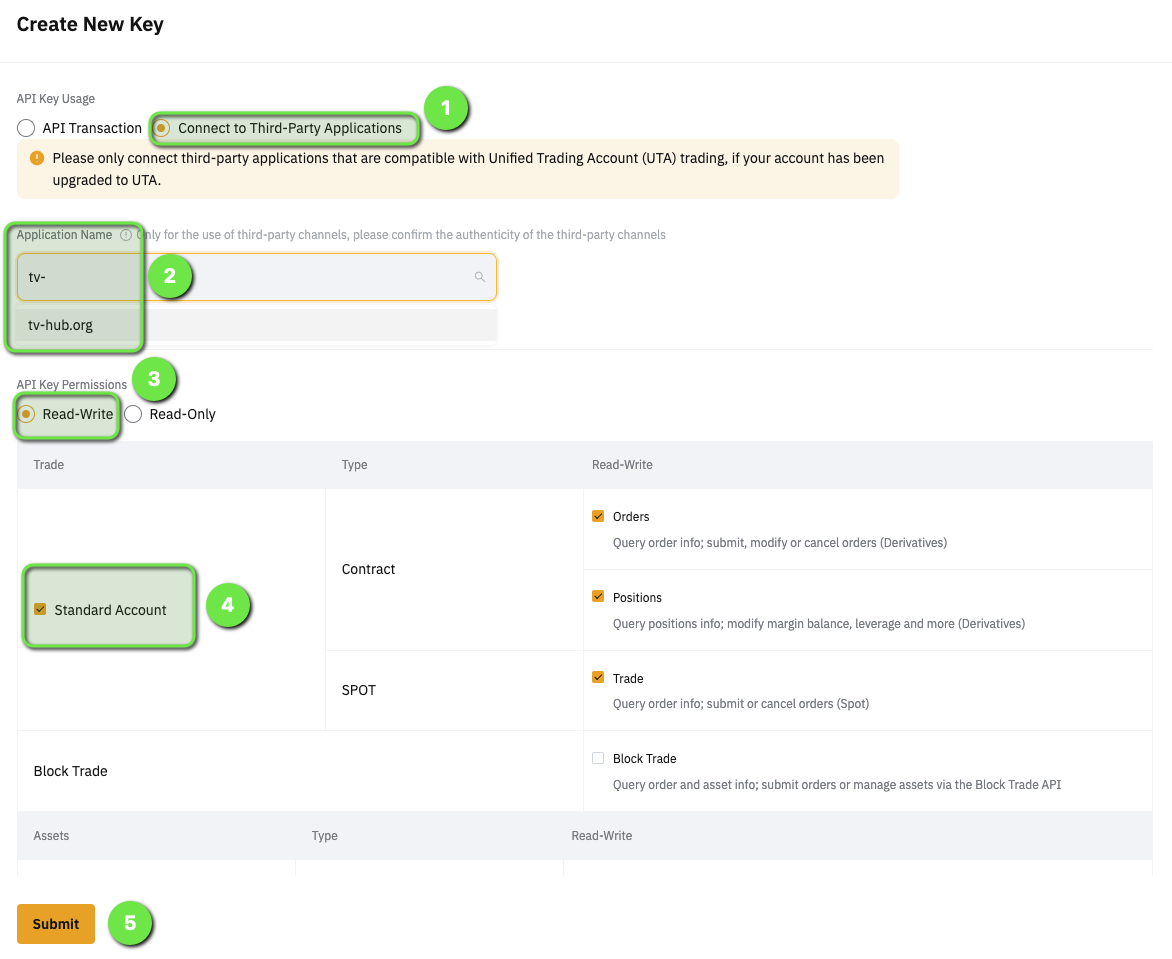
Choose Connect to Third-Party Application, then select tv-hub.org from the list.
-
On the key form, make sure tv-hub.org is the selected third-party app in the dropdown, then set the permissions to Read-Write (Unified Trading → Trade); leave withdrawals off.
-
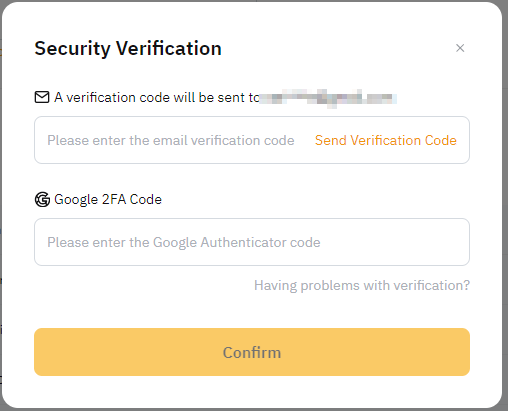
Pass the security check / 2FA and click Submit.
-
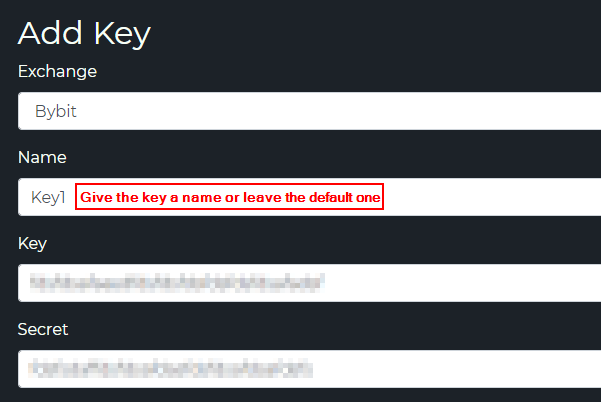
Copy the Key + Secret (shown once) into TVH at Account → Settings → API Keys.
Bybit Spot (UTA)
| Field | Value |
|---|---|
| Exchange identifier | bybit-spot |
| Webhook URL | https://alerts.tv-hub.org |
| Symbol format | BTCUSDT, ETHUSDT — same as Futures |
| Max leverage | n/a (use UTA Margin for leveraged spot) |
| Permissions | Read + Unified Trading → Spot Trade |
| Demo support | ✅ Demo Account checkbox |
Example payload:
{
  "token": "your-tvh-token",
  "exchange": "bybit-spot",
  "pair": "BTCUSDT",
  "isMarket": true,
  "isBuy": true,
  "units": 50,
  "unitsType": "percentBalance"
}
API key creation
Because Bybit ships UTA, one API key with "Unified Trading" enabled covers Spot + Derivatives — you don't need two keys. The creation flow is the same as Futures (third-party binding, no IP whitelist); just add the key to TVH a second time with the bybit-spot identifier.
-
Log in at bybit.com → top-right account icon → API.
-
Click Create New Key → System-generated API Keys.
-
Choose Connect to Third-Party Application, then select tv-hub.org from the list.
-
On the key form, make sure tv-hub.org is the selected third-party app in the dropdown, then set the permissions to Read-Write (Unified Trading → Trade); leave withdrawals off.
-
Pass the security check / 2FA and click Submit.
-
Copy the Key + Secret (shown once) into TVH at Account → Settings → API Keys — pick the
bybit-spotidentifier in the dropdown.
Bybit Testnets
For most users the Demo Account is the better choice — one checkbox, no separate site, real market prices and liquidity. Only use Testnet if you specifically need a clean, fully separate environment.
Separate from Demo. Testnets run on testnet.bybit.com with their own user accounts, their own balances, and their own API keys.
| Variant | TVH identifier | Site |
|---|---|---|
| Futures Testnet | bybit-testnet | testnet.bybit.com |
| Spot Testnet | bybit-spot-testnet | testnet.bybit.com |
When to pick Demo vs Testnet
| Demo | Testnet | |
|---|---|---|
| Setup overhead | One checkbox | New account + new key |
| Balance | Free demo USDT | Free testnet USDT |
| Order book | Live-mirrored (real liquidity) | Thin, mostly bot-driven |
| Recommended for | Beginners, quick sanity-check | Strategy backtests, EA testing |
For most users, Demo wins. Use Testnet only if you specifically need a clean, separate environment (e.g. testing automated copy-trading without affecting your live account stats).
Setup
- Create a testnet account at testnet.bybit.com.
- Generate an API key on the testnet site.
- In TVH, add the key with exchange
bybit-testnet(orbybit-spot-testnet). - Do not tick Demo Account checkbox — testnet has its own routing.
- Payload
exchangefield:"bybit-testnet".
Common Bybit quirks
- UTA must be activated. New accounts default to "Classic"; TVH expects UTA. Activate it from Bybit's account settings before generating the API key.
- One-way vs Hedge. This is set on the account (Bybit position-mode setting), not in the payload. In hedge mode,
orderType: "buy"opens/extends the long andorderType: "sell"the short, andcloseLong/closeShortflatten one side — TVH routes the position index automatically. The Binance-style"hedgeMode": truefield is ignored on Bybit; you don't need it. - Use the right TP-attach flag.
setTpToPositionis the limit-entry flag (TP attaches after the limit fills).targetAssignedToPositionis the market-entry flag (TP is attached when the market order is placed). Using the wrong one silently falls back to the default separate-reduce-only behaviour. - Time-in-force defaults differ from Binance. TVH normalizes this — you don't need to set it explicitly.
- API-key TTL. Bybit keys expire after 90 days unless you re-confirm. TVH does not auto-rotate; you'll get 401s when the key expires.
Feature support
| Feature | Futures (UTA) | Spot |
|---|---|---|
| Multiple TPs | ✅ (or ⚠️ 1 TP with setTpToPosition / targetAssignedToPosition) | ✅ |
| Trailing Stop | ✅ | ✅ |
| Scaled Orders | ✅ | ✅ |
| Hedge Mode | ✅ Account-level (set on Bybit; no param) | n/a |
useEntireAccountBalance | ✅ | ❌ |
setTpToPosition (limit entries) | ✅ | n/a |
targetAssignedToPosition (market entries) | ✅ | n/a |
useFixedSize | ✅ | ✅ |
Sub-Accounts (via named apiKey) | ✅ | ✅ |
| Demo Account checkbox | ✅ | ✅ |
Full matrix: Exchange Quirks Reference.
Related
- Common Setup — universal flow
- TradeCommand Sizing —
useEntireAccountBalance,unitsTypesemantics - TradeCommand Take Profit —
setTpToPositionusage - Exchange Quirks Reference