Coinbase — Spot + Futures (Perpetual & Expiring)
Coinbase is the US-regulated option in the TVH lineup. TVH uses Coinbase's Advanced Trade API (not the legacy v2 API), and supports both Spot and Futures (Perpetual + Expiring). On Spot, the adapter auto-transforms TradingView-style symbols (BTCUSD, BTCUSDT) into Coinbase's dashed format. On Futures, symbol suffixes are strict — Coinbase silently rejects wrong formats.
- 2 exchange identifiers:
coinbase-spot(Spot),coinbase(Futures) - Use Coinbase Advanced Trade API, not the legacy v2 API
- Symbol format:
BTC-USD(spot, auto-transformed fromBTCUSD/BTCUSDT) ·BTC-USD-PERP(perpetual futures, strict) ·BTC-26DEC26-CDE(expiring, strict) - No demo, no testnet — Coinbase doesn't offer a paper-trading endpoint TVH can route to
- Secret is an EC private key (PEM block), not a short HMAC string
- All variants use
https://alerts.tv-hub.org
Webhook URL
Both Coinbase markets (Spot + Futures) use the default endpoint:
API key creation
Coinbase uses Advanced Trade API keys (not the legacy v2 keys). There's no third-party binding — the IP whitelist is optional — and no passphrase. The secret is an EC private key, not a short HMAC string.
-
Log in at coinbase.com, open the account menu and go to Settings → API.

-
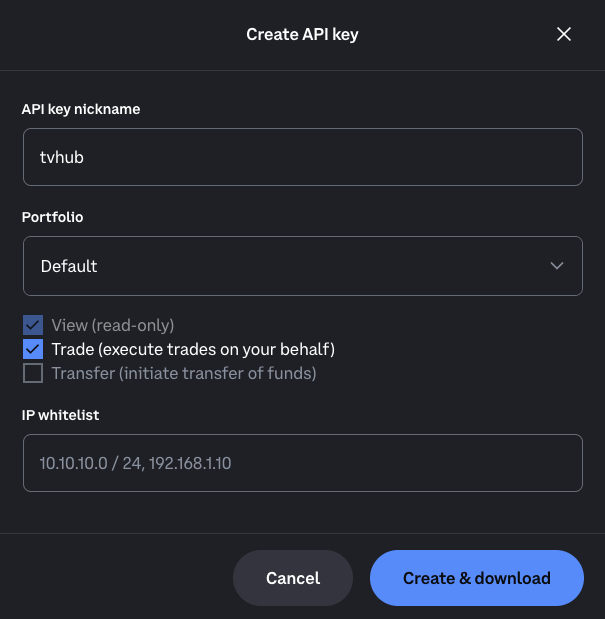
Click + New API Key. In the Create API key dialog: set a nickname, pick the Portfolio (usually Default), enable View + Trade (for futures also Futures Trade), and leave Transfer off. The IP whitelist is optional. Click Create & download.
-
A certificate file downloads and Coinbase shows the key + secret. Add them to TVH at Account → Settings → API Keys:
- API Key field → the value that starts with
organizations/... - API Secret field → the entire EC private key block, from
-----BEGIN EC PRIVATE KEY-----to-----END EC PRIVATE KEY----- - Pick
coinbase-spot(spot) orcoinbase(futures) in the Exchange dropdown.
- API Key field → the value that starts with
Permissions deep-dive
Coinbase splits permissions more granularly than other exchanges. Pick exactly what you need:
| Permission | Grant? | Why |
|---|---|---|
| View Accounts | ✅ Required | TVH needs to read balances |
| Trade | ✅ Required | Place + cancel orders |
| Futures Trade | ✅ if using futures | Required for coinbase identifier |
| Transfer | ❌ Skip | Not needed |
| Convert | ❌ Skip | Not needed |
| Withdraw | ❌ Never | TVH never withdraws |
Variants
- Spot
- Futures
Coinbase Spot
| Field | Value |
|---|---|
| Exchange identifier | coinbase-spot |
| Webhook URL | https://alerts.tv-hub.org |
| Symbol format | BTC-USD, ETH-USD, SOL-USD — dash separator |
| Max leverage | n/a (spot) |
| API generation | Coinbase Advanced Trade API |
| Permissions | View + Trade |
| Sub-account support | ❌ Not supported in TVH |
| Demo support | ❌ |
Example payload:
{
  "token": "your-tvh-token",
  "exchange": "coinbase-spot",
  "pair": "BTC-USD",
  "isMarket": true,
  "isBuy": true,
  "units": 50,
  "unitsType": "percentBalance"
}
The Spot adapter automatically rewrites BTCUSD → BTC-USD and BTCUSDT → BTC-USDC when the pair has no dash. You can paste TradingView chart symbols directly (e.g. from CBSE:BTCUSD or BINANCE:BTCUSDT) without manual reformatting. The canonical BTC-USD / BTC-USDC format also works as-is.
Auto-transform converts BTCUSDT → BTC-USDC, not BTC-USDT. Coinbase Spot does not list USDT pairs directly — the adapter rewires you to the USDC equivalent. This is intentional, but surprising the first time. Quote your balances in USDC if you plan to trade Coinbase Spot via TradingView USDT alerts.
Coinbase Futures
Coinbase Futures launched as part of Coinbase International / Advanced Trade. There are two contract types:
| Contract | Symbol format | TVH support |
|---|---|---|
| Perpetual | BTC-USD-PERP (or TradingView's BTCUSD.P) | ✅ |
| Expiring (CDE = Cash-Delivered Expiring) | BTC-26DEC26-CDE, ETH-26DEC26-CDE | ⚠️ Use at your own risk |
| Field | Value |
|---|---|
| Exchange identifier | coinbase |
| Webhook URL | https://alerts.tv-hub.org |
| Symbol format | BTC-USD-PERP (perp), BTC-26DEC26-CDE (expiring) |
| Margin | USD-collateralised |
| Max leverage | Per-product (set by Coinbase tier) |
| Permissions | View + Trade + Futures Trade |
| Sub-account support | ❌ |
| Demo support | ❌ |
Example payload (perpetual):
{
  "token": "your-tvh-token",
  "exchange": "coinbase",
  "pair": "BTC-USD-PERP",
  "isMarket": true,
  "isBuy": true,
  "units": 0.01,
  "leverage": 5,
  "marginType": "isolated"
}
Symbol format gotcha
On a TradingView Coinbase chart, the symbol displays as BTCUSD — no separator, no suffix. Coinbase's API expects a dashed format.
| You want to trade | pair value | Adapter behaviour |
|---|---|---|
| Spot BTC/USD | BTC-USD (or paste BTCUSD directly) | ✅ Auto-transformed |
| Spot BTC/USDC | BTC-USDC (or paste BTCUSDT) | ✅ Auto-transformed — USDT is rewritten to USDC |
| Perpetual BTC futures | BTC-USD-PERP, or TradingView's BTCUSD.P | ✅ A -PERP or .P suffix is resolved to the live perpetual by base asset |
| 26 Dec 2026 BTC futures | BTC-26DEC26-CDE (date + CDE) | ❌ Strict — exact contract symbol only |
For perpetuals, send either the dashed BTC-USD-PERP or TradingView's native BTCUSD.P notation — the adapter matches the base asset to the live Coinbase perpetual. Expiring (CDE) contracts are strict: the symbol must be the exact dated form. A bare BTCUSD (no suffix) or a wrong suffix on Futures returns a 400 from Coinbase, which doesn't echo a useful error message — TVH logs the raw 400 in the Activity Log. Coinbase Spot is forgiving because of the auto-transform, but only for the two canonical TradingView prefixes (BTCUSD, BTCUSDT).
See also: Symbol format reference.
Common Coinbase quirks
- Wrong API product. Generating a legacy Coinbase Pro / Coinbase v2 key by mistake. Always pick Advanced Trade when creating.
- Symbol format silently rejected on Futures. A bare
BTCUSD(no suffix) or a wrong suffix on Futures gets a useless 400 from Coinbase. Send a perpetual asBTC-USD-PERPorBTCUSD.P, and an expiring contract as its exactBTC-26DEC26-CDEform. Spot is forgiving — the adapter auto-transformsBTCUSD/BTCUSDT(the latter becomesBTC-USDC). - EC private-key secret is multi-line. When pasting into TVH, the full PEM block (including the
-----BEGIN EC PRIVATE KEY-----/-----END EC PRIVATE KEY-----lines) is what Coinbase expects. - No sub-account routing in TVH. Coinbase Portfolios are a separate concept — TVH currently treats whichever portfolio the key belongs to as the only target.
- No demo / testnet. Practice mode is not available. Trade small first.
Feature support
| Feature | Spot | Futures |
|---|---|---|
| Market & Limit orders | ✅ | ✅ |
| Multiple TPs | ✅ | ✅ |
| Trailing Stop | ⚠️ via reduce-only | ✅ |
| Scaled Orders | ✅ | ✅ |
useFixedSize | ✅ | ✅ |
useEntireAccountBalance | ❌ | ❌ |
| Sub-Accounts | ❌ | ❌ |
| Limit Order Chasing | ⚠️ | ⚠️ |
| Demo Account checkbox | ❌ | ❌ |
Full matrix: Exchange Quirks Reference.
Related
- Common Setup — universal flow
- TradeCommand gotchas — symbol format
- Exchange Quirks Reference