KuCoin — Spot and Futures
KuCoin's two markets (Spot and Futures) use very different symbol conventions and are exposed as two separate identifiers in TVH. KuCoin requires a Passphrase like OKX, and there's no demo or testnet — only live.
- 2 exchange identifiers:
kucoin(Futures),kucoin-spot(Spot) - Symbol formats differ: Futures
XBTUSDTM(XBT + M suffix), SpotBTC-USDT(dash) - Leverage cap is read from the KuCoin contract spec at runtime. The adapter does not apply a hard 20× cap, your
leveragevalue is bounded by whatever KuCoin's contract metadata returns for the pair. - Passphrase required — set when creating the key on KuCoin
- No demo, no testnet — only live trading
- All variants use
https://alerts.tv-hub.org
Webhook URL
All KuCoin markets (Futures + Spot) use the default endpoint:
API key creation
KuCoin's API key system is unified — one key works for both Spot and Futures if you grant both permissions. KuCoin supports third-party binding, so no IP whitelist is needed; a passphrase is still required.
-
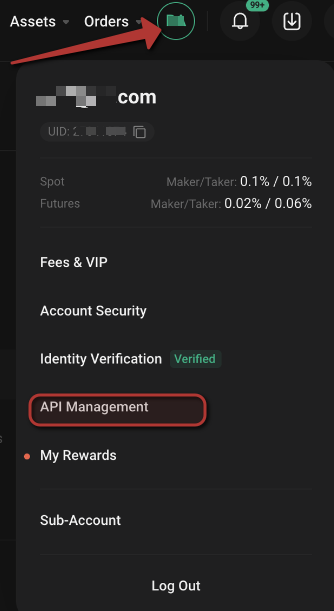
Log in at kucoin.com and open the top-right account menu → API Management.
-
Click Create API.

-
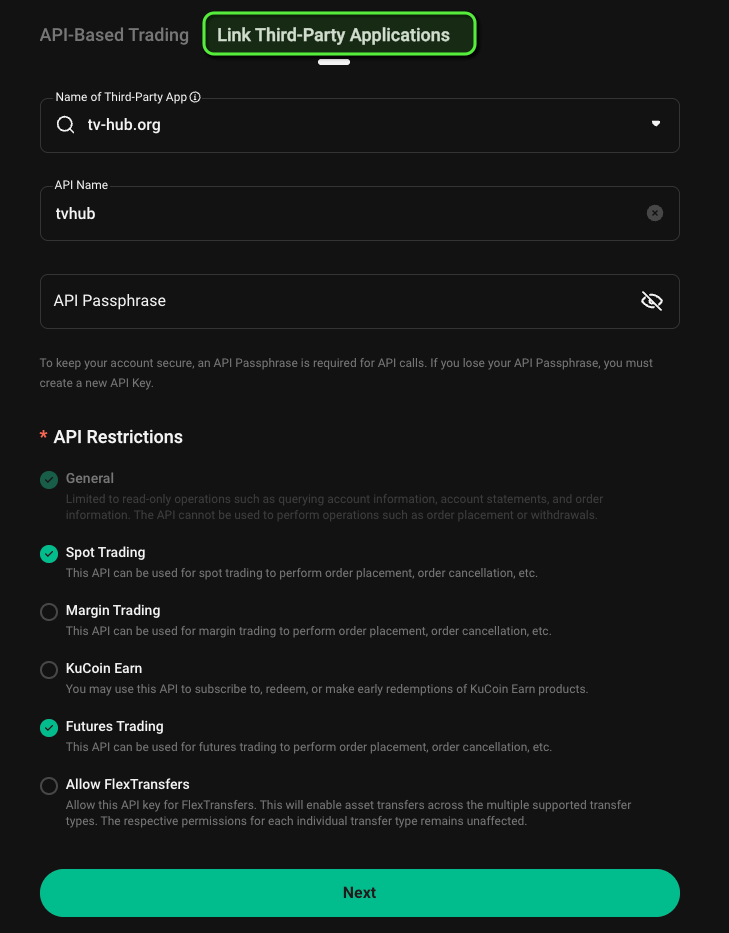
Open the Link Third-Party Applications tab, pick tv-hub.org as the third-party app, give it an API name, and set an API passphrase (you'll need this exact passphrase in TVH). Enable Spot Trading and/or Futures Trading, then click Next and complete the security verification.
-
Copy the Key + Secret immediately (the secret is shown only once) along with your passphrase, then add the key to TVH at Account → Settings → API Keys — once with exchange
kucoin(Futures) and/or once withkucoin-spot(Spot), same Key/Secret/Passphrase both times.
The secret is shown only once. Store it safely. TV-Hub staff will never ask for your full API secret or passphrase.
Finding your KuCoin UID
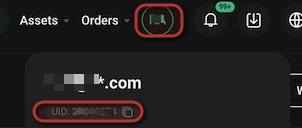
Some flows (sub-account permissions, support requests) reference your KuCoin UID — a numeric account ID separate from your username. Find it under the user dropdown.
Variants
- Futures
- Spot
KuCoin Futures
| Field | Value |
|---|---|
| Exchange identifier | kucoin |
| Webhook URL | https://alerts.tv-hub.org |
| Symbol format | XBTUSDTM, ETHUSDTM — XBT (not BTC), M suffix = perpetual |
| Max leverage | Per-contract (read from KuCoin's contract metadata at runtime) |
| Permissions | General + Futures Trading |
| Passphrase | Required |
| Sub-account support | ✅ via named apiKey field (one TVH key per sub-account) |
| Demo support | ❌ Not supported |
Symbol format reference
| Pair | Perpetual symbol |
|---|---|
| BTC | XBTUSDTM |
| ETH | ETHUSDTM |
| SOL | SOLUSDTM |
| DOGE | DOGEUSDTM |
KuCoin Futures uses XBT instead of BTC (a legacy holdover from KuCoin Futures' early days). The M at the end stands for "Margin contract" (perpetual). Dated futures use a date suffix instead.
Example payload:
{
  "token": "your-tvh-token",
  "exchange": "kucoin",
  "pair": "XBTUSDTM",
  "isMarket": true,
  "isBuy": true,
  "units": 0.001,
  "leverage": 10,
  "marginType": "isolated"
}
Leverage cap
The KuCoin adapter reads the max leverage from KuCoin's contract metadata at runtime. There is no hard-coded 20× ceiling in the adapter. Your leverage field is therefore bounded by whatever KuCoin currently advertises for that contract (often 100× on BTC / ETH perpetuals, less on illiquid alts).
That said, most TVH copy-trading strategies run sub-20× for survivability — KuCoin's liquidation engine has a track record of cascading on high-leverage longs during fast moves. Treat 20× as a soft personal ceiling, not an adapter-enforced one.
KuCoin Spot
| Field | Value |
|---|---|
| Exchange identifier | kucoin-spot |
| Webhook URL | https://alerts.tv-hub.org |
| Symbol format | BTC-USDT, ETH-USDT — dash separator, no XBT |
| Max leverage | n/a (spot) |
| Permissions | General + Spot Trading |
| Passphrase | Required (same key system as Futures) |
| Sub-account support | ✅ via named apiKey field |
| Demo support | ❌ |
Example payload:
{
  "token": "your-tvh-token",
  "exchange": "kucoin-spot",
  "pair": "BTC-USDT",
  "isMarket": true,
  "isBuy": true,
  "units": 50,
  "unitsType": "percentBalance"
}
KuCoin Spot uses BTC-USDT (dash, BTC). KuCoin Futures uses XBTUSDTM (no separator, XBT, M suffix). Same exchange, two completely different formats. Copy from KuCoin's UI directly to avoid mistakes.
Sub-Accounts
KuCoin sub-accounts are routed via the named apiKey field — one TVH API key per sub-account.
-
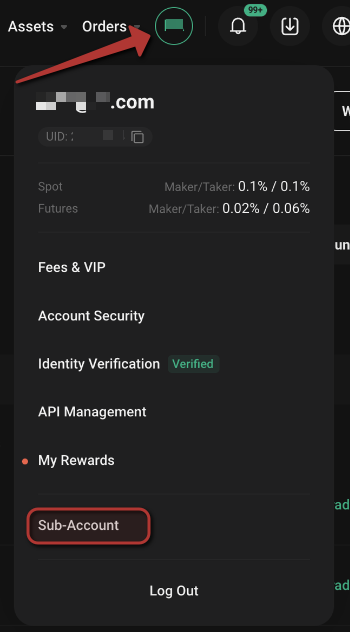
Open the top-right account menu and go to Sub-Account.
-
Click Create Sub-Account.

-
Give it a sub-account name, enable the Spot and/or Futures permissions, set a login password and an optional remark, then Save.
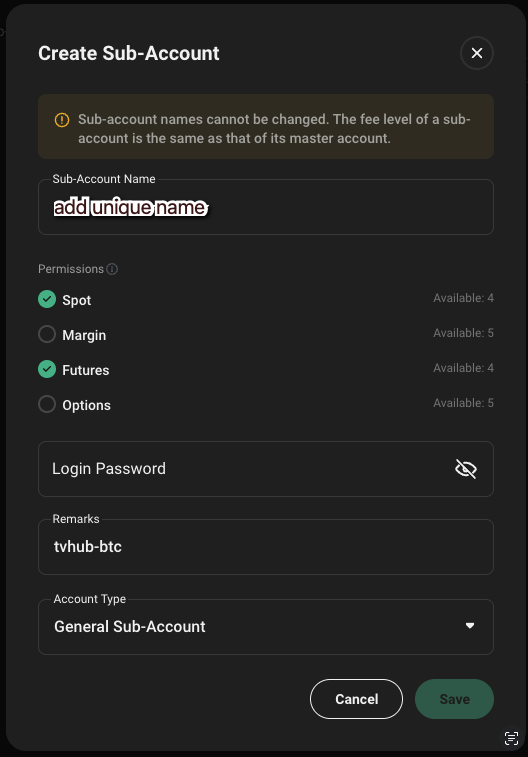
-
In the sub-account row's ⋯ actions menu, choose View API to create that sub-account's own API key (and Transfer to fund it).
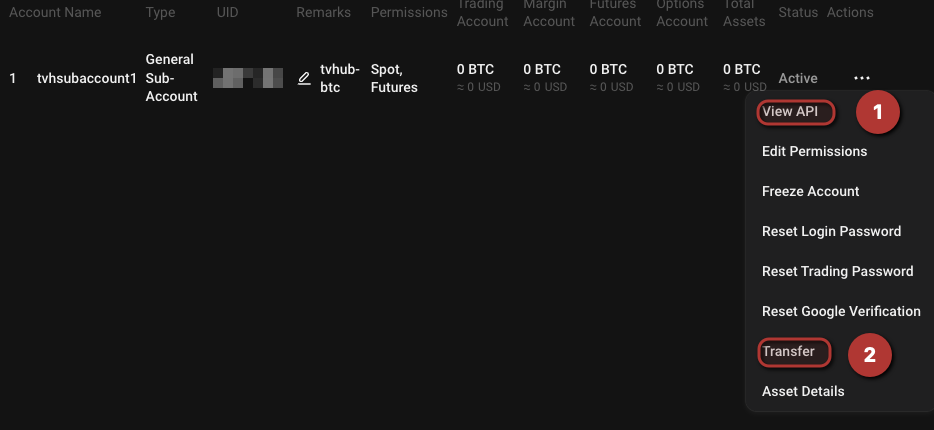
-
Add that key to TVH with a descriptive name and target it from your payload:
{
  "exchange": "kucoin",
  "pair": "XBTUSDTM",
  "apiKey": "kucoin-bot-1",
  "isMarket": true,
  "isBuy": true,
  "units": 0.001
}
Common KuCoin quirks
- Two symbol conventions on one exchange. Futures:
XBTUSDTM. Spot:BTC-USDT. Don't paste from one chart into the other. - Passphrase is mandatory. Forget to enter it in TVH → "Invalid Sign" rejection.
- Leverage is per-contract. The KuCoin adapter reads the max leverage from KuCoin's contract metadata at runtime. Treat 20× as a soft personal ceiling; the adapter does not enforce one.
- No demo, no testnet. If you need risk-free testing, use Bybit Demo or Binance Futures Testnet instead.
- One key, both markets. A single KuCoin API key with both Spot + Futures permissions covers both
kucoinandkucoin-spotidentifiers in TVH.
Feature support
| Feature | Futures | Spot |
|---|---|---|
| Market & Limit orders | ✅ | ✅ |
| Multiple TPs | ✅ | ✅ |
| Trailing Stop | ✅ | ✅ |
| Scaled Orders | ✅ | ✅ |
useFixedSize | ✅ | ✅ |
useEntireAccountBalance | ❌ | ❌ |
| Hedge Mode | ⚠️ | n/a |
| Sub-Accounts | ✅ | ✅ |
| Limit Order Chasing | ✅ | ✅ |
| Demo Account checkbox | ❌ | ❌ |
Full matrix: Exchange Quirks Reference.
Related
- Common Setup — universal flow
- TradeCommand Futures options —
leverage,marginType - TradeCommand Sizing —
unitsTypesemantics - Exchange Quirks Reference