E-Mail Signals — Webhook Backup
Even with webhooks configured, a webhook can occasionally get lost in transit. E-mail signals give you a second, independent path so the trade still fires. TVH runs e-mail as a delayed backup that only executes when the webhook didn't arrive.
- Enable e-mail as a backup for the rare cases a webhook is lost in transit.
- Backup mode requires
alertTimestampin the JSON payload (the Trade Command Builder adds it automatically). - TVH delays e-mail execution by 5 seconds so it doesn't double-fire on top of a successful webhook.
When to use this
Set up the webhook flow first (Quickstart), then add e-mail as a safety net. If a webhook is ever lost in transit, the matching e-mail still fires the trade a few seconds later.
Setup (4 steps)
Step 1 — Copy your TVH e-mail address
In TVH, open Account → E-Mail Signals. You'll see a TVH-issued e-mail address that's unique to your account. Copy it.
Step 2 — Add the address to TradingView
In TradingView, open Settings → Notifications and find the Alternative e-mail field.
Paste the TVH-issued address into the Alternative e-mail field.
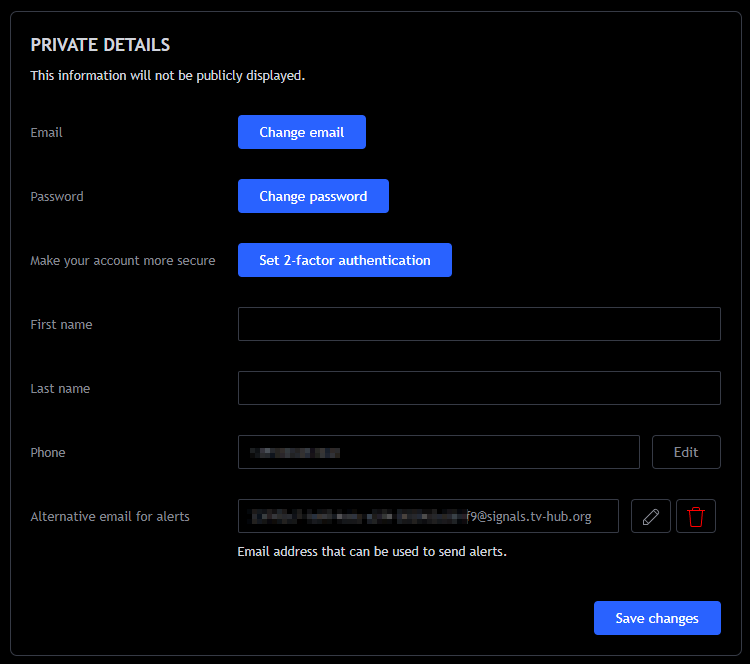
Make sure your TradingView account language is set to English before you continue. Otherwise TVH cannot parse the e-mail TradingView sends. You can switch back to your usual language afterwards.
Step 3 — Verify with the code
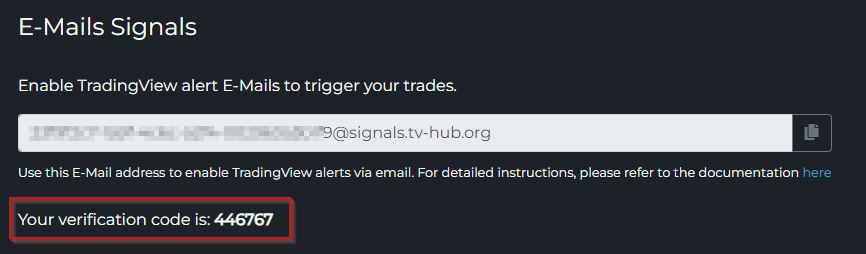
TradingView sends a verification code to the TVH-issued address. TVH catches the code automatically and shows it on the same E-Mail Signals settings page.
Refresh the page, copy the code, paste it back into TradingView's verification dialog.
Step 4 — Use "Send plain text" on alerts
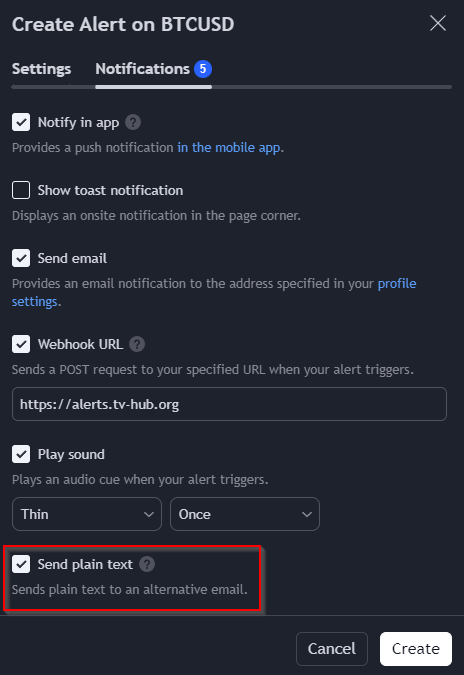
When you create or edit a TradingView alert that should also fire via e-mail, enable the Send plain text option in the Notifications tab.
Required JSON field for backup mode
If you use e-mail as a backup for webhooks (i.e. the alert is sent via both transports), the JSON payload must include this field:
"alertTimestamp": "{{ticker}}-{{timenow}}"
This is the deduplication key. TVH uses it to recognise that the webhook and the e-mail describe the same alert, and to execute only one of them.
{
  "exchange": "bybit",
  "pair": "BTCUSDT",
  "isBuy": true,
  "isMarket": true,
  "unitsType": "percent",
  "unitsPercent": 1,
  "token": "YOUR_USER_TOKEN",
  "alertTimestamp": "{{ticker}}-{{timenow}}"
}
The Trade Command Builder adds alertTimestamp automatically for any command created or edited after this feature shipped. If you have older trade commands that lack the field, recreate them in the Builder or add the line manually.
5-second backup delay
TVH intentionally delays e-mail execution by 5 seconds. The flow:
- Webhook hits TVH → trade fires immediately.
- E-mail arrives a moment later → TVH sees a matching
alertTimestampalready executed → drops the duplicate.
If the webhook fails or is lost, the 5-second delay still leaves room for the e-mail to land and execute the missing signal. Net effect: webhook latency on the happy path, with a guaranteed backstop on failures.
You can override the 5-second delay per command:
"delay": -1

Troubleshooting
| Symptom | Likely cause | Fix |
|---|---|---|
| Verification code never shows in TVH | TV hasn't sent yet, the address is mistyped, or your TradingView language isn't English | Wait 1–2 minutes and refresh, double-check the address letter for letter, and set your TradingView language to English. |
| Alert fires in TV but no row in TVH Activity Log | Send plain text is off, so TradingView never sent the alert to your alternative e-mail | Edit the alert and tick Send plain text under Notifications. |
| Duplicate trades when using both webhook + e-mail | alertTimestamp missing from the payload | Recreate the command in the Trade Command Builder, or add the line manually. |