Best Crypto Trading Bots for Beginners (2026 Guide)
Quick Summary
Crypto trading bots automate buy and sell decisions on your exchange through an API. No emotion, no sleep, no missed 3 a.m. moves. For beginners, the safest starting points are DCA and grid bots. Expect real costs (platform fees, exchange fees of roughly 0.1% per trade, plus spread), not guaranteed profit. A signal bot that mirrors your TradingView strategy needs a TradingView Essential plan for webhooks, but the bot layer itself can be free: TradingView Hub is free when you open a partner exchange account through our referral link, and demo trading is always free. This guide covers bot types, a vetted platform comparison, a security-first setup checklist, scam red flags, and honest ROI math.
Disclosure: some exchange links on this page are referral links. If you sign up through one, the exchange pays us a commission at no extra cost to you, which is how the TradingView Hub bot stays free for you.
A crypto trading bot is software that connects to your exchange through an API and places buy and sell orders for you, following rules you set instead of your mood. For beginners, the best crypto trading bots aren't the flashiest ones. They're the simple ones you actually understand: dollar-cost averaging (DCA) and grid bots. This guide is written for people who have never run a bot before.
We'll keep it honest. Bots don't print money, and anyone promising guaranteed returns is running a script you don't want to be part of. What a good bot does is remove emotion, watch the market while you sleep, and execute your plan the same way every single time.
By the end you'll know the main bot types, how a signal bot actually fires an order, what the whole thing costs (including the one fee most listicles never mention), how to spot a scam, and how to set up your first bot without handing over the keys to your account. Want the wider picture first? Our complete guide to TradingView automation connects all the pieces.
What Are Crypto Trading Bots?
Crypto trading bots are programs that automatically buy and sell cryptocurrencies based on rules you define. You connect the bot to your exchange through an API, hand it a strategy like "buy when the price drops 5%," and it executes that plan around the clock without getting tired, scared, or greedy.
The connection is the important part. An API is a permission slip you generate inside your exchange account. It lets the bot see your balance and place orders, but you decide exactly what it's allowed to do. Grant "trade" and leave "withdraw" switched off, and the bot can open and close positions without ever being able to move your money out. More on that in the setup section.
Why does any of this matter for crypto specifically? Because the market runs 24 hours a day, seven days a week. Traditional stock exchanges close on nights, weekends, and holidays. Bitcoin doesn't. A regulatory headline out of Asia at 3 a.m. your time can move the whole market before you've had coffee. A bot is awake for all of it.
Then there's the emotional side. When Bitcoin drops 15% in an hour, fear pushes people to sell at the bottom. When it rips to new highs, greed pushes them to buy the top. A bot follows your rules through both, which is often the difference between a plan and a panic. Speed helps too: for something like arbitrage, an edge that exists for a few seconds is gone long before a human can react.
Types of Crypto Trading Bots
The four bot types beginners meet first are arbitrage, grid, DCA, and signal bots. They differ in risk, complexity, and the market conditions they suit. DCA and grid bots are the gentlest on-ramp. Arbitrage and signal bots ask more of you. Here's what each one actually does.
Arbitrage Bots
Arbitrage bots hunt price gaps between exchanges. If Bitcoin trades slightly cheaper on one venue than another, the bot buys low, sells high, and pockets the spread. Simple in theory. In practice these gaps are tiny and vanish in seconds, so you need funds pre-positioned on multiple exchanges and fast execution. It's the highest-complexity option here and rarely the right first bot.
Grid Trading Bots
Grid bots love a market that chops sideways. They lay a ladder of buy and sell orders across a price range, buying each time the price dips to a rung and selling each time it climbs to the next. That's "buy low, sell high" automated into a grid. They're easy to grasp and forgiving to configure, which is why so many beginners start here. The catch: a grid bot in a strong downtrend keeps buying all the way down.
DCA (Dollar-Cost Averaging) Bots
DCA bots buy a fixed dollar amount on a schedule, regardless of price. Maybe $100 of Ethereum every Monday. You stop trying to time the perfect entry and instead average your cost across weeks and months. Dollar-cost averaging is a well-worn concept precisely because it removes timing pressure (Investopedia, 2026). For most first-timers, this is the lowest-stress bot to run.

Signal-Based Bots
Signal bots execute trades from an external source, most often a TradingView indicator or strategy. Your chart fires an alert that says "buy" or "sell," and the bot turns that alert into a real order on your exchange. This is the bridge between the analysis you already do on TradingView and hands-off execution.
One honest caveat that most guides skip: on TradingView, the alert delivery method that makes signal bots work is the webhook, and webhooks are not on the free plan. TradingView's free tier gives you 3 active price alerts as of July 2026, but webhook-based alerts start with the paid Essential plan. We break down exactly how that alert becomes an order in the next section, and the plumbing itself is explained in our anatomy of a webhook post.
Here's the same information in table form for quick scanning:
| Bot Type | Best For | Risk Level | Complexity | Market Condition |
|---|---|---|---|---|
| Arbitrage | Quick spreads | Medium | High | All markets |
| Grid Trading | Steady range gains | Low-Medium | Low | Sideways markets |
| DCA | Long-term accumulation | Low | Very Low | All markets |
| Signal-Based | Following a strategy | Varies | Medium | Depends on signals |
Plenty of traders run more than one type at once, say a DCA bot on Bitcoin plus a grid bot on Ethereum. If you already trade a specific exchange, our TradingView-to-Binance setup shows how signal automation looks there. And for the alert side, our guide on setting up TradingView alerts walks through the whole thing.
How Do Crypto Trading Bots Work?
A trading bot works in a loop: it reads market data, checks your rules, runs a risk check, and places an order through the exchange API. For a signal bot the loop starts on your chart. A TradingView alert fires, a webhook carries it as JSON, the platform translates it into an order, and your exchange fills it. Every step leaves a record.
Let's make the generic loop concrete first, then the signal-bot flow.
Step 1: Market analysis. The bot scans prices, volume, and indicators across the pairs you've told it to watch, much faster than a human refreshing a chart.
Step 2: Signal generation. When conditions match your rule ("price crossed below the 50-day moving average"), the bot flags a trade. That rule can live in the bot, or it can come from an outside source like a TradingView strategy.
Step 3: Risk check. Before anything hits the exchange, the bot checks position size, available balance, and any loss limits you set. This is your seatbelt.
Step 4: Execution. If the checks pass, the order goes to the exchange in milliseconds.
Step 5: Monitoring. After the fill, the bot manages the position: stop-losses, take-profits, and the next signal.
The signal-bot flow, step by step
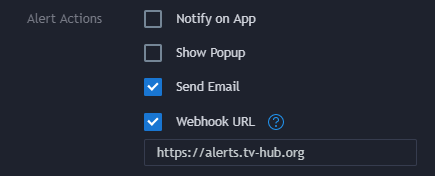
This is where TradingView Hub lives, so it's worth seeing the exact chain. Your TradingView alert fires and posts a small JSON payload to a webhook URL. TradingView Hub receives that payload, matches it to your trade command, and sends the order to your connected exchange. The result lands in your Activity Log.
What happens when a trade fails
This trips up a lot of newcomers, so we'll be precise about how TradingView Hub behaves. When an order can't be placed (say the exchange rejects it, or a key permission is missing), the failure shows up as an entry in your Activity Log. TradingView itself does not get a usable status code back, so it won't tell you the trade failed. The Activity Log is your source of truth.
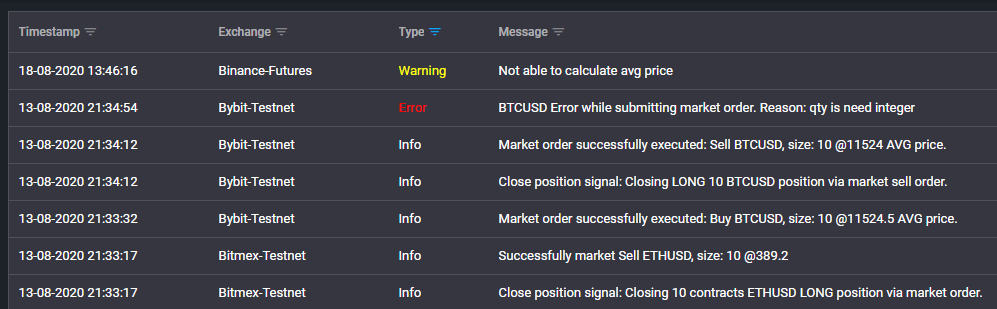

If something doesn't fire the way you expect, our debug a failed alert documentation walks through reading the log and finding the cause. Backtesting also lives in this workflow: most platforms let you test a strategy against historical data before real money is on the line, which we cover in the TradingView backtesting guide.
What Are the Benefits of Using Trading Bots?
The real benefits of trading bots are discipline, coverage, and speed. They execute your plan without the fear-and-greed swings that wreck manual trading, they watch the market 24/7 while you sleep, and they react in milliseconds. Bots don't make you smarter. They make you consistent, which is often what's actually missing.
Emotional discipline
Fear sells the bottom, greed buys the top, and FOMO does both on the same day. A bot doesn't feel any of it. Picture a hard crash: while a human might dump everything at the low, a DCA bot just keeps buying on schedule, quietly lowering the average cost. That mechanical consistency is the single biggest edge most beginners gain from automation.
24/7 market coverage
Crypto never closes, but you have to sleep sometime. News breaks at odd hours and prices move on it. A bot is watching when Asian markets run overnight and when a weekend rumor sends everything sideways. It can track dozens of pairs at once, which no manual trader can match.
Speed and multitasking
By the time you've read a price alert, opened the app, and typed an order, a fast move can already be over. Bots act in milliseconds. And while one is managing your Bitcoin position, it can watch Ethereum, trail a stop on an altcoin, and run your weekly DCA buy in parallel.
Backtesting before you risk anything
Before committing real capital, you can test a strategy against years of historical data. Backtesting shows how an approach behaved through bull runs, bear markets, and crashes, and it sets realistic expectations. Just be careful not to over-trust it, which is a trap we cover in the risks section below. For a candid look at what automation actually returns over time, see our breakdown of whether automated trading is profitable.
What Are the Risks of Using a Trading Bot?
Trading bots carry technical, market, security, and psychological risks, and none of them are hypothetical. Software fails, strategies break in conditions they weren't built for, API keys can be stolen, and over-optimized backtests routinely mislead. Understanding these upfront is what separates a careful beginner from an expensive one.
Technical risks
Technology breaks at the worst moments. An API connection can drop, an exchange can go into maintenance during a crash, and a bug can send an order at the wrong price. With TradingView Hub, a rejected order surfaces in your Activity Log rather than silently vanishing, so you can actually see what went wrong and fix it (start with our failed alert debugging guide). Self-hosted setups add another failure point: if your own machine or home internet goes down, the bot goes down with it.
Market risks
Bots follow rules, and markets don't care about your rules. A strategy tuned for calm, range-bound conditions can bleed during a flash crash or a violent trend. Grid bots are the classic example: in a sustained downtrend, a grid bot keeps buying the whole way down, stacking losses a discretionary trader might have sidestepped. Black-swan events like the 2022 FTX collapse overwhelmed plenty of "sophisticated" algorithms.
Security concerns
Running a bot means sharing API keys with a platform, which is a real attack surface. If that platform is careless or gets breached, your exchange account is exposed. The single most effective defense is boring and free: never grant withdrawal permission unless a strategy truly needs it. Most bots only need "trade." Regulators echo this: the CFTC repeatedly warns that automated-trading schemes promising easy profits are a classic fraud pattern (CFTC, 2024).
Over-optimization (curve fitting)
Here's the subtle one. You discover backtesting, tweak the parameters until last year's results look glorious, and convince yourself you've found an edge. You've usually found noise. This is called curve fitting, and it's a documented statistical phenomenon: with enough backtest trials, a strategy can look great on history while having zero real predictive power (Bailey, Borwein, Lopez de Prado and Zhu, 2016). The fix is to keep strategies simple and test on data you didn't use for tuning. If you want the deeper trade-off list, our pros and cons of crypto trading bots guide lays it out.
How Do You Spot a Trading Bot Scam?
You spot a trading bot scam by checking for a handful of red flags: guaranteed returns, an anonymous team, pressure to deposit into "their" wallet, no verifiable track record, and a demand for withdrawal access. Any one of these should stop you. Fraud losses here are enormous. The FBI's Internet Crime Complaint Center logged more than $5.6 billion in cryptocurrency-related fraud losses in 2023 alone (FBI IC3, 2024).
Because this is your money, we'd rather teach you to verify any bot yourself than tell you which single product to trust. Here's the checklist we'd run before touching an unfamiliar platform.
Bot scam red flags
- Guaranteed or fixed returns. "Earn 2% daily" is math that doesn't exist. Real trading has losing days.
- Anonymous or fake team. No named people, no company, no address. Reverse-image-search the "founders."
- Deposit to our wallet. A legitimate bot connects to your exchange by API. It never asks you to send crypto to an address it controls.
- No real track record. Screenshots of profits are not evidence. Ask for verifiable, third-party performance you can independently check.
- Withdrawal permissions required. If a bot insists on withdrawal access to your exchange keys, walk away. Trade permission is enough.
- Social-media-only presence. A Telegram group and a slick video, but no documentation, no company footprint, and pushy "act now" messaging.
The U.S. Federal Trade Commission keeps a plain-language rundown of these patterns worth bookmarking (FTC, 2026). The through-line across every safe setup is the same principle from the security section: you keep custody, the bot only gets permission to trade. If a platform's model breaks that rule, the answer is no, no matter how good the returns look.
Popular Crypto Trading Bot Platforms Comparison
The right platform depends on how much you want to configure and how you like to trade. Beginners usually land on a hosted app with presets, TradingView users want signal automation, and developers reach for open-source. Below we group the main options honestly, without pretending stale price tags are current.
Cloud-based apps
3Commas is a common first stop, with pre-built DCA and grid bots and a friendly interface. Cryptohopper leans into social and signal trading and has a strategy marketplace, though the interface can overwhelm total beginners. TradeSanta markets itself as the simplest, with streamlined long and short bots. Coinrule takes a no-code, rule-based route: you assemble if-this-then-that rules from templates instead of configuring a bot type. All four run on tiered plans, some with a limited free tier. We're deliberately not quoting exact monthly prices here, because they change often and vary by tier. Check each provider's own pricing page before you commit.
Signal automation: TradingView Hub
TradingView Hub focuses on one job and does it well: turning your TradingView signals into real orders across exchanges. If you already analyze on TradingView, it slots into your existing workflow instead of asking you to learn a new charting tool. It's also the honest-cost option, which we detail in the cost section: free when you connect a partner exchange through our referral link, free forever in demo mode, and a modest subscription otherwise.
Self-hosted, open-source
If you can write a little code, Freqtrade and Hummingbot are the two actively maintained open-source projects worth knowing. Freqtrade is a Python bot with solid backtesting and a large community; Hummingbot specializes in market making and connects to many exchanges. Both are free to run but put you in charge of hosting, updates, and uptime. A quick heads-up: older open-source bots like Gekko and Zenbot that still show up in listicles are no longer maintained, so don't build on them today.
Exchange-native bots
Most large exchanges now bundle their own grid and DCA bots. Binance offers spot and futures grid bots plus DCA, and KuCoin has a similar toolkit. They're convenient and cheap since everything stays on one venue, but customization is limited and you're locked to that single exchange.
| Platform | Pricing Model | Ease of Use | Exchange Support | Best For | Notable Feature |
|---|---|---|---|---|---|
| 3Commas | Subscription, tiered | High | Many major | Beginners wanting presets | Pre-built DCA/grid |
| Cryptohopper | Free tier + paid tiers | Medium | Many major | Signal and social traders | Strategy marketplace |
| TradeSanta | Subscription, tiered | Very High | Fewer major | First-timers | Simple long/short bots |
| Coinrule | Free tier + paid tiers | High | Many major | No-code rule builders | If-this-then-that templates |
| TradingView Hub | Free via referral, or from $23/mo | Medium | Bybit, Binance, OKX, Bitget, KuCoin | TradingView signal users | Webhook automation, free demo |
| Freqtrade | Free, open-source | Low (technical) | Many (self-hosted) | Developers | Python control, backtesting |
| Exchange-native | Free, per-trade fees | High | That exchange only | Single-exchange users | Built-in grid/DCA |
Third-party subscription prices change often and vary by tier, so exact figures are left out on purpose. For picking the exchange underneath any of these, see our best crypto exchanges comparison.
Choosing the Right Trading Bot for Beginners
To choose the right bot as a beginner, match the tool to your market view and your budget, then favor simplicity over features you won't use. Sideways market? A grid bot fits. Just accumulating? DCA. Already following TradingView signals? A signal bot. Run this quick decision, then the checklist below.
Beginner selection checklist
Before you sign up anywhere, run down this list. If a platform fails on security or demo trading, keep looking.
- ☐ Trade-only API support. The platform works with withdrawal permission disabled.
- ☐ Demo or paper trading. You can practice with fake money before risking real funds.
- ☐ Low fixed cost on small accounts. Flat fees beat percentage-of-capital fees when you're starting small.
- ☐ Supports your exchange. Confirm your chosen exchange is on the list before signing up.
- ☐ Clear documentation and support. Real docs and a responsive channel when something breaks.
- ☐ Two-factor authentication. On both the bot platform and your exchange.
- ☐ Simple first strategy. DCA or grid, not a 40-parameter algorithm you can't explain.
Notice what's not on the list: flashy AI claims. "AI trading bot" is a growing search, and some tools genuinely use machine learning, but for a beginner the label matters far less than whether you understand the strategy and control your keys. A simple rule you can reason about beats a black box you can't. For help choosing the exchange underneath the bot, our exchange comparison covers fees and API support.
How Do You Set Up Your First Trading Bot?
You set up your first bot in four stages: prepare a verified exchange account, generate a trade-only API key, connect it to your bot platform, and start in demo mode with a simple strategy. The whole thing takes well under an hour, and the demo step costs nothing. Take the security parts slowly.
Stage 1: Prepare your exchange account
Pick a reputable exchange that supports API trading, create the account, and finish verification (uploading ID can take a day or two). Fund it with money you can genuinely afford to lose. You do not need much to learn. A few hundred dollars is plenty, and demo mode needs none at all.
Stage 2: Generate a trade-only API key
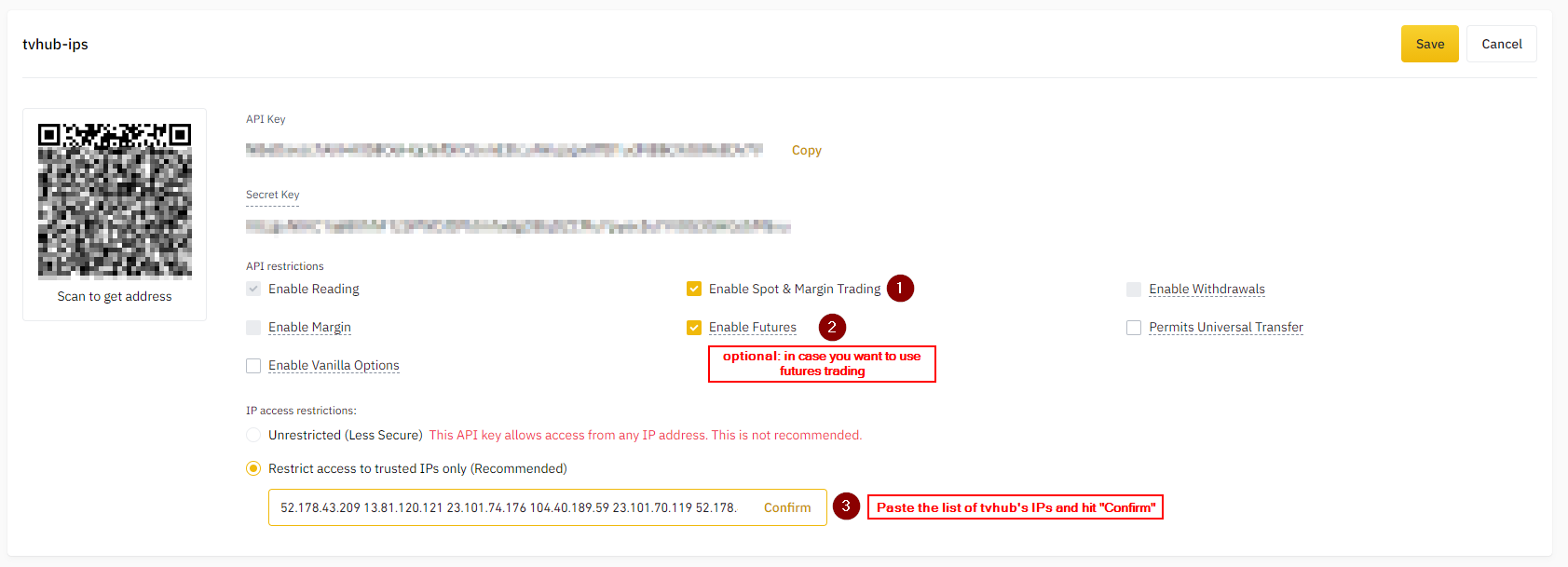
In your exchange's API settings, create a new key named for its purpose (for example, "TV-Hub grid bot"). This is the step that protects your money, so get the permissions right:
- Enable Trade so the bot can place orders.
- Leave Withdraw disabled unless a strategy genuinely requires it (almost none do).
- Add an IP whitelist if your platform supports a static IP.
- Turn on every extra security toggle the exchange offers.
Copy the key and secret into a password manager immediately. Most exchanges show the secret only once. Our step-by-step Bybit connection walkthrough shows exactly where these settings live on one popular exchange.
Stage 3: Connect to your bot platform
Sign up for your chosen platform with a strong, unique password and turn on two-factor authentication right away. Paste in the API key and secret you generated. TradingView Hub tests the connection and, once linked, shows your account balance so you know it worked.
Stage 4: Start in demo mode with a simple strategy
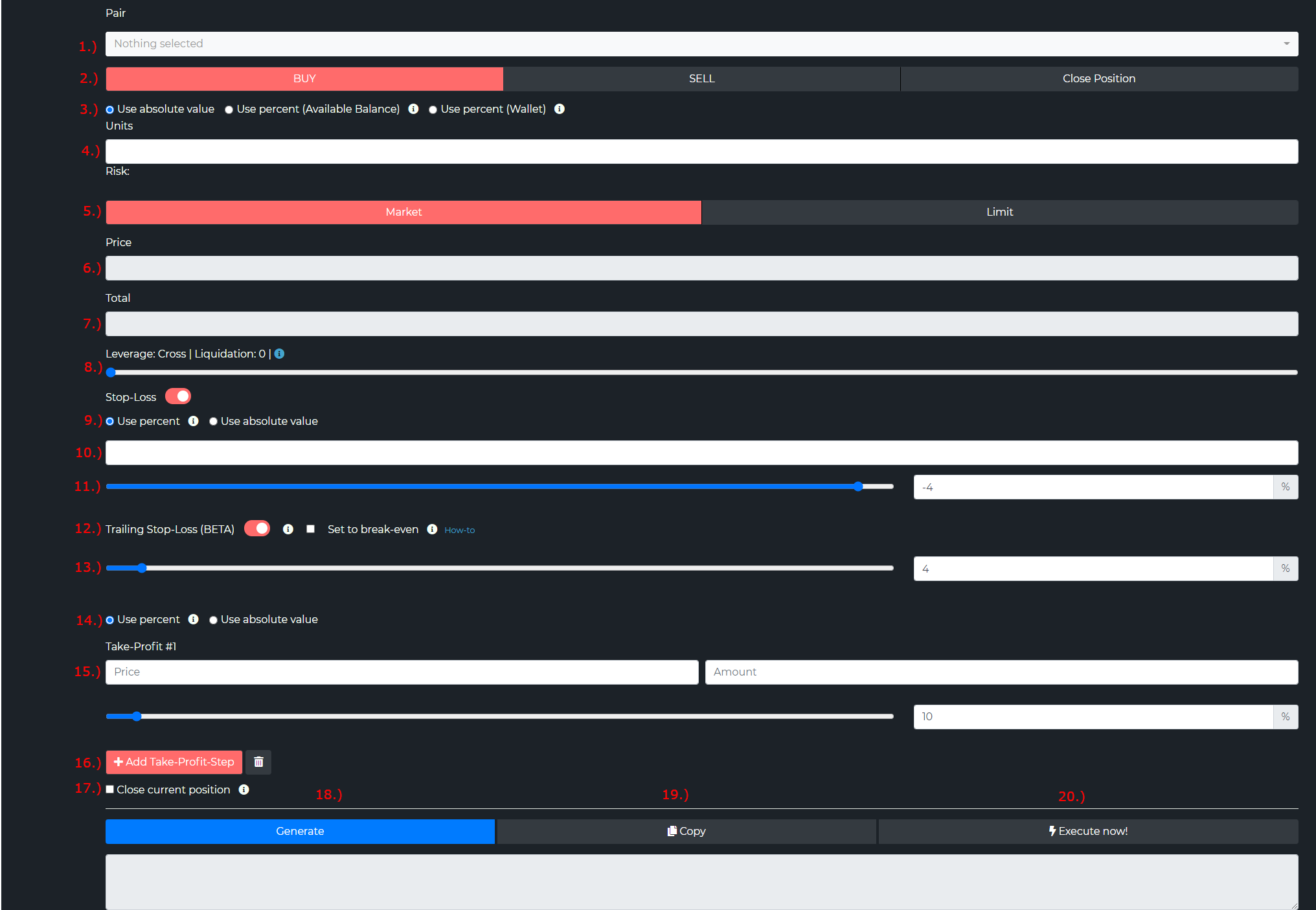
Begin with DCA or a basic grid, not a complex algorithm. Keep position sizes small (2% to 5% of capital per trade), set wider stops than feel necessary, and stick to liquid coins like Bitcoin or Ethereum for your first runs. Then flip on demo mode and let it run for at least a week. Demo trading is free on TradingView Hub, so there's no reason to skip it.
| Step | Task | Status |
|---|---|---|
| 1 | Exchange account created and verified | ☐ |
| 2 | Trading funds deposited (demo needs none) | ☐ |
| 3 | API key generated with Trade on, Withdraw off | ☐ |
| 4 | API key and secret stored in a password manager | ☐ |
| 5 | Bot platform account created | ☐ |
| 6 | Two-factor authentication enabled | ☐ |
| 7 | Exchange connected and balance confirmed | ☐ |
| 8 | Simple strategy selected and configured | ☐ |
| 9 | Demo run completed successfully | ☐ |
| 10 | Monitoring and alerts set up | ☐ |
For connecting the TradingView side of a signal bot, our TradingView alerts setup guide walks through building the alert and pointing it at your webhook. If you're on Bybit specifically, the TradingView-to-Bybit page covers that route end to end.
What Are the Best Practices for Beginners?
The best practices for bot beginners come down to four habits: start in demo mode, size positions small, protect your keys, and keep learning. None of them are glamorous. All of them are what separate the traders still running bots a year later from the ones who blew up in week two.
Start small and paper trade
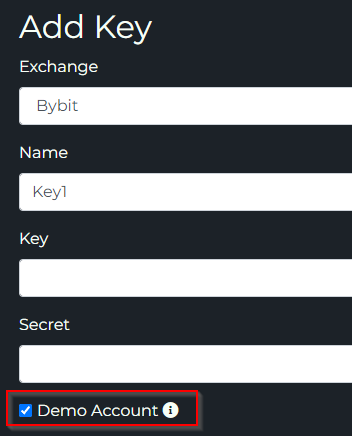
Demo mode is your friend, and on TradingView Hub it's free. Spend at least a week watching how your bot behaves in different conditions before a single real dollar is at stake. When you do go live, use amounts that won't stress you if they vanish. Early on, the goal is education, not profit. Scale up only after you've seen consistent behavior with small money.
Risk management essentials
Keep single-trade risk to 1% to 2% of your portfolio. Put stop-losses on everything, even if the platform doesn't force them. Set a maximum daily loss that pauses the bot when hit. These habits matter even more later. If you ever trade a crypto prop firm account, strict drawdown limits aren't a suggestion, they're the rules of the challenge. And diversify: splitting capital across a DCA bot and a grid bot on different coins beats betting the whole account on one idea.
Secure your keys, always
Never give a bot withdrawal permission unless a strategy truly needs it. Use unique, strong passwords stored in a password manager. Turn on two-factor authentication and trade alerts on both the exchange and the platform so unauthorized activity is impossible to miss. Rotate keys if you ever suspect a compromise.
Keep learning
Understand why your bot makes the trades it makes. Keep a simple journal of performance and market conditions. Review monthly and be willing to pause a strategy that isn't working. The traders who last treat bots as tools that need attention, not set-and-forget money machines. For a longer list of traps, see our guide to common automated trading mistakes.
What Common Mistakes Should Beginners Avoid?
The most common beginner mistakes are over-optimizing a backtest, skipping risk management, ignoring market conditions, and picking a bot that's too complex to understand. Each one is avoidable, and each one is cheaper to learn about here than through your own account balance.
Over-optimizing the backtest
You run a strategy against history, tune the settings until it shows 200% a year with tiny losses, and feel like a genius. That's curve fitting, and it almost never survives contact with live markets. The academic work is blunt about it: run enough backtest variations and you're statistically likely to find one that looks brilliant purely by chance (Bailey, Borwein, Lopez de Prado and Zhu, 2016). Keep strategies simple and validate on out-of-sample data. Our backtesting guide shows the disciplined way to do it.
Skipping risk management
Chasing profit while ignoring downside is how accounts get wiped. No stop-losses, no position limits, no max drawdown, and one bad week does the rest. A grid bot without guardrails will happily keep buying a coin that's down 80%. Build risk rules into every strategy from day one, and never put the whole account behind a single idea.
Ignoring the market
"Automated" doesn't mean "unattended." Different strategies suit different regimes: grids thrive in ranges and suffer in trends, momentum bots do the opposite. Stay aware of major news and shifts, and be willing to pause an aggressive bot during an obvious bear market. Your judgment stays in the loop.
Choosing a bot you can't explain
If you can't describe your strategy in a sentence, you're not ready to trade it with real money. Complex arbitrage setups look exciting and demand capital, speed, and attention that beginners rarely have. Start with DCA or a simple grid, understand exactly when it works and when it doesn't, and add complexity only as your understanding grows.
Cost Analysis and ROI Expectations
Bot trading has three real cost layers: the platform (which can be $0), exchange fees of roughly 0.1% per trade on standard tiers (Binance, 2026), and the spread on every fill. The one fixed cost nobody's listicle mentions is a paid TradingView plan, because webhooks need it. Let's price this honestly.
What a bot actually costs
Subscription fees are only the start. Every trade pays an exchange fee, and an active bot can make dozens or hundreds of trades a month. Coinbase Advanced beginner tiers, for instance, run meaningfully higher than 0.1% (Coinbase, 2026), which is why fee-heavy strategies punish small accounts. This gets brutal with high-frequency approaches like scalping bots unless you're using maker orders. Then there's the spread, the gap between bid and ask you pay on every entry and exit.
The honest cost pivot
Here's what most bot comparisons won't tell you. The bot layer can genuinely cost $0. TradingView Hub is free when you open or fund an account at a partner exchange (Bybit, Binance, OKX, Bitget, or KuCoin) through our referral link. Demo and paper trading are always free, referral or not. Without a referral, it's from $23 a month, cheaper on longer terms. Bitget currently sits outside that math: every Bitget key runs free until 31 October 2026, referral or not, and our Bitget futures automation guide covers the setup.
Disclosure: when you sign up to a partner exchange through our referral link, the exchange pays us a commission. It costs you nothing extra, and the bot stays free for you.
The one cost you can't fully dodge is a paid TradingView plan, at least for an indicator-driven signal bot. Free TradingView gives you 3 active price alerts as of July 2026, and it still delivers those to an alternative email address, so a simple price-level bot can run from a free account through TV-Hub's email signals. But webhook alerts, the kind that drive an indicator or strategy bot, start with the Essential plan. That's not a TradingView Hub quirk. Every webhook bot platform (3Commas, Cryptohopper, and the rest) needs a paid TradingView plan for the same reason. We're not going to invent a price here, so check tradingview.com/pricing for the current Essential rate.
The cheapest way to run a bot (small accounts)
If you're starting small, fees are the whole game. On a $500 account, a $50-a-month platform fee is 120% of your capital in annual overhead. That math kills small accounts before the strategy ever gets a chance. A referral-free bot plus demo mode is realistically the only sensible beginner path. Practice free in demo, run the bot free via a partner exchange, and pay only the unavoidable TradingView plan. Our Bybit connection walkthrough shows this exact free route, and our take on whether automated trading is profitable sets honest expectations. One venue skips the subscription question entirely: on Hyperliquid, TV-Hub takes a 0.01% builder fee per perp fill instead of a monthly plan, which our Hyperliquid perp DEX automation guide explains.
Realistic ROI expectations
Now the part where we don't lie to you. Returns vary enormously with market conditions, strategy, and execution, and the figures below are illustrative, not a forecast. DCA bots roughly track the underlying asset with small improvements from systematic dip-buying. Grid bots can grind out gains in sideways markets but lag buy-and-hold in strong bull runs. Arbitrage bots aim for smaller, steadier returns but need real capital to clear fees. What matters more than any headline percentage is risk-adjusted return: a strategy making 25% with 50% drawdowns is far riskier than one making 15% with 10% drawdowns.
Break-even math
Figure out your break-even before you start. If a paid subscription and fees total $500 a year, the bot has to earn $500 more than manual trading just to draw level. The table below is illustrative, assuming a $25 to $50 monthly subscription and about 0.1% exchange fees per trade (Binance, 2026). The break-even column annualizes that monthly fee (twelve months) and adds the yearly trading fees, which is why small accounts start so deep in the hole. Go the referral-free route and the platform-fee column drops to zero, slashing every figure below.
| Account Size | Monthly Platform Cost | Annual Trading Fees | Break-Even Return Needed |
|---|---|---|---|
| $1,000 | $25 (or $0 via referral) | $120 | 42% |
| $5,000 | $25 (or $0 via referral) | $300 | 12% |
| $10,000 | $50 (or $0 via referral) | $600 | 12% |
| $25,000 | $50 (or $0 via referral) | $1,000 | 6.4% |
Illustrative only, not a forecast. Fee assumption based on standard-tier exchange fees (Binance, 2026).
The pattern is clear: paid subscriptions make more sense as accounts grow, which is exactly why the referral-free model matters so much for beginners. The most durable bot traders treat automation as one tool in a broader plan, not a shortcut to wealth.
Conclusion
Crypto trading bots are genuinely useful tools, not magic. They trade without emotion, cover the market 24/7, and execute your plan the same way every time. What they can't do is guarantee profit or replace your judgment, and any platform claiming otherwise belongs on the scam checklist above.
For a beginner, the winning path is narrow and boring on purpose. Start with a DCA or grid bot you actually understand. Keep the bot layer free with demo mode and, when you go live, a partner-exchange referral. Budget for the one unavoidable cost, a paid TradingView plan for webhooks. Lock down your keys with trade-only permissions. And size everything small while you learn.
Your next steps:
- Open a bot platform and switch on demo mode (free on TradingView Hub).
- Practice with simulated funds until the platform feels obvious.
- Generate a trade-only API key, withdrawal disabled.
- Run a simple DCA or grid bot with small real money.
- Review monthly and scale up only as your confidence earns it.
Bots are one piece of a bigger picture. To see how alerts, webhooks, exchanges, and strategies fit together, read our complete TradingView automation guide. Take your time, start conservatively, and treat the first few months as tuition rather than income.
Ready to Automate Your Crypto Trading?
Run your TradingView strategy across major exchanges with TV-Hub. Demo trading is free, and the bot is free via an exchange referral.
Start Free Trial View Documentation