7 Best Crypto Exchanges for TradingView Automation (2026)
Quick Summary
Compare the best crypto exchanges for TradingView automation. We rank Binance, Bitget, Bybit, OKX, KuCoin, and Coinbase Advanced on base fees, API reliability, webhook support, and security, and we count which of them list perpetuals on stocks, metals and oil. Fee and API figures are sourced to the official docs and checked in July 2026; the contract counts were read from the exchange APIs on 1 September 2026.
Which crypto exchanges work with TradingView automation? Binance, Bitget, Bybit, OKX, KuCoin, and Coinbase Advanced all accept TradingView alerts through a webhook layer such as TradingView Hub, which holds your API key and places the order. TradingView's free plan has no webhooks, so automation needs at least the Essential tier (verified July 2026).
Your automated trading strategy is only as good as the exchange that executes it. A flawless TradingView setup still bleeds money if the exchange behind it has slow APIs, thin liquidity, or fees that swallow your edge.
Plenty of traders find this out the hard way. They perfect a strategy for weeks, then discover their exchange won't accept webhooks cleanly or charges a base taker fee six times higher than the competition. On a bot that turns over dozens of round trips a day, that gap alone decides whether the strategy survives.
This guide compares the exchanges that actually hold up under automation: base fees, API reliability, TradingView webhook support, and security. You'll also get a simple framework for matching an exchange to your strategy, whether you run high-frequency scalps or slow DCA.
How we ranked these exchanges
We scored each exchange on five criteria: documented API reliability and rate limits, base trading fees, TradingView webhook support through TV-Hub, security controls (trading-only keys, IP whitelisting), and whether the exchange is a TV-Hub referral partner that makes the bot free. For this update we added a sixth: how many real-world-asset perpetuals each venue lists, counted directly from its public contract endpoint.
Data sources: each exchange's official fee schedule and API documentation, their public status pages, and TradingView's pricing page. Fees and limits are tiered and change often, so treat the numbers as base-tier reference points and verify current rates against the linked sources. Checked July 2026.
Affiliate disclosure: some exchange links on this page are referral links. If you sign up through one, we may earn a commission from the exchange. That commission is what keeps the TV-Hub bot free on our partner exchanges, and it never changes your trading fees.
For the complete automation setup process, see our Ultimate Guide to Automating Crypto Trading with TradingView Signals.
Essential Features for Automated Trading Exchanges
An automation-ready exchange needs five things: high API uptime, order execution under 100ms, granular API-key security, low maker-taker fees, and reliable webhook handling. Base spot taker fees across the exchanges we rank span 0.10% to 0.60% per their July 2026 fee schedules, so the wrong pick can multiply your trading costs sixfold. Exchange choice comes before the strategy itself.
API reliability is the most critical factor. Your exchange needs consistently high uptime, because any outage means missed trades and potential losses if the market moves against you. The strongest platforms keep their APIs responsive even during high-traffic periods when their websites slow down.
Order execution speed is a real edge. The difference between fills at 50ms and 500ms can decide whether you catch a price move or miss it. For scalping strategies in particular, latency alone can drive the choice of exchange.
Security protocols come first, not last. Automated trading needs API access, which adds risk. Look for exchanges that offer granular API permissions, IP whitelisting, and the ability to restrict a key to trading only, with no withdrawal rights.
Fee structures can make or break a strategy. A high-frequency bot might place hundreds of trades a day, and even an extra 0.02% per fill compounds fast. The best exchanges use maker-taker models that reward you for providing liquidity.
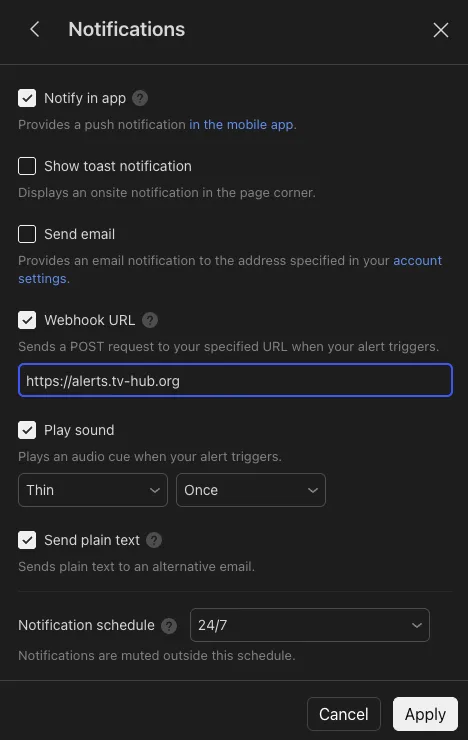
Webhook compatibility is now a baseline requirement. Most modern strategies fire from TradingView alerts, so your exchange path needs to accept webhooks reliably and turn each signal into an order within seconds.
| Essential Feature | Why It Matters | Minimum Standard |
|---|---|---|
| API Uptime | Prevents missed trades during market moves | 99.9%+ |
| Order Execution Speed | Critical for scalping and arbitrage | <100ms |
| Fee Structure | Directly impacts profitability | Maker fees <0.1% |
| Security Features | Protects automated trading capital | API key restrictions |
| Webhook Support | Enables TradingView integration | JSON parsing |
| Documentation Quality | Reduces setup time and errors | Complete examples |
Learn more about setting up these integrations in our TradingView alerts for automation guide.
Top-Tier Exchanges for Professional Automation
For serious automation, four exchanges lead on reliability and depth: Binance for volume and low base fees, Coinbase Advanced for US-regulated stability, Bybit for deep derivatives liquidity, and Bitget for cross-asset coverage. They're built to handle high-volume trading with the API headroom that bots need.
Binance - The Volume Leader
Binance leads crypto trading volume, and its API handles heavy request loads without straining, which suits high-frequency strategies.
API capacity is deep. Binance uses a weight-based rate-limit system documented in its API docs, and its WebSocket streams update in real time with low latency. That matters for any strategy that needs fresh market data on every tick.
Base fees are low. Spot maker and taker fees start at 0.10% per the Binance fee schedule, and paying fees in BNB plus volume tiers can push that to 0.075% or lower. For strategies that trade often, that difference compounds quickly.
TradingView works through a webhook. Binance has no native TradingView auto-trading, so a bridge like TV-Hub holds your API key and places the order when an alert fires. It supports standard order types including stop-losses and take-profits.
Ready to Automate Binance Trading?
Get the step-by-step setup with webhook templates, API configuration, and strategies that work on Binance.
Read Binance Setup Guide Explore Futures TradingCoinbase Advanced - Enterprise-Grade Reliability
Coinbase Advanced brings institutional-level stability to automated trading. The coin selection is smaller than Binance, but the reliability and US regulatory standing are hard to match.
Security and compliance lead the industry. As a publicly traded US company, Coinbase holds itself to strict standards, and its API has a clean track record. See its security page for current details.
API stability is strong. Uptime runs consistently high (check the Coinbase status page), and the documentation is thorough. Coinbase has no paper-trading mode through TV-Hub, so start with small position sizes.
Regulatory clarity helps US traders. If you're based in America, Coinbase Advanced offers cleaner tax reporting and regulatory certainty that offshore exchanges can't match. The trade-off is higher base fees, covered in the fee section below.
US-Compliant Automated Trading
Set up Coinbase automation with full regulatory clarity. Our guide covers API setup, fee optimization, and security best practices.
Read Coinbase Automation GuideBybit - Derivatives Automation Specialist
Bybit is built for derivatives, which makes it a natural fit for automated futures and perpetual-contract strategies.
Perpetuals automation is a core strength. The API handles leveraged positions with proper risk controls, and position sizing, stop-losses, and take-profits all route through automation. Derivatives fees run lower than spot on Bybit's fee schedule.
Account-level risk limits let you cap what a strategy can do, adding a safety layer on top of your own logic.
Connect Bybit to TradingView
Our step-by-step walkthrough covers the read-write API key, the webhook JSON, and your first demo trade in under ten minutes.
Bybit Setup Page Full Webhook WalkthroughBitget - Best for Cross-Asset Trading
Bitget matches the other top-tier venues on fees and adds something none of them offer at the same depth. Of its 768 USDT-margined perpetuals, 304 track a real-world asset rather than a coin: shares, indices, ETFs, precious metals and energy. Counted live from the Bitget contract API on 1 September 2026.
One API key covers futures and spot. Bitget issues a key, a secret, and a passphrase you pick yourself. TV-Hub trades the USDT-margined futures market with that key, and the crypto perpetuals and the real-world-asset contracts sit in the same contract list, so a single USDT balance margins the whole strategy.
Futures fees start at 0.02% maker and 0.06% taker at the base tier, read from the contract API. Spot is 0.10% on both sides, and the BGB token discount applies to spot only. Hedge mode is supported, so a long and a short on the same symbol stay two separate positions.
Demo trading is available and issues its own API key, so you can rehearse the full alert-to-fill chain before real money moves. Bitget is the newest venue in the TV-Hub lineup, which is why we have no production latency figures for it yet.
Trade Crypto and Stocks From One Key
Every Bitget key runs free on TV-Hub until 31 October 2026, with no referral and no subscription. Our setup guide covers the key, the passphrase, and hedge mode.
Bitget futures automation guide| Exchange | API Rate Limit | Base Maker | Base Taker | TradingView Support | Best For |
|---|---|---|---|---|---|
| Binance | Weight-based | 0.10% | 0.10% | Webhook (via TV-Hub) | High-frequency trading |
| Coinbase Advanced | ~10 req/sec | 0.40% | 0.60% | Webhook (via TV-Hub) | US-based traders |
| Bybit | Per-endpoint | 0.10% | 0.10% | Webhook (via TV-Hub) | Derivatives automation |
| Bitget | Per-endpoint | 0.10% | 0.10% | Webhook (via TV-Hub) | Cross-asset trading |
Spot maker and taker figures for non-VIP accounts, per each exchange's published fee schedule (Binance, Coinbase, OKX, plus Bybit's and Bitget's fee pages). Futures fees are lower and are broken out in the fee section below. Verified July 2026, Bitget checked 31 August 2026; rates change with volume tiers.
These exchanges are where most professional automated traders start, and for good reason.
Start Trading on Top-Tier Exchanges Today
Open Binance, Bybit, or OKX through our referral links and the TV-Hub bot is free for that exchange. We earn a commission from the exchange, so you don't pay for the bot.
Start Free Trial View DocumentationMid-Tier Exchanges with Strong Automation Support
These exchanges don't match Binance on raw volume, but each brings a real advantage for specific strategies or markets: KuCoin for altcoins and OKX for a unified account. Both rank among the higher-volume centralized exchanges on public trackers like CoinGecko's exchange rankings.
KuCoin - Emerging Markets Focus
KuCoin shines when you want to automate smaller altcoins that bigger exchanges haven't listed yet, and its API is well-suited to automation.
Altcoin coverage is the draw. KuCoin lists new tokens faster than most major exchanges, giving strategies early access to trending markets across hundreds of pairs.
Fees stay competitive for smaller accounts. Base spot fees start at 0.10% maker and taker per the KuCoin fee levels, with further reductions through the KCS token. For sub-$100k accounts, that often beats the larger exchanges.
Automate Altcoins on KuCoin
Our KuCoin automation guide covers hundreds of pairs, including early-stage altcoins, with webhook setup and API configuration.
Read KuCoin Setup GuideOKX - Comprehensive Trading Ecosystem
OKX bridges the gap between mid-tier and top-tier, with automation across spot, futures, options, and perpetual swaps in one account.
A unified account simplifies automation by allowing cross-margin trading across products, which cuts the complexity of moving funds between separate wallets.
Advanced order types and algos include iceberg orders, TWAP, grid trading, and DCA. Base spot fees are 0.08% maker and 0.10% taker per the OKX fee page.
Automate Any Market on OKX
Our OKX automation guide walks through unified-account setup, webhook configuration, and API keys for spot, futures, and perpetual swaps.
Read OKX Setup GuideAvoid common selection mistakes by reading our guide to automated trading errors.
Where does Hyperliquid fit for automated trading?
Hyperliquid is a perpetual DEX rather than a centralized exchange: different custody model, different cost model, no company holding your balance. It still appears in the API, fee and webhook tables further down, because a bot cares about the same things everywhere, but read its rows with that difference in mind. It is the first decentralized venue in the TV-Hub lineup, and you trade it from your own wallet with no account application and, depending on where you live, no KYC queue.
The security model has no API key at all. You authorize an API wallet that can trade but can never withdraw, then paste that wallet's private key and your account address into TV-Hub. There is nothing to IP-whitelist, because there is no exchange account to whitelist it on.
The cost model is a builder fee, not a subscription. Hyperliquid lets you route a small share of each fill to a "builder". Approve TV-Hub as your builder and the key runs with no subscription, which is why Hyperliquid delivers the same free access as our referral partners through a completely different mechanism. Signing up through our link also takes 4% off Hyperliquid's own trading fees.
One key covers perps and spot. The exchange field in each trade command decides which market a signal hits. One caveat is worth knowing before you point a strategy at it: Hyperliquid has not enabled trigger orders on its spot market, so a spot signal carrying a stop loss opens the position and the stop is refused. If your strategy depends on a hard stop, trade it on perps.
Stocks on Hyperliquid exist, but not where a bot can reach them yet. The core order book is almost pure crypto: 233 perpetuals with exactly one real-world asset, tokenised gold. The equity, index and commodity markets sit one layer out, on builder-deployed venues under HIP-3. Ten were live on 31 August 2026 with 275 markets between them, roughly 244 of them non-crypto, and the largest alone lists 116 including TSLA, NVDA, ASML, SP500 and Brent crude. Each is a separate venue with its own deployer and its own liquidity. TV-Hub routes to the core book only, so a TradingView alert cannot reach them today. That is the practical gap to Bitget, where the real-world-asset contracts sit in the same list as BTCUSDT and take the same trade command.
The full walkthrough is in our Hyperliquid perp DEX automation guide.
Exchange API Comparison and Technical Requirements
For API-first automation, Binance offers the deepest liquidity and a well-documented weight-based limit, and it, OKX, and Bybit all provide demo trading for risk-free testing. The right choice depends on whether your bot leans on REST calls, real-time WebSocket data, or both.
REST vs WebSocket performance differs by exchange. REST APIs work well for occasional position and balance checks, while WebSocket connections are essential for strategies that need live price updates. Most successful bots use both: REST for orders and account management, WebSocket for market data. Binance and Bybit handle this hybrid approach well.
Rate-limit models vary. Binance uses a weight-based system where different calls consume different amounts of your budget; other exchanges use per-endpoint or counter-based limits. Read the official docs before you tune a bot's request cadence, and always leave headroom.
Authentication ranges from simple key pairs to HMAC-SHA256 signatures. More secure methods add code complexity, so plan for that when you pick an exchange.
Error handling is where real money is won or lost. When a trade fails through TV-Hub, it shows up as an entry in your Activity Log rather than a status code handed back to TradingView, so debugging happens on the TV-Hub side. Our debug a failed alert doc walks through matching each Activity Log error to its fix.
Testing environments let you validate a strategy before risking capital. Through TV-Hub you can paper trade for free on Bybit, OKX, Binance, and Bitget using their demo accounts, then go live by swapping the API key. Coinbase Advanced and KuCoin are live-only, so start with tiny position sizes there. Hyperliquid has no demo account, but it runs a full testnet you can point a key at first.
| Exchange | API Type | Rate Limits | Testing Environment | Security Method |
|---|---|---|---|---|
| Binance | REST + WebSocket | Weight-based | Demo / paper trading | HMAC-SHA256 |
| Coinbase Advanced | REST + WebSocket | ~10 req/sec | - | API key + secret |
| OKX | REST + WebSocket | Per-endpoint | Demo / paper trading | HMAC-SHA256 |
| Bybit | REST + WebSocket | Per-endpoint | Demo / paper trading | HMAC-SHA256 |
| KuCoin | REST + WebSocket | Weighted pool | - | HMAC-SHA256 |
| Bitget | REST + WebSocket | Per-endpoint | Demo / paper trading | HMAC-SHA256 + passphrase |
| Hyperliquid | REST + WebSocket | Weight-based | Testnet | Signed API wallet, no key pair |
Rate-limit models per each exchange's official API documentation (Binance, OKX, and each exchange's developer portal). Exact limits are endpoint-specific; verify current values before tuning a bot. Hyperliquid is the outlier on authentication: it issues no API key and secret at all. You authorise a separate wallet that can trade but never withdraw, and every order is signed with that wallet's key. Checked July 2026, Bitget and Hyperliquid August 2026.
Want the field-by-field breakdown of the JSON that actually triggers a trade? Our TradingView webhook format reference walks every payload field.
For detailed technical setup instructions, see our Ultimate Guide to Automating Crypto Trading with TradingView Signals.
Fee Structure Analysis for Automated Trading
For automation, base fees matter most, because bots trade often. Binance, Bybit, OKX, and KuCoin all sit at 0.10% base spot taker, while Coinbase Advanced starts at 0.60% and falls with 30-day volume. That spread is exactly why high-frequency strategies avoid the most expensive venues.
Base spot taker fee by exchange
Base-tier spot taker fees, per each exchange's published fee schedule. Verified July 2026; rates drop with 30-day volume and token discounts.
Maker vs taker matters more with automation. A 0.10% maker-taker spread means roughly 0.20% lost per round-trip trade. If a bot does 10 round trips a day, that's about 2% daily just in fees, more than most strategies can overcome. Strategies that post maker orders and provide liquidity pay less, and sometimes earn rebates.
Volume tiers cut costs for active bots. Most exchanges lower fees as your 30-day volume climbs, so a high-turnover strategy can qualify for meaningfully better rates than the base tier. Check the current thresholds on each fee page before you assume a discount.
Withdrawal and hidden costs often get overlooked. Slippage on market orders, spread, funding rates on perpetuals, and network withdrawal fees all eat into returns. Limit orders avoid slippage but risk partial fills that can leave a strategy unbalanced.
| Exchange | Base Maker | Base Taker | Discount Path | Notable Cost |
|---|---|---|---|---|
| Binance | 0.10% | 0.10% | BNB + volume tiers | Low slippage |
| Coinbase Advanced | 0.40% | 0.60% | Volume tiers | Higher base fees |
| OKX | 0.08% | 0.10% | OKB + volume tiers | Competitive spread |
| Bybit | 0.10% (spot) | 0.10% (spot) | Lower on derivatives | Funding rates |
| KuCoin | 0.10% | 0.10% | KCS + volume tiers | Withdrawal fees |
| Bitget | 0.10% | 0.10% | BGB, on spot only | Funding rates |
Spot fees. Sources: Binance, Coinbase Advanced, OKX, Bybit, KuCoin, plus Bitget's published fee schedule. Base-tier, non-VIP; verified July 2026.
Spot fees or futures fees: which one applies to a bot?
Futures fees are the ones that apply to most TradingView automation, and they are far lower than the spot fees above. Base USDT-perpetual taker fees run 0.05% to 0.06% across Binance, Bitget, Bybit, OKX and KuCoin, against 0.10% to 0.60% on spot. Every comparison article we found ranks exchanges on spot fees, which answers the wrong question for an automated strategy.
The maker side is where it gets interesting: all five venues charge exactly 0.02% to make a USDT-perpetual market. On futures, the entire competitive spread between them is one basis point on the taker side. Fee shopping between major venues is close to pointless for a perpetuals bot, and the real cost differences live in funding rates, slippage and fill quality instead.
| Exchange | USDT-Perp Maker | USDT-Perp Taker | Source |
|---|---|---|---|
| Binance | 0.02% | 0.05% | Fee schedule, July 2026 |
| Bitget | 0.02% | 0.06% | Contract API, 31 Aug 2026 |
| Bybit | 0.02% | 0.055% | Fee schedule, July 2026 |
| OKX | 0.02% | 0.05% | Fee schedule, July 2026 |
| KuCoin | 0.02% | 0.06% | Contract API, 31 Aug 2026 |
| Hyperliquid | 0.015% | 0.045% | Fee schedule, Aug 2026 |
| Coinbase Advanced | No USDT perpetuals through TV-Hub | - | |
Base-tier, non-VIP USDT-margined perpetual fees. The Bitget and KuCoin figures were read directly from their public contract endpoints on 31 August 2026 (api.bitget.com/api/v2/mix/market/contracts and api-futures.kucoin.com/api/v1/contracts/active, verified against BTCUSDT and XBTUSDTM). The Binance, Bybit and OKX figures come from their published fee schedules and were last checked in July 2026. Hyperliquid has the lowest base fees in the table, and it is the one venue where using TV-Hub adds to them: approving the TV-Hub builder fee costs 0.01% per perp fill, which takes the effective taker to 0.055%, level with Bybit and below Bitget and KuCoin. That approval is what replaces the subscription, so the trade is a fee for a fee, not a fee on top of one.
Learn more about optimizing costs in our is automated trading profitable analysis.
Which crypto exchanges let a bot trade stocks, metals and oil?
Every centralized venue in this guide that runs a perpetuals market now lists real-world-asset contracts, and Bitget carries the widest selection: 304 of its 769 USDT-margined contracts track a non-crypto underlying, ahead of Bybit at 224 and Binance at 180. We counted these live from each exchange's public contract endpoint on 1 September 2026.
A real-world-asset perpetual is a USDT-collateralized perpetual contract on a non-crypto underlying: a share, an index, an ETF, a metal, or a barrel of oil. There is no custody of the underlying, no broker account, and no share register. You get the price exposure inside the same futures wallet that already margins your BTC positions.
Real-world-asset perpetuals per exchange
Counted from each exchange's public contract endpoint on 1 September 2026. Every figure is exact, because each venue labels these contracts itself; see the methodology note below.
| Exchange | Perpetuals Listed | Of Which Real-World Assets | Endpoint Counted |
|---|---|---|---|
| Bitget | 769 | 304 | api.bitget.com/api/v2/mix/market/contracts |
| Bybit | 740 | 224 | api.bybit.com/v5/market/instruments-info |
| Binance | 706 | 180 | fapi.binance.com/fapi/v1/exchangeInfo |
| OKX | 443 | 168 | okx.com/api/v5/public/instruments |
| KuCoin | 669 | 139 | api-futures.kucoin.com/api/v1/contracts/active |
| Coinbase International | 140 (USDC) | 34 | api.international.coinbase.com/api/v1/instruments |
How we counted. Every exchange in this table labels its own real-world-asset contracts, and each one uses a different field, so all six counts are exact rather than estimated. Bitget uses isRwa. Bybit uses symbolType, which splits its 224 into 171 shares, 49 ETFs and 4 commodities. Binance uses a separate contract type, TRADIFI_PERPETUAL, covering 180 USDT-margined contracts plus one settled in USD1. OKX uses instCategory, where 3 and 4 mark the non-crypto instruments. KuCoin uses marketType, which returns NASDAQ for 139 contracts and CRYPTO for the rest. Coinbase International uses underlying_type, marking 23 equities, 5 equity ETFs, 4 commodities and 2 pre-IPO contracts; its perpetuals are quoted in USDC rather than USDT, and the 140 counts only contracts still trading. All six endpoints were queried on 1 September 2026.
How much of this actually trades? Listing counts and turnover are two different things. We measured a week of real volume across all 876 labelled contracts and ranked the underlyings by it in our deep dive on TradFi perpetuals, which also covers Hyperliquid's HIP-3 venues and Coinbase International. The short version: the top ten underlyings take about three quarters of all TradFi turnover, and the exchange with the longest list is not the one with the deepest books.
An earlier version of this table understated four exchanges. Until 1 September 2026 we matched every venue against Bitget's real-world-asset set, because we had only found Bitget's flag. That made Bybit, Binance, OKX and KuCoin estimates and put them at roughly 185, 163, 151 and 134. Reading each exchange's own field instead gives 224, 180, 168 and 139. Bitget still leads, by less than the earlier numbers suggested. The same pass added Coinbase International, which the earlier count missed because its perpetuals do not appear on the anonymous Advanced Trade product list. A later check found KuCoin's marketType field, which replaced our last estimate with an exact count and corrected it downward.
Why Hyperliquid is not a row in this table. Its core order book holds 233 perpetuals and exactly one real-world asset, tokenised gold. The equity and commodity markets live one layer out, on builder-deployed venues under HIP-3: ten of them were live on 31 August 2026, carrying 275 markets between them, of which roughly 244 track a non-crypto underlying. The largest, xyz, alone lists 116. Those are real markets, but they are separate venues with their own deployers and their own liquidity, not entries in the main book. TV-Hub routes to the core book only, so they are not reachable through a TradingView alert today. Counted from the perpDexs and per-dex meta endpoints on 31 August 2026.
What sits inside Bitget's 304 contracts
The list goes well past the obvious US megacaps, which is where the gap to the other venues opens up:
- US equities: AAPL, NVDA, TSLA, MSFT, AMZN, GOOGL, META, PLTR, COIN, MSTR, HOOD, GME
- Asian equities: BABA, TENCENT, MEITUAN, SAMSUNG, SKHYNIX, HYUNDAI, NAVER, KUAISHOU, SONY, FUTU, JD, plus ASML out of Europe
- Private-market proxies: OPENAI, ANTHROPIC, MINIMAX, ZHIPU, UNITREE
- Index and ETF contracts: QQQ, SPY, IWM, SMH, SOXL, SOXS, TQQQ, SQQQ, XBI, XLE, GDX, EWJ, EWT, EWY, EWZ
- Precious metals: XAU, XAG, XPT, XPD, PAXG, XAUT
- Energy and industrial: CL (WTI crude), BZ (Brent), NATGAS, COPPER
Leverage is capped per contract: 260 of the 304 go up to 20x, and 15 go up to 100x, namely the seven large US equities plus every metal and energy contract.
Do real-world-asset perpetuals cost more than crypto perpetuals?
On Bitget, no. A stock perpetual charges the same 0.02% maker and 0.06% taker as BTCUSDT, verified by reading TSLAUSDT and BTCUSDT out of the contract API side by side on 31 August 2026. The intuitive assumption is a premium for the exotic product, and there isn't one. Bybit takes the other route and puts its TradFi perpetuals in a separate symbol group, G9, with its own fee schedule, live since 16 June 2026 (Bybit help center).
What this changes for a TradingView strategy
The real-world-asset contracts sit in the same futures list as BTCUSDT. Same trade command, same API key, same alert structure, same wallet. A strategy that already runs on BTCUSDT runs on TSLAUSDT without a single change to the payload. For anyone whose TradingView watchlist was never purely crypto, that removes the second platform, the second key, and the second webhook.
For the full asset-class picture, including which shares, metals and pre-IPO names carry real volume and how the venues compare on depth rather than on listing count, read which crypto exchanges list stock perpetuals.
One list of 768 contracts is hard to read, so TV-Hub marks every real-world-asset contract with an (RWA) suffix in the pair dropdown. Type rwa into the search box and the list collapses to the 304 non-crypto contracts. The option value stays the plain exchange symbol, so the trade command still carries TSLAUSDT and nothing about the payload changes.
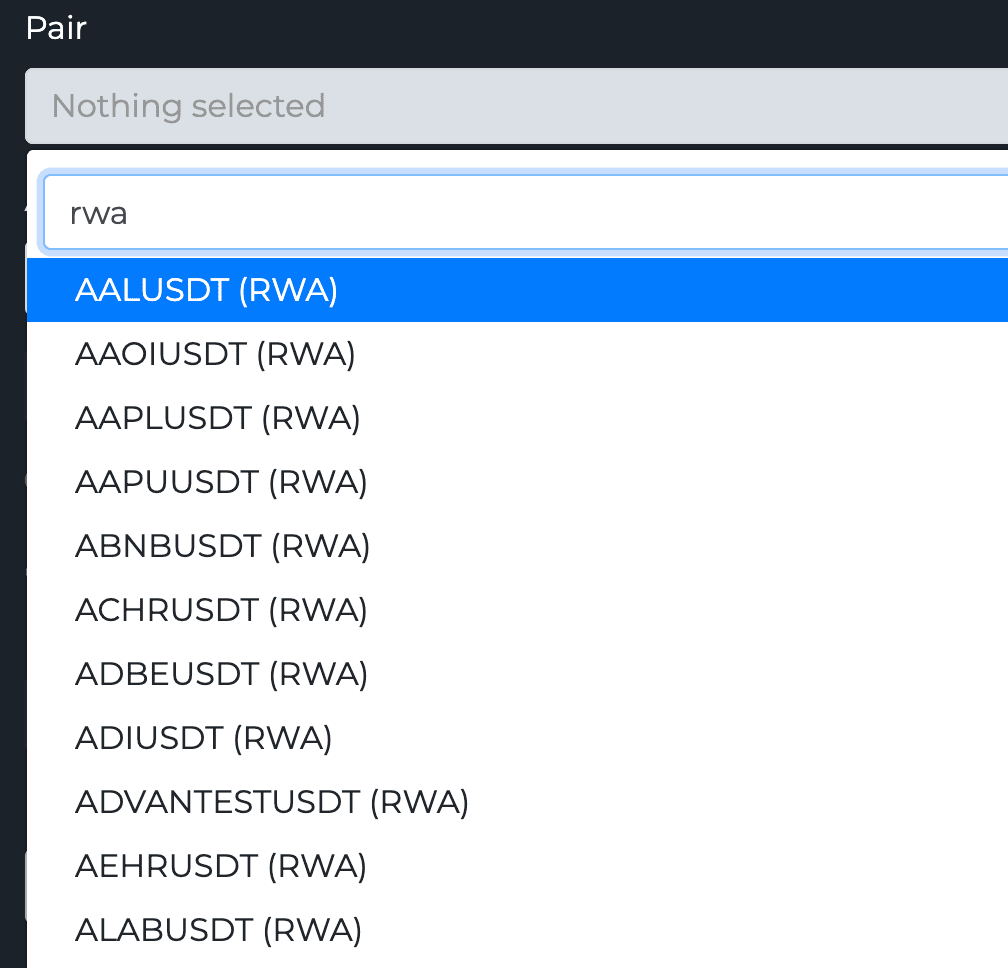
rwa in the TV-Hub pair search filters Bitget's futures list down to the real-world-asset contracts. The (RWA) suffix is a label only, the symbol sent to the exchange stays unchanged.The segment grew fast in 2026. TradFi perpetuals went from roughly 52 billion USD in monthly volume in January to 268 billion USD in June, a factor of five in one half-year, with equity perpetuals overtaking commodities as the growth driver (TokenInsight, Crypto Exchange Report Q2 2026).
The limitations worth knowing first
- The pricing is synthetic. The contract tracks a reference price; it is not a claim on the asset.
- You own nothing. No shares, no voting rights, no dividends.
- Funding never stops. These are perpetuals, so the funding rate applies exactly as it does on a crypto contract.
- Sessions still apply. An equity contract follows its underlying market's hours, not the 24/7 crypto clock. An alert that fires at 3am on a stock symbol has nowhere to go, so check the hours of the underlying before pointing a strategy at one.
- Availability is regional. Which contracts you can reach depends on where you are.
Setup, symbol format and hedge mode are covered in the Bitget futures automation guide.
Regional Considerations and Compliance
Where you live decides which exchanges you can legally automate. For TV-Hub automation, US traders go through Coinbase Advanced, the regulated venue we support, while European and most other traders reach the wider set of global exchanges under local rules. KYC is now standard everywhere before API access is granted, and verification can take a few days, so plan ahead. Tax reporting also varies: US-based platforms tend to provide detailed documents, while offshore exchanges often give only raw transaction histories.
Avoid compliance mistakes by reviewing common automated trading errors.
Security Features and Risk Management
Automated trading turns your API keys into standing permissions, so security is not optional. Four core defenses are the same across exchanges: trading-only keys with no withdrawal rights, IP whitelisting, 2FA on the account, and a fast way to kill a key. Get those right and a stolen key can't drain your funds.
API key permissions should follow least privilege. Grant only what a bot needs, and use trading-only keys that can't withdraw. TV-Hub never needs withdrawal access to place trades.
IP whitelisting adds another layer, and the setup depends on the exchange. On Binance and Coinbase Advanced you add TV-Hub's IP range to the key yourself. On OKX, Bybit, and KuCoin the key is created through a third-party app binding that ties it to our IPs automatically, so a leaked key is useless from anywhere else.
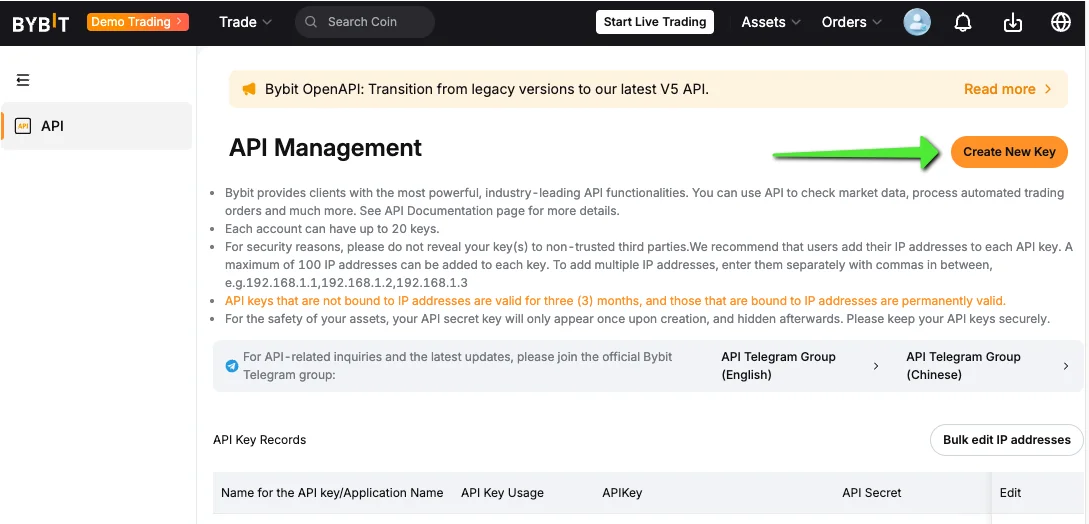
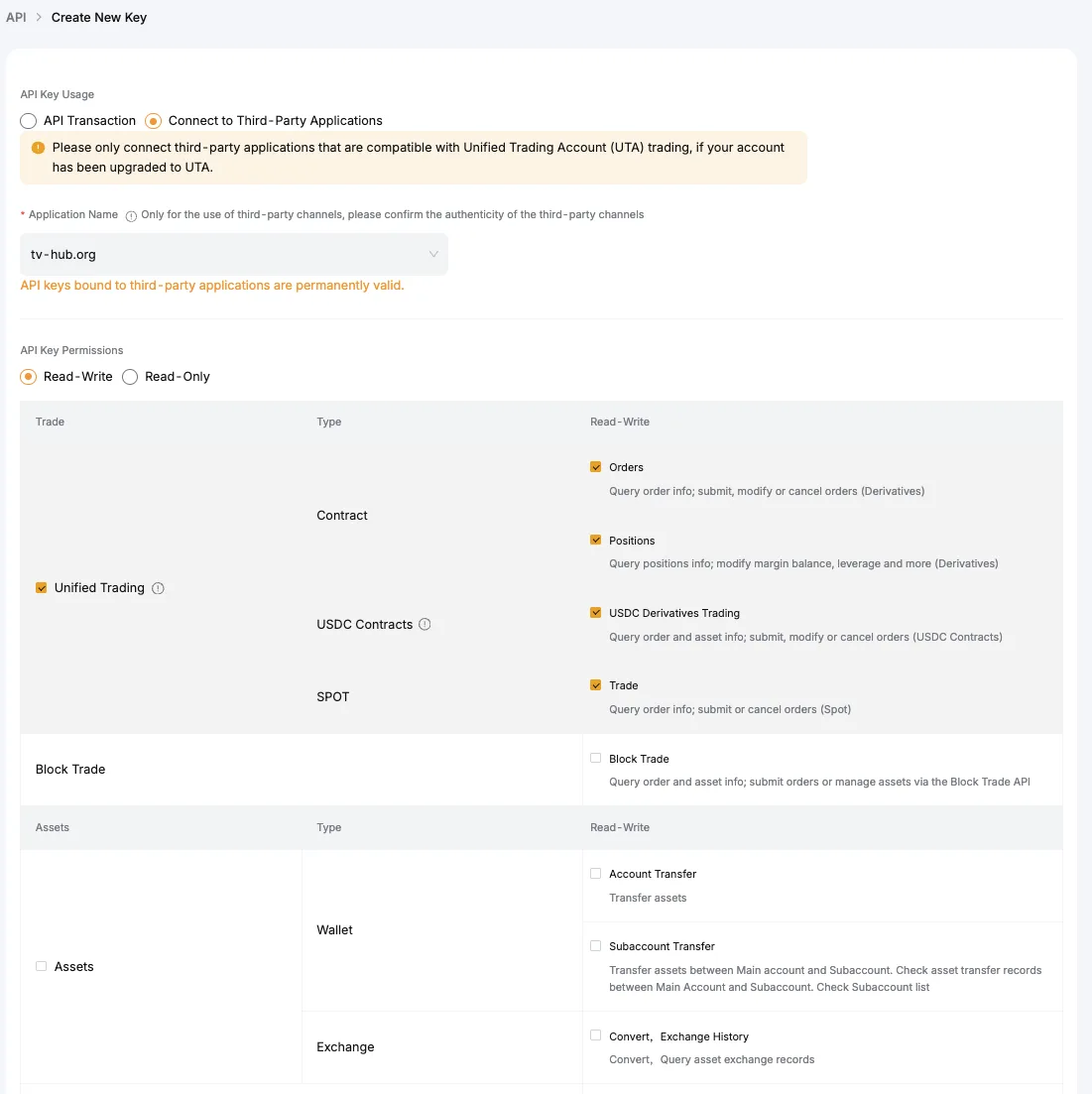
2FA and automated access create a wrinkle: bots can't type a 2FA code. This is exactly why trading-only API keys exist, so automation runs without exposing withdrawal rights.
Fund protection differs by exchange. USD cash balances at Coinbase may be eligible for FDIC pass-through insurance through its partner banks, which does not cover crypto assets; see the Coinbase security page. Binance maintains an emergency insurance fund (SAFU). Many smaller exchanges offer no protection at all.
Cold storage keeps the bulk of customer crypto offline. Coinbase and Binance both state they hold the large majority of customer assets in cold storage; check each exchange's current security or proof-of-reserves page for specifics rather than relying on a fixed percentage.
Emergency controls let you disable automation instantly. The best exchanges provide one-click API key deactivation, and on TV-Hub a failed or misbehaving trade is visible in the Activity Log so you can react.
Learn more security practices in our automated trading mistakes guide.
TradingView Integration and Webhook Support
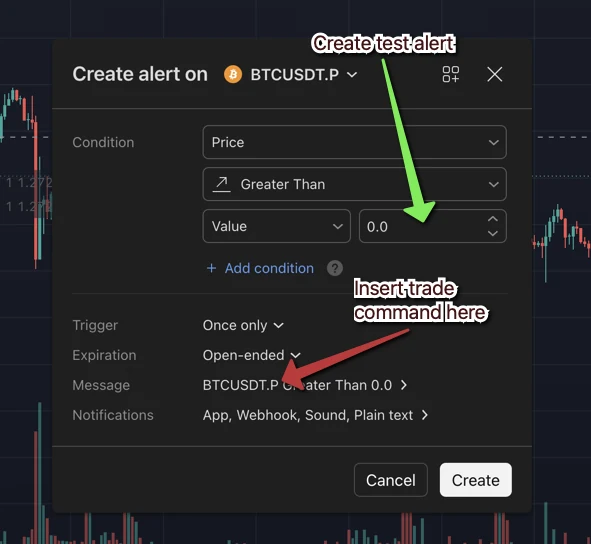
No mainstream exchange executes TradingView alerts natively. Instead, a webhook posts each alert as JSON to a bridge like TradingView Hub, which holds your API key and places the order on the exchange. Through TV-Hub, Binance, Bitget, Bybit, OKX, KuCoin, and Coinbase Advanced all accept TradingView webhook alerts.
Webhook reliability and response time decide whether an alert actually becomes a trade. In TV-Hub's production routing, a typical alert-to-fill sits between 1 and 6 seconds depending on the exchange and market conditions, with the highest-liquidity venues at the fast end.
JSON formatting must match exactly. Each order field has to line up with what the exchange expects, and a small formatting error is the most common reason a trade lands as an error entry instead of a fill. The webhook format reference shows the exact camelCase schema to copy.
Can you automate TradingView on the free plan?
As of July 2026, the TradingView free plan includes 3 active price alerts and 0 technical alerts, and it has no webhook notifications; webhook and indicator alerts start with the Essential tier. TradingView still delivers the free plan's price alerts to an alternative email address, so TV-Hub can act on up to 3 simple price-level triggers even from a free account, though email is slower than a webhook. Any indicator or strategy automation, via TV-Hub or any other webhook bot, requires at least TradingView Essential.
Which exchanges support TradingView webhooks?
All of the exchanges in this guide support TradingView webhook trading through TV-Hub. The table below shows how each connects, the typical alert-to-fill time TV-Hub sees in production, and where to check live status.
| Exchange | Integration via TV-Hub | Typical Alert-to-Fill | JSON Payload | Referral Partner |
|---|---|---|---|---|
| Binance | Webhook + API | 1-3 seconds | TV-Hub schema | Yes (bot free) |
| Bybit | Webhook + API | 1-3 seconds | TV-Hub schema | Yes (bot free) |
| OKX | Webhook + API | 2-4 seconds | TV-Hub schema | Yes (bot free) |
| KuCoin | Webhook + API | 3-6 seconds | TV-Hub schema | Yes (bot free) |
| Coinbase Advanced | Webhook + API | 2-5 seconds | TV-Hub schema | No (paid TV-Hub) |
| Bitget | Webhook + API | 2-4 seconds | TV-Hub schema | Yes (bot free) |
| Hyperliquid | Webhook + API wallet | 3-6 seconds | TV-Hub schema | No referral (builder fee) |
Typical alert-to-fill ranges reflect TV-Hub production routing and vary with exchange API load and order type; they are not fixed guarantees. Hyperliquid settles on-chain, which puts it at the slower end even though its order book is fast. Referral-partner status determines whether the TV-Hub bot is free, and Hyperliquid replaces that mechanism with a builder fee (see the Free Access section). Checked August 2026.
Typical alert-to-fill latency (TV-Hub production)
Typical alert-to-fill ranges observed in TV-Hub production routing, August 2026. Actual latency depends on exchange API load and order type. Hyperliquid settles on-chain, which is why a fast order book still lands at the slower end.
When a trade fails, it does not send a status code back to TradingView. It appears as an entry in your TV-Hub Activity Log, which is where you debug it. Match the error to a fix with our debug a failed alert doc.
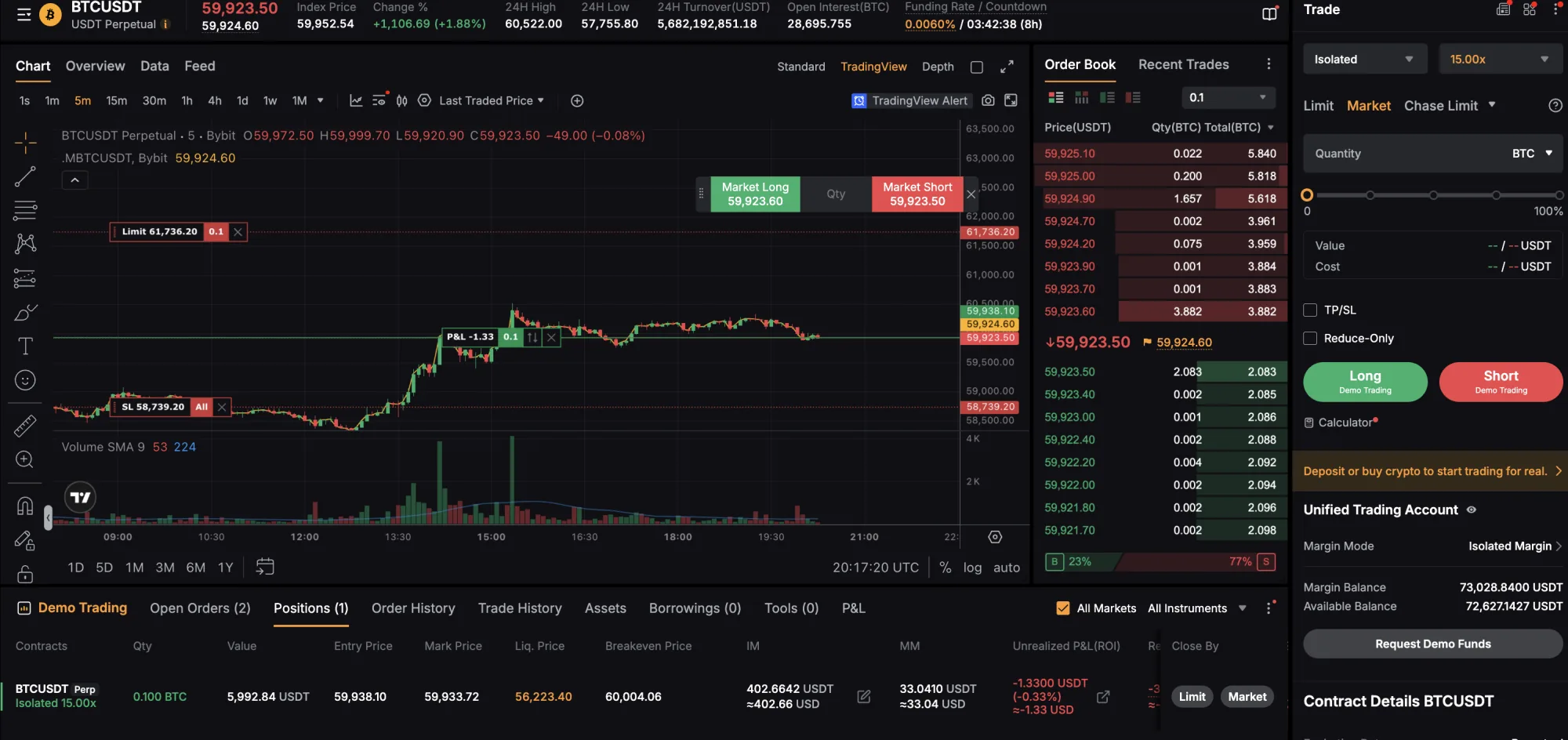
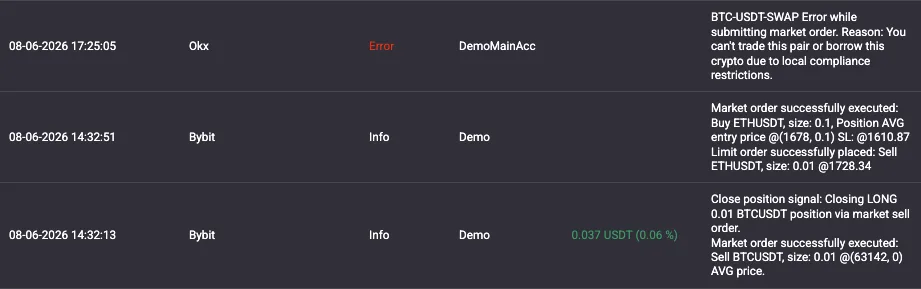
A bridge tool like TV-Hub handles the connection between TradingView and exchanges. It removes the coding work but adds a link in the chain, so pick one with clear logging and an audit trail.
For complete TradingView integration setup, see our Ultimate Guide to Automating Crypto Trading.
Perfect TradingView Integration Awaits
Connect TradingView to your exchange with a single webhook and let TV-Hub place the orders. Works with Binance, Bybit, OKX, KuCoin, and more.
Start Free Trial View DocumentationMobile Trading and Management Capabilities
For managing automation on the go, Binance and Bybit offer the most complete mobile apps, exposing position monitoring, strategy pause, and one-tap API key deactivation from the phone. Automation isn't set-and-forget, so that reach matters when a strategy misbehaves away from your desk. Push notifications for fills, stop-losses, and profit targets keep you in the loop without desk time. The one rule: keep your mobile view in sync with desktop, because acting on stale data leads to bad decisions.
See real-world examples in our automated trading case studies.
Choosing the Right Exchange for Your Strategy
The best exchange depends on your strategy, not on a leaderboard. High-frequency and scalping bots need the lowest fees and fastest fills; DCA and long-term strategies prioritize security and low withdrawal costs; multi-exchange arbitrage needs reliable APIs on every venue. Match the exchange to the job before you optimize anything else.
High-frequency and scalping strategies need ultra-low latency and minimal fees. Binance and Bybit fit best here, with deep liquidity and low base fees, and VIP tiers help once volume grows.
Bitcoin-focused and long-term DCA strategies care more about security and cost than raw speed. Coinbase Advanced and OKX offer regulatory clarity and reasonable long-term costs for accumulating positions.
Leveraged and derivatives automation belongs on venues built for it. Bybit, OKX, and Bitget all handle perpetuals with proper risk controls through the API.
Cross-asset strategies that mix crypto with stocks, metals or oil need a venue that lists both. Bitget carries 304 real-world-asset perpetuals next to its crypto ones, all in the same futures wallet, which is covered in the stocks, metals and oil section above.
Portfolio rebalancing and altcoin strategies work best where the coin coverage is widest. KuCoin and OKX list smaller altcoins that the largest exchanges skip.
New to bots? Start with our crypto trading bots for beginners guide, then test on one exchange before adding more.
Future-Proofing Your Exchange Choice
To future-proof your choice, favor exchanges that adapt on two fronts: a strong compliance record as US and EU regulation tightens, and native support for Layer 2 networks like Arbitrum and Polygon that keeps costs down as base-chain fees rise. Clear, consistent listing policies matter too, because they decide which new markets your strategies can reach. Pick an exchange that has upgraded its infrastructure through past growth rather than one that stalls under load.
Exchange risk is not theoretical. BitMEX, the venue that invented the perpetual swap, is closing on 23 September 2026 after eleven years. It stopped new registrations on 23 July and blocked position increases from 26 August, so traders who ran a single-exchange setup there got two months to rebuild (BitMEX closure announcement). Keep your strategy portable across at least two venues.
Portability is what decides how long a rebuild takes. A strategy that already runs the same trade command format on a second exchange moves in minutes. One that is wired to a single venue has to be rebuilt from the alert up.
Get Lifetime Free Access to TV-Hub Through Our Exchange Partners
Here's the honest version of how TV-Hub stays affordable: the bot is free when you open your exchange account through our referral link. We earn a commission from the exchange, and that commission is what keeps the bot free for you. It does not change your trading fees.
How the free-bot model works
Open an account with a referral partner (Bybit, Binance, OKX, Bitget, or KuCoin) through our link, verify it, and fund it. The TV-Hub bot then runs free for that exchange for as long as the account stays active. Bitget is the exception until 31 October 2026: every Bitget key runs free during the launch window, referral or not. Demo and paper trading are always free. Without a referral, subscriptions start at $23/month, with discounts on longer terms. Hyperliquid works differently, because a DEX has no referral account for us to read: there you approve the TV-Hub builder fee instead, and the key runs without a subscription. The one fixed outside cost is a paid TradingView plan (Essential or higher) for webhook alerts, which every webhook bot platform requires.
Supported Exchanges
These six partner exchanges make the TV-Hub bot free: Bybit, Binance, OKX, KuCoin, Bitget, and Hyperliquid. On the five centralized venues the referral link does it; on Hyperliquid you approve the TV-Hub builder fee instead, because a DEX has no referral account to read. Coinbase Advanced is not a referral partner, so TV-Hub runs on a paid subscription there.
| Exchange | TV-Hub Cost | Sign Up Link | Best For |
|---|---|---|---|
 Binance Binance |
Free via referral | Sign Up Free | High-frequency trading |
 Bybit Bybit |
Free via referral | Sign Up Free | Derivatives & futures |
 KuCoin KuCoin |
Free via referral | Sign Up Free | Altcoin trading |
 OKX OKX |
Free via referral | Sign Up Free | Comprehensive trading |
 Bitget Bitget |
Free until 31 Oct 2026, then free via referral | Sign Up Free | Crypto plus stocks, metals and oil |
 Hyperliquid Hyperliquid |
Free via builder fee | Sign Up Free | Perp DEX, no account application |
 Coinbase Advanced Coinbase Advanced |
Paid subscription | Sign Up Not a referral partner |
US-regulated trading |
Disclosure: we earn a commission when you sign up through the links above. For the referral partners, that commission is what keeps the bot free for you; the Coinbase Advanced link is an affiliate link on the paid plan. Either way, it does not change your trading fees or your relationship with the exchange.
What this means for your strategy
The full toolkit is included on a partner exchange: TradingView alert execution, order management, risk controls, and portfolio tracking, with no monthly fee for the bot. Your access stays free as long as the exchange account stays active.
You keep custody. All partner exchanges are licensed in their jurisdictions, and your funds stay under your control. TV-Hub only ever holds trading permissions, never withdrawal access.
Simple 3-step process
- Choose your exchange: click any referral link above to sign up for a partner exchange.
- Complete verification: finish KYC and make your first deposit.
- Activate automation: your TV-Hub bot is enabled for that exchange, ready for TradingView webhooks.
Pro tip: you can connect multiple partner exchanges and run the bot free on each, which is how many traders spread automation across venues.
Conclusion
Choosing the right exchange for automation comes down to matching a platform to your strategy, not chasing the longest feature list. For most traders it reduces to three factors: reliability, cost, and features.
Binance offers the best mix for high-frequency strategies with deep liquidity and 0.10% base fees. Coinbase Advanced leads on US compliance and security, at higher fees. Bybit and OKX cover derivatives and unified-account trading, KuCoin reaches the altcoins the big names skip, and Bitget is the one to pick if your strategies are not all crypto.
Test before you commit. Use a sandbox or run minimal capital for a week to reveal API quirks and real execution speed. Then scale gradually, because even a strong exchange can wobble in extreme conditions.
Ready to put this into practice? Start with our Ultimate Guide to Automating Crypto Trading with TradingView Signals, then read the webhook format reference so your first payload executes instead of erroring out.
Ready to Automate Your Trading?
Connect your chosen exchange to TradingView and start trading 24/7 with TV-Hub's automation platform.
Start Free Trial View Documentation