Quickly Test a Trade
Before you trust an alert in production, fire one trade on demand to confirm the whole chain works: the API key has the right permissions, the webhook reaches TVH, and your payload parses and executes. Use a demo key (or a tiny size) so a test never costs you anything.
- Fastest: open the Trade Command Builder and click Execute now!. No TradingView alert needed.
- Through TradingView: create an alert with a condition that is always true (price greater than 0). It fires within seconds, so you can verify the full webhook path.
- Watch the result land in your Activity Log.
Option 1: Execute now from the Builder
The quickest test skips TradingView entirely. In the Trade Command Builder, configure the trade, then click Execute now!. TVH sends it straight to the exchange right then.

Use this to:
- Confirm an API key has Read plus Trade permissions.
- Smoke-test a new payload before you paste it into an alert.
- Place a one-off demo trade to see the balance and fill in the Activity Log.
It does not test the TradingView webhook path, only the key and the payload. For that, use Option 2.
Option 2: An instant TradingView alert
To test the full webhook path (TradingView to TVH to exchange), create an alert that fires immediately:
- Open the alert dialog on any chart.
- Condition: Price, Greater Than, a Value below the current price (
0always works). The condition is true right away. - Trigger: Once only, so it fires a single time and then disables itself.
- Notifications: tick Webhook URL and paste your TVH endpoint.
- Message: paste the trade command you want to test (from the Trade Command Builder).
- Click Create.
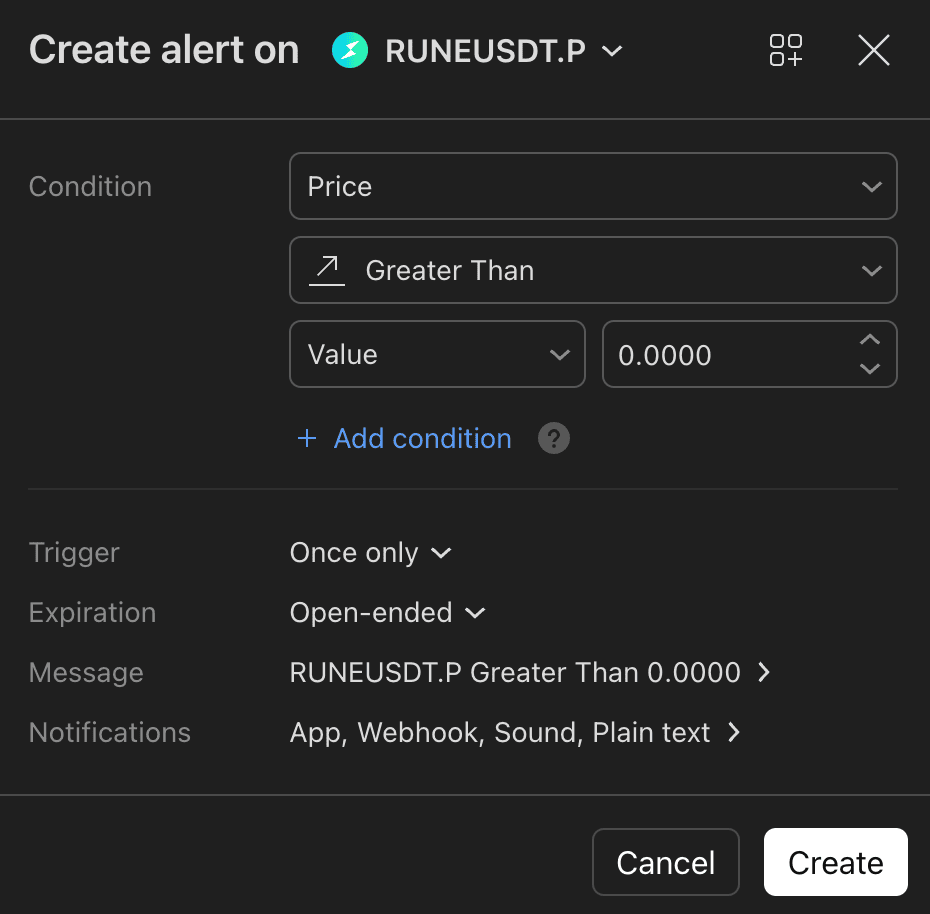
The alert fires almost immediately and posts your command to TVH. Check the Activity Log for the result. Because it is Once only, it disables itself after the single fire; delete it once you are done.
Both options place a real order on whatever key you selected. Test on a demo account or with a minimal size until you are confident the payload behaves.