Account & API Keys
This page covers everything around your TVH account: how access works (free vs paid), where your User Token lives, and how to add exchange API keys with demo mode toggled on or off.
- TVH is free when you sign up for an exchange via our affiliate links — TVH detects the link and waives the subscription for that key.
- Otherwise, subscriptions start at $23 / month (single-month plan; longer plans are cheaper per month).
- Add as many exchange API keys as you want — one per row in Account → Settings → API Keys.
- Tick Demo Account to route the key to the exchange's testnet/sandbox.
Free with affiliate exchange accounts
TVH offers free access on any API key tied to an account that was created through our affiliate link. When you add the API key, our system checks whether the underlying exchange account was referred by us. If yes, the key skips subscription enforcement — you can use it indefinitely without paying for TVH.
| Exchange | Affiliate link |
|---|---|
| Bybit | Open Bybit accountAffiliate link — TradingView Hub may earn a commission at no cost to you. |
| Binance | Open Binance accountAffiliate link — TradingView Hub may earn a commission at no cost to you. |
| OKX | Open Okx accountAffiliate link — TradingView Hub may earn a commission at no cost to you. |
| KuCoin | Open Kucoin accountAffiliate link — TradingView Hub may earn a commission at no cost to you. |
| BitMEX | Open Bitmex accountAffiliate link — TradingView Hub may earn a commission at no cost to you. |
| Coinbase | Open Coinbase accountAffiliate link — TradingView Hub may earn a commission at no cost to you. |
Hyperliquid has no referral check. Instead you approve a small builder fee with your wallet, and the key is free to use for as long as the approval stands. See Hyperliquid — free trading via the builder fee.
There is no reliable way to move an existing exchange account onto our referral anymore. If free access matters to you, the practical option is to open a fresh account through our affiliate link, for example via a family member or friend if you really need to. Otherwise you can simply keep your existing account and run it on a TVH subscription instead.
Subscriptions (without affiliate)
If you don't open your exchange accounts through our affiliate links, you can run TVH on a paid subscription instead. The per-month price drops the longer the term.
Trading plans
| Plan | Price | Effective |
|---|---|---|
| Free | $0 | — |
| 1 month | $23 | $23 / month |
| 3 months | $63 | $21 / month |
| 6 months | $114 | $19 / month |
Every paid plan includes unlimited API keys and unlimited trades, plus Copy Trading, the Telegram bot, and the browser extensions.
The Free plan ($0) gives you:
- Free access forever when you open your exchange accounts through our referral links (Bybit, Binance, Binance Futures, KuCoin, BitMEX, OKX), or on Hyperliquid by approving the builder fee.
- Without a referral, a 7-day free trial per exchange.
- Demo accounts and testnets are always free.
Chrome Extension (Strategy Finder) plans
These bundle the TradingView Strategy Finder Chrome extension on top of unlimited API keys and trades.
| Plan | Price | Effective |
|---|---|---|
| 1 month | $45 | $45 / month |
| 3 months | $120 | $40 / month |
| 6 months | $210 | $35 / month |
Manage everything at Account → Subscription, or see the live pricing page.
Where to find your User Token
Your User Token is the secret that authenticates webhook requests as belonging to your TVH account. Every JSON payload includes it:
{
  "token": "YOUR_USER_TOKEN",
  "..."
}
To find it: Account → Settings. In the dashboard it is labeled Access Key.
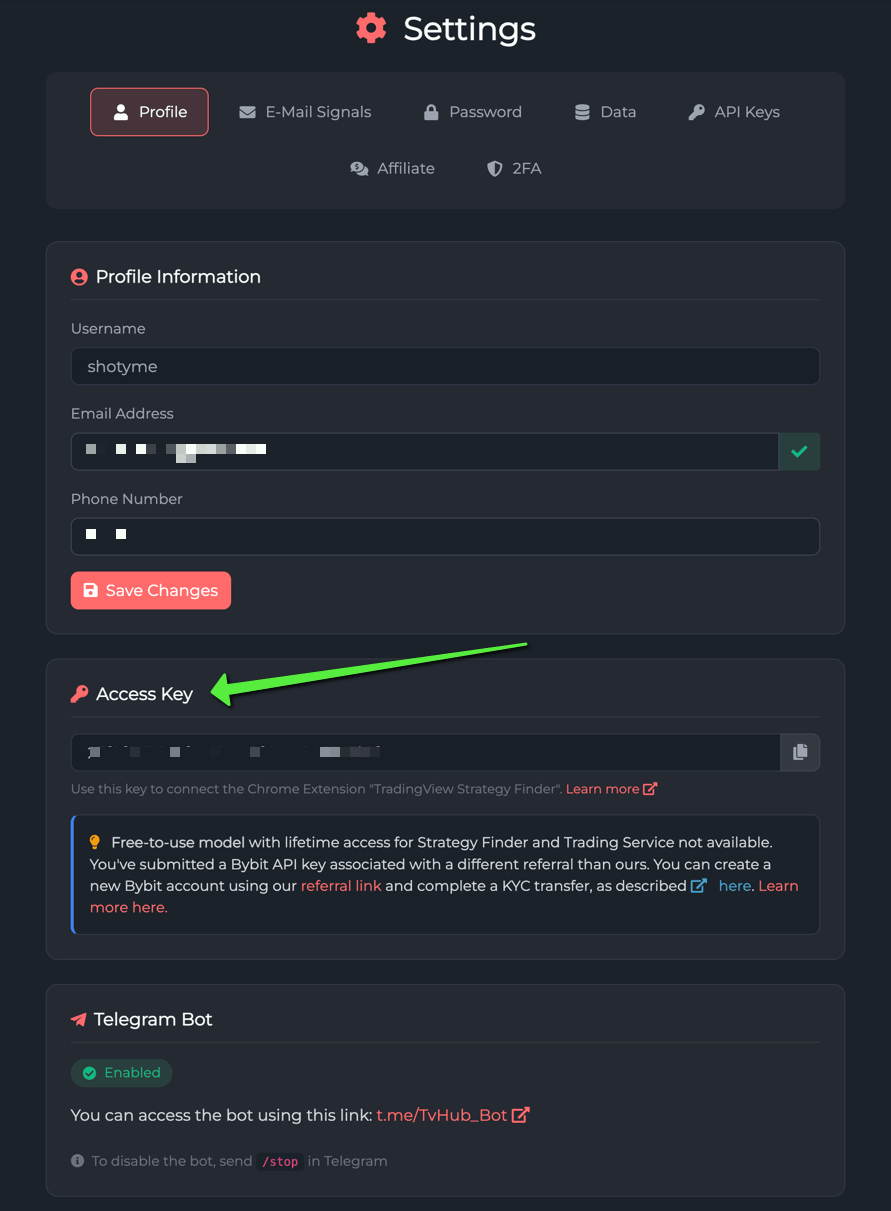
- Never publish it in a public Pine Script or screenshot.
- Never commit it to a GitHub repo.
- The Trade Command Builder embeds it automatically; you'll rarely need to copy it by hand.
Adding exchange API keys
Go to Account → Settings → API Keys and click Add new. The form has the same shape for every exchange:
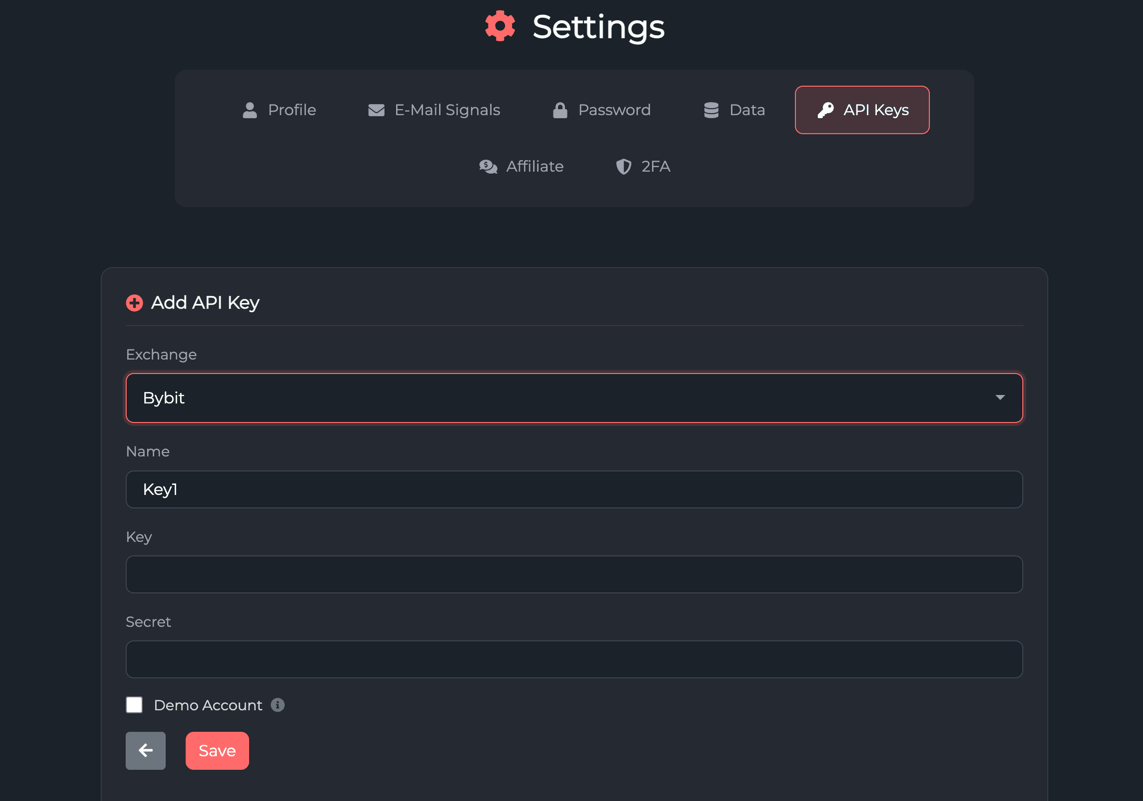
| Field | Notes |
|---|---|
| Name | Free-text label. Used in copy trading. See Naming conventions. |
| Exchange | Pick from the dropdown. Each exchange's quirks are documented in Exchanges. |
| Public Key | Paste from the exchange. On Hyperliquid the field is your main wallet address instead. |
| Secret | Paste from the exchange. Encrypted at rest. On Hyperliquid it is the API wallet private key. |
| Passphrase | Required for OKX and KuCoin. Set when you created the key on the exchange. |
| Demo Account | Tick to route the key to the exchange's testnet/sandbox. See below. |
Demo Account checkbox
TVH supports two distinct ways of running paper-trading flows, and they're easy to confuse:
- Demo Account checkbox — routes orders to the exchange's paper-trading endpoint while keeping the regular exchange selection. Same TVH setup, just a flag flipped. Available for Bybit, OKX, Binance (Spot and USD-M Futures) and Hyperliquid (Perps and Spot, where it routes to the Hyperliquid testnet).
- Testnet exchange identifier — a separate entry in the exchange dropdown (e.g.
binance-futures-testnet). You create a real testnet API key on the exchange's separate testnet site and add it to TVH as a regular API key — no Demo checkbox.
In both cases the rest of the stack is identical:
- Same TVH JSON payload schema.
- Same webhook URL.
- Same Trade Command Builder UI.
- Same Activity Log and Telegram notifications.
When you flip from demo to live, you add a new key against the live exchange identifier (and untick the Demo checkbox if you used that path).
For per-exchange demo setup walkthroughs, see Demo Accounts.
Naming conventions and multi-account
You can add as many API keys per exchange as you want — one for scalping, one for swing trades, one for copy trading, etc. We recommend a consistent naming scheme:
{exchange}-{purpose}
For example: binance-scalp, bybit-swing, okx-copy-master, bybit-demo.
Why naming matters:
- Copy Trading references API keys by name — clear names prevent accidental cross-wiring.
- Telegram bot commands like
buy bybit-swing btc 1%reference the key by name.
Security best practices
- No withdraw permissions on exchange keys. TVH only needs Read + Trade (plus Futures if you trade futures). Never grant Withdraw — there's no scenario where TVH legitimately needs it.
- Enable IP whitelisting on the exchange side. See Webhook URLs & IP Whitelist.
- Test in demo first. Tick the Demo Account checkbox, fire a test signal, verify the fill, then switch to a live key. See Demo Accounts.
- Use unique keys per use case. Don't share one key between your main trading bot and a copy-trading source; if one gets compromised, you can revoke it without taking down everything else. Better still, run each strategy on its own exchange sub-account, especially when you trade different strategies on the same pair. See Sub-accounts.
If you suspect a key has leaked: revoke it on the exchange immediately, then delete it from TVH. The Activity Log will show any orders placed in the meantime so you can reconcile manually.