Webhook URLs & IP Whitelist
Paste one of these URLs into your TradingView alert's Webhook URL field. Most users only need the Default endpoint. Binance uses its own.
Default Webhook
For everything except Binance.
Standard (queued, recommended):
Fast execution:
Exchanges that don't support third-party binding (for example Coinbase) must use this IP whitelist.
We highly recommend adding email alerts as a backup so a trade still fires on the rare occasion a webhook is lost in transit. See Email Signals.
Binance Webhook
All Binance markets (Spot, USD-M and Coin-M Futures) run on a separate endpoint with their own IP set. Use it for anything Binance.
Standard (queued):
Fast execution:
Remember to whitelist the Binance IPs on your Binance API key.
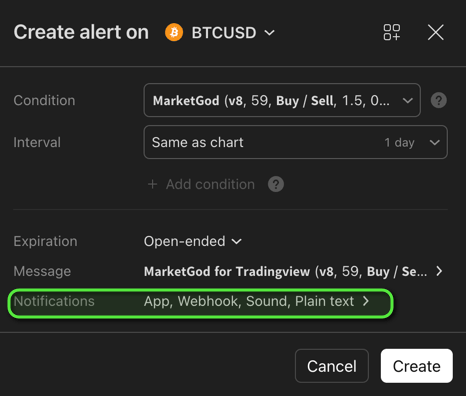
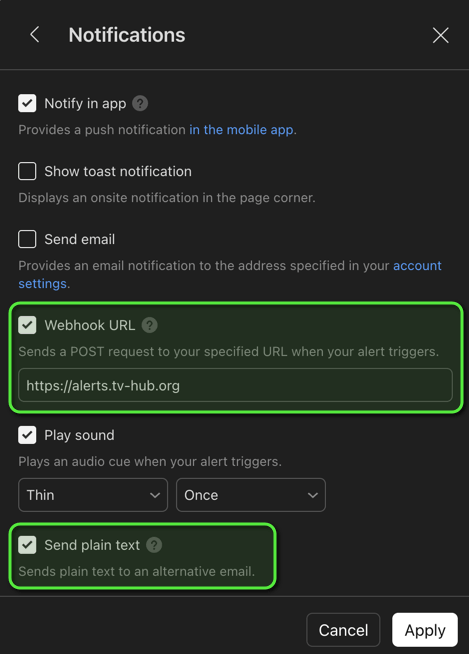
How to add a webhook to a TradingView alert
Open your TradingView alert's Notifications tab, tick Webhook URL, and paste the URL.
IP Whitelist
The IPs below are the outbound addresses TVH's signal executor uses to talk to the exchange. Adding them to your exchange API key's IP restrictions panel means the key only works when the request comes from TVH — a strong defence against key leakage.
For Default / Fast execution endpoints (alerts.tv-hub.org)
Use this set with any non-Binance exchange (Bybit, OKX, KuCoin, BitMEX, Coinbase, etc.).
52.178.43.209 13.81.120.121 23.101.74.176 104.40.189.59 23.101.70.119 52.178.46.226 52.166.118.167 20.82.83.137 20.82.84.106 20.82.84.161 20.82.85.24 20.82.85.156 20.82.86.9 20.82.86.122 20.82.87.61 20.101.240.10 20.101.240.38 20.101.241.140 20.101.241.203 50.85.64.231 13.69.68.7 52.174.236.207 52.174.236.246 52.174.236.136 52.232.16.136 52.232.23.166 52.174.236.251 52.174.236.214For Binance endpoints (binance.tv-hub.org)
Binance runs in a separate region. Use this set for all Binance markets.
20.194.185.150 20.191.169.179 20.191.172.69 20.48.71.250 20.191.172.206 20.191.173.63 20.191.174.156 20.191.175.88 20.78.104.150 20.78.105.3 20.78.105.95 20.78.105.134 20.78.105.150 20.191.175.195 20.78.105.154 20.78.105.162 20.78.105.172 20.78.105.244 20.78.106.67 20.78.106.119 20.78.106.130 20.48.71.143 20.78.106.137 20.78.106.149 20.78.106.151 20.191.173.152 20.78.106.157 20.78.106.166 20.46.190.72 20.78.106.172 20.43.67.38 13.69.68.7 52.174.236.207 52.174.236.246 52.174.236.136 52.232.16.136Troubleshooting
| Symptom | Likely cause | Fix |
|---|---|---|
401 Unauthorized or 403 Forbidden in Activity Log | Wrong token in the JSON payload | Re-copy your User Token from Account → Settings (Account & API Keys) |
Connection refused / IP not allowed from the exchange | TVH's outbound IP is not on your exchange's whitelist | Add the correct IP set above. For Binance use the Binance set, not the Default set |
| Alert fires on TradingView but no row appears in Activity Log | Webhook URL is wrong or alert is unticked | Re-paste the URL in the TradingView alert. Make sure the Webhook URL checkbox is enabled |
If you're stuck, also check that the Demo Account checkbox state on your API key matches where you expect the trade to land (testnet vs production).