Indicator-Based Alerts
Use indicator alerts when your signal source is a Pine indicator() — RSI, EMA cross, custom oscillator, anything that does not track positions. One alert per direction is the standard pattern: one for long entries, one for short entries, one for closes (if you exit on a signal rather than fixed SL/TP).
- Indicators do not track positions. Pine
alert()calls (or static alerts onplotshape) emit one JSON per signal. - Use single-quoted Pine strings to wrap the JSON. The
{{ticker}}placeholder makes one template work on every chart. - Set the alert frequency to Once Per Bar Close unless you genuinely need intra-bar fires.
- For positional logic ("close my long when RSI turns down"), prefer a Pine
strategy()— see Strategy Alerts.
Indicator vs strategy: when to use which
| Indicator | Strategy | |
|---|---|---|
| Position tracking | None. Each signal is independent. | Built-in. Pine knows strategy.position_size, strategy.market_position. |
| Order direction | You decide per alert. | Auto-resolved via {{strategy.order.action}}. |
| TV alerts needed | One per direction (buy/sell/close). | One alert with {{strategy.order.alert_message}} covers entry, SL, TP, close. |
| Backtesting | Not available — indicators have no equity curve. | Strategy Tester runs on the same code. |
| Best for | Stand-alone signals, multi-symbol scanning, signal forwarding. | Real trading with position management. |
Rule of thumb: if you intend to live-trade with stop-loss and take-profit logic on the Pine side, use a strategy. If Pine is purely a signal generator and TVH (or the exchange) handles SL/TP, an indicator works fine.
Pine v5 indicator template
A minimal indicator that emits TVH-shaped JSON on RSI crosses:
//@version=5
indicator("RSI Pullback Signals — TVH", overlay=true)

rsi_len        = input.int(14, "RSI Length")
rsi_oversold   = input.int(30, "Oversold Level")
rsi_overbought = input.int(70, "Overbought Level")

r            = ta.rsi(close, rsi_len)
long_signal  = ta.crossover(r, rsi_oversold)
short_signal = ta.crossunder(r, rsi_overbought)

plotshape(long_signal,  "Long",  shape.triangleup,   location.belowbar, color.new(color.green, 0))
plotshape(short_signal, "Short", shape.triangledown, location.abovebar, color.new(color.red,   0))

// Emit JSON dynamically on each signal.
buy_command  = '{"exchange":"binance","pair":"{{ticker}}","apiKey":"binance-main","isBuy":true,"unitsType":"percent","unitsPercent":2,"isMarket":true,"token":"YOUR_TOKEN"}'
sell_command = '{"exchange":"binance","pair":"{{ticker}}","apiKey":"binance-main","isSell":true,"unitsType":"percent","unitsPercent":2,"isMarket":true,"token":"YOUR_TOKEN"}'

if long_signal
    alert(buy_command,  alert.freq_once_per_bar_close)

if short_signal
    alert(sell_command, alert.freq_once_per_bar_close)
What this gives you:
- One alert in TradingView that listens to
alert()from this indicator. The Message field stays empty (or{{ticker}}for context); the body comes from the Pine call. - Different payloads per direction without duplicating alerts.
- The
{{ticker}}placeholder so the same indicator works on BTCUSDT, ETHUSDT, XAUUSD — TradingView substitutes the chart's symbol before posting.
Static alert per condition (no alert() call)
If you cannot edit the indicator (built-in, third-party, closed-source), create one TradingView alert per plotshape or per condition:
- Open the alert dialog.
- Condition: select the indicator, then the specific condition ("Buy Alert" or "Sell Alert").
- Trigger: Once Per Bar Close.
- Message: paste the static JSON for that direction, built in the Trade Command Builder.
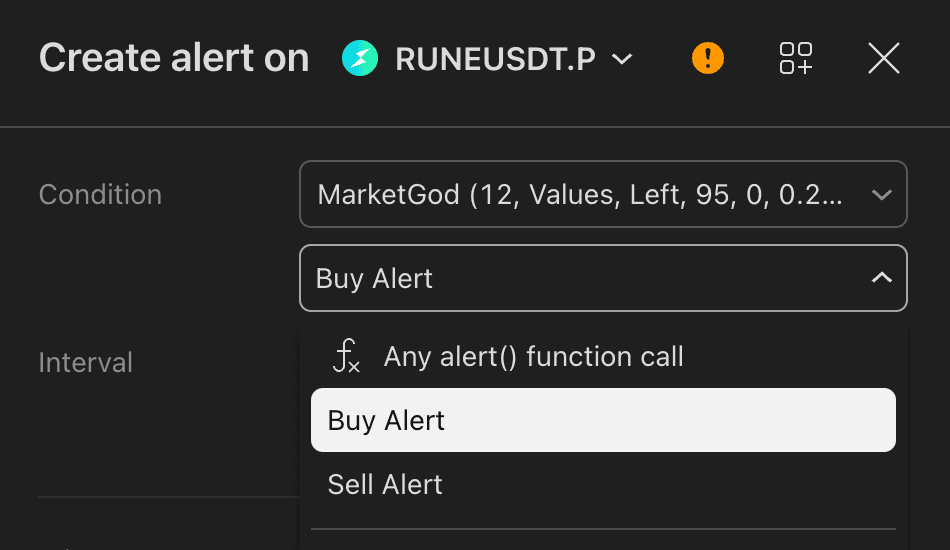
The second dropdown lists each named condition the indicator exposes, here Buy Alert and Sell Alert, plus Any alert() function call for indicators built on the alert() template above. Pick one condition per alert and give each its own Message.
Limitations of the static pattern:
- The JSON is fixed. No runtime values from Pine.
- Repeat the dance for every direction and every symbol you want to trade.
- Use TradingView placeholders inside the static JSON (
{{ticker}},{{close}}) to keep it generic.
Dynamic values via placeholders
Five {{...}} tokens cover most indicator-alert use cases. TradingView substitutes them before posting.
| Placeholder | Maps to | Example resolved value |
|---|---|---|
{{ticker}} | pair | "BTCUSDT" |
{{close}} | price, stopLoss, targets[0].price | "65250.5" |
{{time}} / {{timenow}} | alertTimestamp | "2026-05-21T12:00:00Z" |
{{interval}} | metadata, idempotency suffix | "15" |
{{exchange}} | rarely useful | "BINANCE" |
Sample payload that uses three of them:
{
  "exchange": "binance",
  "pair": "{{ticker}}",
  "apiKey": "binance-main",
  "isBuy": true,
  "isLimit": true,
  "price": "{{close}}",
  "postOnly": false,
  "unitsType": "percent",
  "unitsPercent": 2,
  "alertTimestamp": "{{ticker}}-{{timenow}}",
  "token": "YOUR_TOKEN"
}
The full placeholder list — including the strategy-only ones — is on Pine Placeholders.
Common indicator patterns
EMA crossover
//@version=5
indicator("EMA Cross — TVH", overlay=true)

fast = ta.ema(close, 9)
slow = ta.ema(close, 21)
plot(fast, "Fast", color.new(color.aqua, 0))
plot(slow, "Slow", color.new(color.orange, 0))

cross_up   = ta.crossover(fast, slow)
cross_down = ta.crossunder(fast, slow)

cmd_buy  = '{"exchange":"binance","pair":"{{ticker}}","apiKey":"binance-main","isBuy":true,"unitsType":"percent","unitsPercent":5,"isMarket":true,"token":"YOUR_TOKEN"}'
cmd_sell = '{"exchange":"binance","pair":"{{ticker}}","apiKey":"binance-main","isSell":true,"unitsType":"percent","unitsPercent":5,"isMarket":true,"token":"YOUR_TOKEN"}'

if cross_up
    alert(cmd_buy,  alert.freq_once_per_bar_close)
if cross_down
    alert(cmd_sell, alert.freq_once_per_bar_close)
RSI extreme (single direction)
//@version=5
indicator("RSI Extreme Long — TVH")

r = ta.rsi(close, 14)
go_long = ta.crossover(r, 25)

cmd = '{"exchange":"bybit","pair":"{{ticker}}","apiKey":"bybit-main","isBuy":true,"unitsType":"percent","unitsPercent":3,"isMarket":true,"token":"YOUR_TOKEN"}'

if go_long
    alert(cmd, alert.freq_once_per_bar_close)
Donchian breakout (price-based)
//@version=5
indicator("Donchian Breakout — TVH", overlay=true)

length = input.int(20)
upper  = ta.highest(high, length)[1]
lower  = ta.lowest(low,  length)[1]
plot(upper, "Upper", color.new(color.green, 0))
plot(lower, "Lower", color.new(color.red, 0))

break_up   = ta.crossover(close, upper)
break_down = ta.crossunder(close, lower)

cmd_long  = '{"exchange":"binance-futures","pair":"{{ticker}}","apiKey":"bin-fut-main","leverage":5,"marginType":"cross","isBuy":true,"unitsType":"percent","unitsPercent":10,"isMarket":true,"token":"YOUR_TOKEN"}'
cmd_short = '{"exchange":"binance-futures","pair":"{{ticker}}","apiKey":"bin-fut-main","leverage":5,"marginType":"cross","isSell":true,"unitsType":"percent","unitsPercent":10,"isMarket":true,"token":"YOUR_TOKEN"}'

if break_up
    alert(cmd_long,  alert.freq_once_per_bar_close)
if break_down
    alert(cmd_short, alert.freq_once_per_bar_close)
Multi-condition (AND / OR)
//@version=5
indicator("Trend + Pullback — TVH", overlay=true)

ema200    = ta.ema(close, 200)
in_uptrend = close > ema200
rsi_long   = ta.crossover(ta.rsi(close, 14), 35)

long_signal = in_uptrend and rsi_long  // AND filter

cmd = '{"exchange":"binance","pair":"{{ticker}}","apiKey":"binance-main","isBuy":true,"unitsType":"percent","unitsPercent":4,"isMarket":true,"token":"YOUR_TOKEN"}'

if long_signal
    alert(cmd, alert.freq_once_per_bar_close)
Repainting indicators
A repainting indicator is one whose value changes after the bar closes. If your signal source repaints, "Once Per Bar Close" is mandatory — "Once Per Bar" would fire on a value that later vanishes from the chart.
Common repaint sources:
request.security(..., lookahead=barmerge.lookahead_on)— uses future data on the higher timeframe.ta.valuewhen(..., n)withoutbarstate.isconfirmed— index n may shift.- Anything that conditions on
high/lowof the current bar without waiting for close.
Guard against the worst offender by wrapping your emit in a confirmation check:
if long_signal and barstate.isconfirmed
    alert(cmd, alert.freq_once_per_bar_close)
barstate.isconfirmed is true only after the bar closes. Combined with the alert frequency setting, it gives you defence-in-depth.
Next
- Strategy Alerts — single-alert dispatch with
{{strategy.order.alert_message}}. - Pine Placeholders — full token reference.
- Strategy Cookbook — eight ready-to-copy templates, several of which use the indicator pattern.