Hedge Mode — Long + Short on the Same Pair
- Binance Futures supports holding long AND short positions simultaneously on the same pair (Hedge Mode).
- TVH enables this with
hedgeMode: trueon the TradeCommand. - OKX uses
positionSide: "long" | "short" | "net"instead of a boolean. - Bybit supports hedge mode too — set the account to Hedge Mode and TVH routes
buy/sellto each side automatically (nohedgeModeparam; that field is Binance-only). See Bybit. - Direction-aware close:
closeLong: trueorcloseShort: truetargets a single side.
Prerequisite — switch your exchange to Hedge Mode
You must first switch your Binance Futures account from "One-Way Mode" to "Hedge Mode" in the exchange UI:
- Open Binance Futures
- Go to Preferences → Position Mode
- Select Hedge Mode
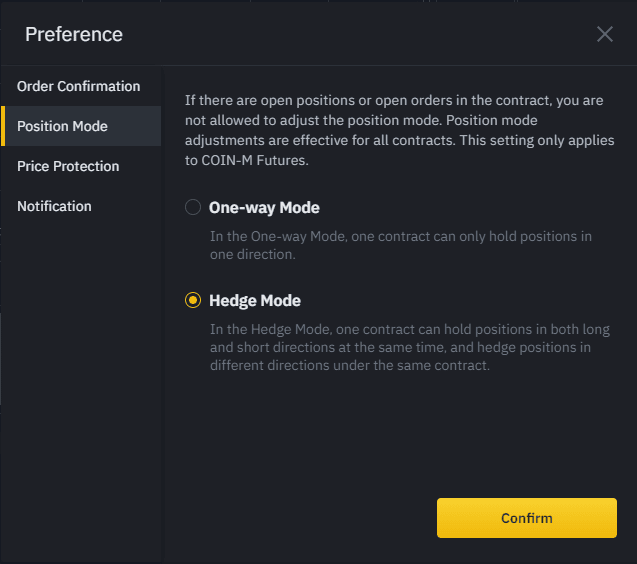
TVH cannot flip this for you — it has to be set on the exchange side first. If you send hedgeMode: true while the account is in One-Way Mode (or vice versa), Binance rejects the trade with Order's position side does not match user's setting. Code: -4061. See Debug a Failed Alert for the fix.
Activate in the Trade Command Builder
Tick the "Hedge Mode" checkbox. The Trade Command Builder adds hedgeMode: true to the generated JSON.

{
  "pair": "BTCUSDT",
  "isBuy": true,
  "isMarket": true,
  "hedgeMode": true,
  "unitsType": "percentBalance",
  "unitsPercent": 50,
  "leverage": 5,
  "stopLossType": "percent",
  "stopLossPercent": 2,
  "exchange": "BinanceFutures",
  "apiKey": "MyKey",
  "token": "{{strategy.order.alert_message}}"
}
Now you can fire a second alert with isSell: true and hedgeMode: true on the same pair — the short opens alongside the long.
Direction-aware close
With hedge mode active, the Close command has three specificity levels:

| Goal | Fields |
|---|---|
| Close everything (long + short) | isClose: true, hedgeMode: true |
| Close only the long | isClose: true, closeLong: true, hedgeMode: true |
| Close only the short | isClose: true, closeShort: true, hedgeMode: true |
Close only the long
{
  "exchange": "binance-futures",
  "pair": "BTCUSDT",
  "apiKey": "binance-futures-main",
  "isClose": true,
  "closeLong": true,
  "hedgeMode": true,
  "token": "YOUR_TOKEN"
}
Close only the short
{
  "exchange": "binance-futures",
  "pair": "BTCUSDT",
  "apiKey": "binance-futures-main",
  "isClose": true,
  "closeShort": true,
  "hedgeMode": true,
  "token": "YOUR_TOKEN"
}
For the full Close behaviour see Close Position.
Use cases
- Pair-trading: long BTC + short ETH on directional divergence
- Pyramiding both sides while signal direction is unclear
- Delta-neutral / market-neutral strategies (long index basket + short futures)
- Funding-rate arbitrage on perpetuals (long-spot vs short-futures)
OKX equivalent — positionSide
OKX does not use a hedgeMode boolean. Instead, the positionSide field controls behaviour:
positionSide | Behaviour |
|---|---|
"net" (default) | One-way / net position mode |
"long" | Targets the long leg of a hedge position |
"short" | Targets the short leg of a hedge position |
{
  "pair": "BTC-USDT-SWAP",
  "isBuy": true,
  "isMarket": true,
  "positionSide": "long",
  "instrumentType": "swap",
  "unitsType": "percentBalance",
  "unitsPercent": 50,
  "leverage": 5,
  "exchange": "OKX",
  "apiKey": "MyOKXKey",
  "token": "{{strategy.order.alert_message}}"
}
You must first enable Hedge / Long-Short Mode in OKX's position-mode setting. See OKX.
Bybit — account-level hedge mode
Bybit supports holding a long and a short on the same pair, but it is driven by the account's position mode, not a payload field. Set your Bybit account (or the pair) to Hedge Mode in Bybit's position-mode setting first. You do not send hedgeMode: true — that field is Binance-specific and ignored on Bybit.
Once the account is in hedge mode, TVH routes each order to the correct side automatically:
orderType: "buy"(orisBuy: true) opens or adds to the long side.orderType: "sell"(orisSell: true) opens or adds to the short side.closeLong/closeShortflatten one side, same as Binance.
No extra parameter is required — the account mode is enough, and TVH picks the right position index per order. TVH does not flip the account mode for you; set it on the exchange first. See Bybit for setup.
Pine snippet — open long + short on signal
//@version=5
indicator("Hedge Mode Pair", overlay=true)

if (openHedge)
    // Open long
    alert('{"pair":"BTCUSDT","isBuy":true,"isMarket":true,"hedgeMode":true,"unitsType":"percentBalance","unitsPercent":50,"leverage":5,"exchange":"BinanceFutures","apiKey":"MyKey","token":"{{strategy.order.alert_message}}","alertTimestamp":"{{ticker}}-long-{{timenow}}"}', alert.freq_once_per_bar_close)
    // Open short (second alert with different timestamp)
    alert('{"pair":"BTCUSDT","isSell":true,"isMarket":true,"hedgeMode":true,"unitsType":"percentBalance","unitsPercent":50,"leverage":5,"exchange":"BinanceFutures","apiKey":"MyKey","token":"{{strategy.order.alert_message}}","alertTimestamp":"{{ticker}}-short-{{timenow}}"}', alert.freq_once_per_bar_close)
For batch-firing both sides in a single alert, see Batch Alerts & Timing.
Common pitfalls
hedgeMode: truewithout exchange-side switch → trade rejected by Binance withCode: -4061(position side mismatch). See Debug a Failed Alert.- One-Way Mode +
closeLong: true→ the flag is ignored. Side-specific closes need hedge mode active (Binance:hedgeMode: true; Bybit/OKX: an account in hedge / long-short mode). - Same
alertTimestampfor long + short → second one is deduplicated. Always use unique timestamps when firing both sides. - OKX is
positionSide, nothedgeMode→ mixing the two leads to silent ignores. - Margin starts shared → switching from one-way to hedge mode keeps the existing margin pool. Verify your margin / liquidation prices after the switch.
For full futures field details, see Futures-Specific Fields.