OKX — Unified Account (Spot, Margin, Futures, Swap, Options)
OKX is one of the most flexible exchanges TVH connects to. A single okx identifier covers Spot, Margin, Perpetual Swaps, dated Futures, and Options — switched by the instrumentType field. Demo trading is supported through the Demo Account checkbox.
- One exchange identifier:
okx - Market is switched by
instrumentType:spot·margin·swap·futures·option - Passphrase is required (you set it when creating the key on OKX)
- Symbol format uses dashes:
BTC-USDT,BTC-USDT-SWAP,BTC-USDT-251226 - Demo Account checkbox — built-in OKX Demo Trading, no separate testnet identifier
- Hedge mode via
positionSide:net(default),long,short
OKX Demo Trading runs on the same okx identifier — just tick the Demo Account checkbox on your API key. Full setup: Demo Accounts → OKX.
Quick facts
| Field | Value |
|---|---|
| Exchange identifier | okx |
| Webhook URL | https://alerts.tv-hub.org |
| Symbol format | dashes: BTC-USDT (spot), BTC-USDT-SWAP (perp), BTC-USDT-251226 (dated) |
| Max leverage | 125× (Swap; varies for dated futures) |
| Permissions | Read + Trade |
| Passphrase | Required |
| Sub-account support | ✅ via named apiKey field (one TVH key per OKX sub-account) |
| Demo support | ✅ Demo Account checkbox |
Webhook URL:
API key creation
OKX supports third-party binding — you authorise TVH while creating the key, so no IP whitelist is needed. A passphrase is still required.
-
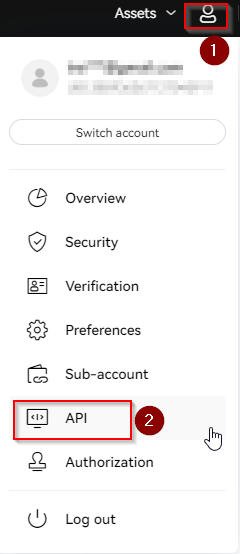
Log in at okx.com and open the API section — top-right account menu → API (or the API key creation page directly).
-
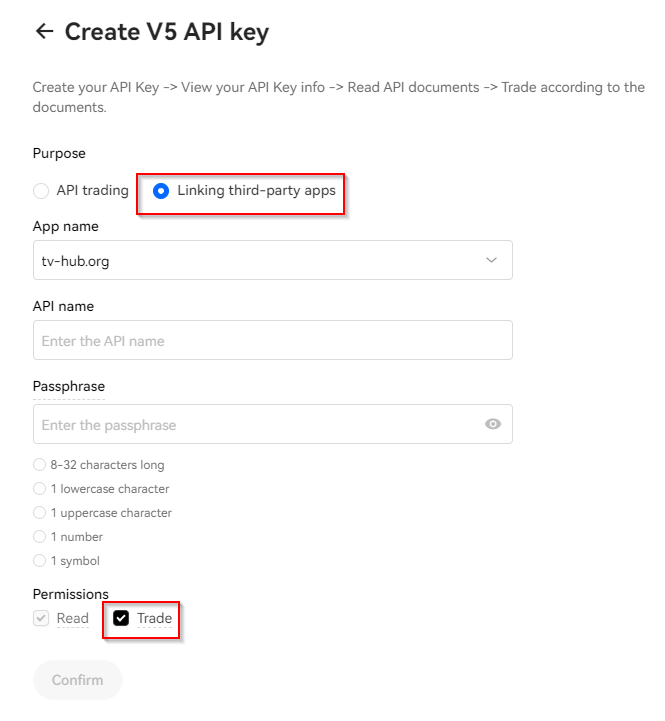
On the Create V5 API key form, set Purpose to Linking third-party apps and pick tv-hub.org as the App name. Give the key an API name, enter a passphrase (you'll need this exact passphrase in TVH — it is not your OKX login password), enable the Trade permission, then click Confirm.
-
Copy the API Key, Secret, and Passphrase into the TVH Add Key form at Account → Settings → API Keys and choose
okxas the Exchange.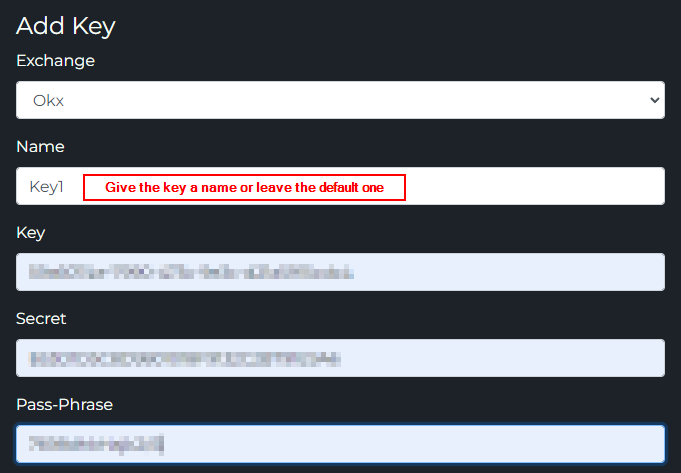
instrumentType — switching markets
The single field that determines which OKX market you're trading. Set this in your TradeCommand payload.
instrumentType | Market | Symbol example |
|---|---|---|
spot | Spot pairs | BTC-USDT |
margin | Cross / isolated margin spot | BTC-USDT |
swap | Perpetual swaps (default if omitted) | BTC-USDT-SWAP |
futures | Expiring (dated) futures | BTC-USDT-251226 |
option | Options — limited TVH support | BTC-USD-251226-50000-C |
The string is singular: use option, not options. If empty or omitted, TVH defaults to swap.
Symbol suffix must match the type:
spot/margin→ no suffix:BTC-USDTswap→-SWAPsuffix:BTC-USDT-SWAPfutures→ date suffix:BTC-USDT-251226(26 Dec 2025)option→ date + strike + C/P:BTC-USD-251226-50000-C(50k call expiring 26 Dec 2025)
positionSide — OKX's hedge mode
OKX's position mode field. Unlike Binance's boolean hedgeMode, OKX uses an enum on the payload itself.
positionSide | Behaviour |
|---|---|
net (default) | Net position mode — one position per pair, longs and shorts cancel |
long | Hedge-like — explicit long position, can coexist with a short on the same pair |
short | Hedge-like — explicit short position |
Set the OKX account-level position mode to Long/Short Mode in the OKX UI before using long / short. Otherwise the orders are rejected.
positionSide defaults to net when omitted.
Example payloads
Spot market buy:
{
  "token": "your-tvh-token",
  "exchange": "okx",
  "pair": "BTC-USDT",
  "instrumentType": "spot",
  "isMarket": true,
  "isBuy": true,
  "units": 100,
  "unitsType": "percentBalance"
}
Perpetual swap with hedge:
{
  "token": "your-tvh-token",
  "exchange": "okx",
  "pair": "BTC-USDT-SWAP",
  "instrumentType": "swap",
  "isMarket": true,
  "isBuy": true,
  "units": 0.1,
  "leverage": 10,
  "marginType": "isolated",
  "positionSide": "long"
}
Dated future:
{
  "exchange": "okx",
  "pair": "BTC-USDT-251226",
  "instrumentType": "futures",
  "isMarket": true,
  "isBuy": true,
  "units": 1,
  "leverage": 5
}
Sub-Accounts
OKX supports up to 1,000 sub-accounts per master. TVH routes to one via the named apiKey field: create the sub-account on OKX, generate its own API key + passphrase, add that key to TVH with a descriptive name, and reference the name from your payload.
-
On OKX, open the Sub-accounts tab in your account settings and click + Create sub-accounts.

-
Enter a Login name (e.g.
BTCSupertrend), keep Account type as Standard sub-account, then Submit. Afterwards, generate an API key for that sub-account (with its own passphrase) the same way as the main key.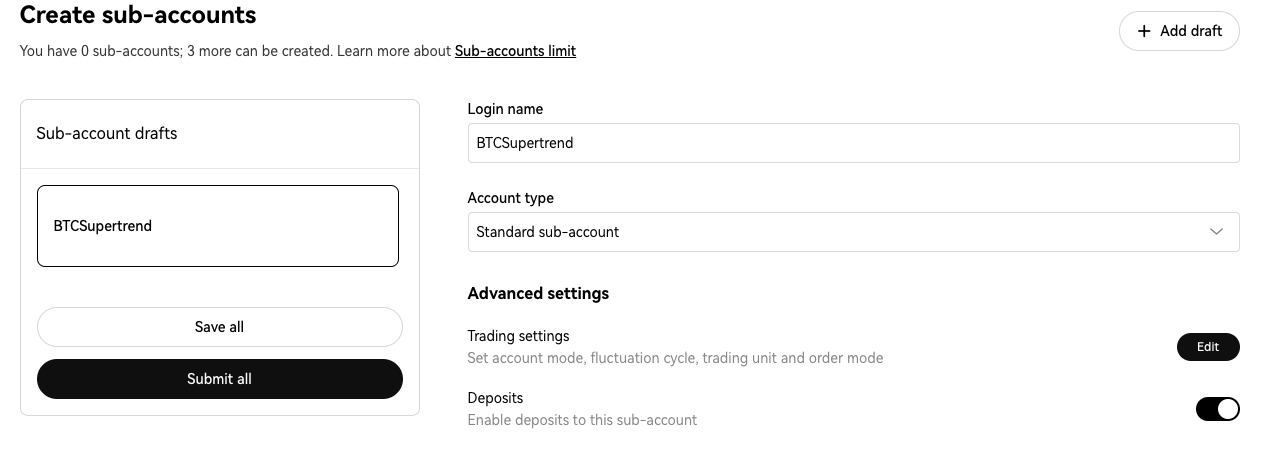
-
Add the sub-account's key to TVH with a descriptive name like
okx-scalper-1and target it from your payload — the TVH API key you point at is what decides which OKX sub-account trades:
{
  "exchange": "okx",
  "pair": "BTC-USDT-SWAP",
  "instrumentType": "swap",
  "apiKey": "okx-scalper-1",
  "isMarket": true,
  "isBuy": true,
  "units": 0.1
}
Cap total exposure with maxExposureMultiple
OKX perpetual swaps and dated futures support an optional exposure ceiling. Add maxExposureMultiple to an entry and TVH caps the total notional of the resulting position at your settlement-currency equity × that multiple. With 1,000 USDT of equity, "maxExposureMultiple": 3 means the position never grows past 3,000 USDT of notional.
{
  "exchange": "okx",
  "pair": "BTC-USDT-SWAP",
  "instrumentType": "swap",
  "apiKey": "okx-main",
  "isBuy": true,
  "isMarket": true,
  "unitsType": "percentWallet",
  "unitsPercent": 40,
  "leverage": 5,
  "maxExposureMultiple": 3,
  "token": "YOUR_TOKEN"
}
Orders that would breach the ceiling are trimmed to what fits rather than rejected, and closes, stop losses and take profits are never affected. There is no checkbox for it: the field goes straight into your alert JSON. Full mechanics, worked example and limits: Max Exposure Multiple.
Common OKX quirks
- Passphrase is REQUIRED. Missing passphrase → "Invalid Sign" error from OKX with no useful detail. Always copy it into the TVH form.
instrumentTypemust match the symbol.swap+BTC-USDT(no-SWAPsuffix) → rejected.spot+BTC-USDT-SWAP→ rejected.- Position mode is account-wide. Switching from Net to Long/Short Mode is set once in OKX, not per-trade. TVH respects whichever mode is active.
- Demo and Live are completely separate accounts. Demo balances, demo positions, demo API keys — no overlap with live.
- Trailing stop keeps the fixed stop. An SL-only payload with
useTrailingStopLoss: trueplaces a native trailing order (move_order_stop) and the fixed full-position stop fromstopLosstogether.pricesets the optional activation price. The two orders are not OCO-linked;cancelSlOrders: truereplaces both. See Stop Loss → OKX: fixed stop + trailing together. - Use singular
option, notoptions. This is a frequent mistake. maxExposureMultipleis swap/futures only. On aspotormarginsignal it logs a warning and the trade executes uncapped. See Max Exposure Multiple.
Feature support
| Feature | Support |
|---|---|
instrumentType (spot/margin/swap/futures/option) | ✅ |
positionSide (net/long/short) | ✅ |
| Hedge mode | ✅ via positionSide |
useFixedSize | ✅ |
| Multiple TPs | ✅ |
| Trailing Stop | ✅ |
| Scaled Orders | ✅ |
maxExposureMultiple (swap + futures) | ✅ |
| Limit Order Chasing | ✅ |
| Sub-Accounts | ✅ |
| Demo Account checkbox | ✅ |
Full matrix: Exchange Quirks Reference.
Related
- Common Setup — universal flow
- TradeCommand Futures options —
leverage,marginType,positionSide - TradeCommand parameter reference —
instrumentTypesemantics - Exchange Quirks Reference