Binance — Spot, Futures USD-M, Futures Coin-M
Binance is the largest crypto exchange by volume. TVH supports the full lineup: Spot, Futures USD-M, Futures Coin-M, and all three testnets. Binance is the one exception to the default webhook URL — both Spot and Futures use binance.tv-hub.org, not alerts.tv-hub.org.
- 5 exchange identifiers:
binance(Spot),binance-futures(USD-M),binance-futures-testnet,binance-futures-coin,binance-futures-coin-testnet - Different webhook URL for all Binance variants:
binance.tv-hub.org(the TVH API Keys UI auto-selects this for bothbinanceandbinance-futures) - Hedge Mode supported via
"hedgeMode": trueon both Futures variants - Demo Account checkbox is supported for Binance Spot and Binance Futures USD-M. Coin-M has no demo path, use the testnet identifier instead.
- Symbol formats:
BTCUSDT(Spot + USD-M),BTCUSD_PERP(Coin-M)
Binance Spot and USD-M Futures support paper trading via the Demo Account checkbox. Full setup: Demo Accounts → Binance.
Variants
- Spot
- Futures USD-M
- Futures Coin-M
- Testnets
Binance Spot
| Field | Value |
|---|---|
| Exchange identifier | binance |
| Webhook URL | https://binance.tv-hub.org (selected by the TVH UI) |
| Symbol format | BTCUSDT, ETHUSDT, SOLUSDT — no separator |
| Min notional | ~$5 (exchange-enforced) |
| Max leverage | n/a (spot — use Binance Margin for leveraged spot) |
| Permissions required | Read + Spot Trading |
| Sub-account support | ✅ via named apiKey field (one TVH key per sub-account) |
| Demo path | ✅ Demo Account checkbox — routes the key to Binance's paper-trading endpoint |
Webhook URL:
Binance IP whitelist — paste these into the key's IP-restriction field:
20.194.185.150 20.191.169.179 20.191.172.69 20.48.71.250 20.191.172.206 20.191.173.63 20.191.174.156 20.191.175.88 20.78.104.150 20.78.105.3 20.78.105.95 20.78.105.134 20.78.105.150 20.191.175.195 20.78.105.154 20.78.105.162 20.78.105.172 20.78.105.244 20.78.106.67 20.78.106.119 20.78.106.130 20.48.71.143 20.78.106.137 20.78.106.149 20.78.106.151 20.191.173.152 20.78.106.157 20.78.106.166 20.46.190.72 20.78.106.172 20.43.67.38 13.69.68.7 52.174.236.207 52.174.236.246 52.174.236.136 52.232.16.136Example payload:
{
  "token": "your-tvh-token",
  "exchange": "binance",
  "pair": "BTCUSDT",
  "isMarket": true,
  "isBuy": true,
  "units": 0.01,
  "unitsType": "absolute"
}
API key creation
- Log in at binance.com.
- Account → API Management.
- Click Create API, pick System generated, give it a name like
tvh-spot. - Pass email + 2FA verification.
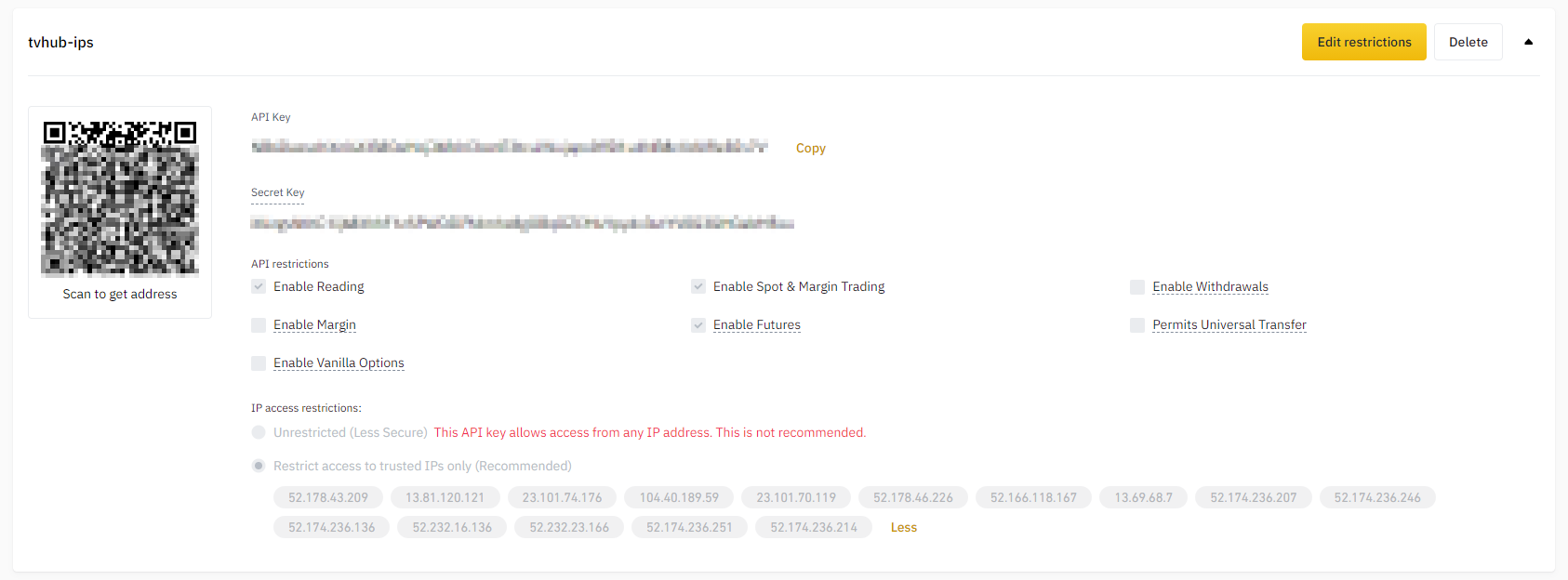
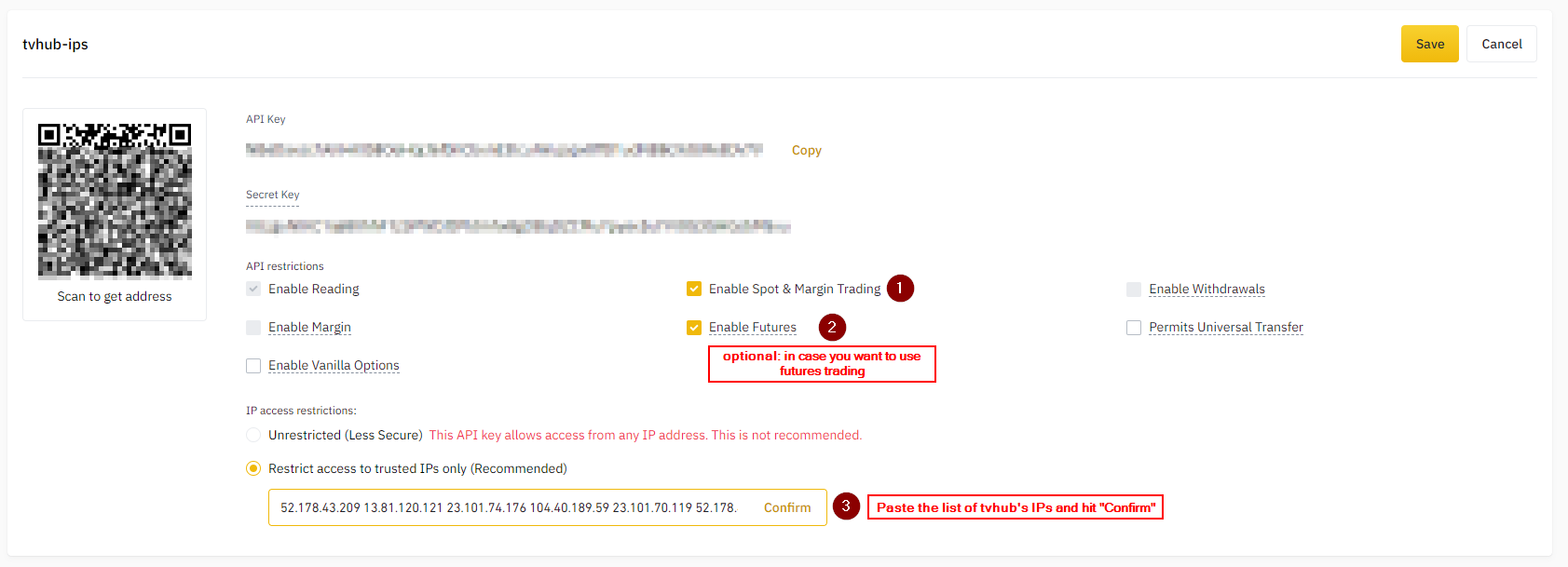
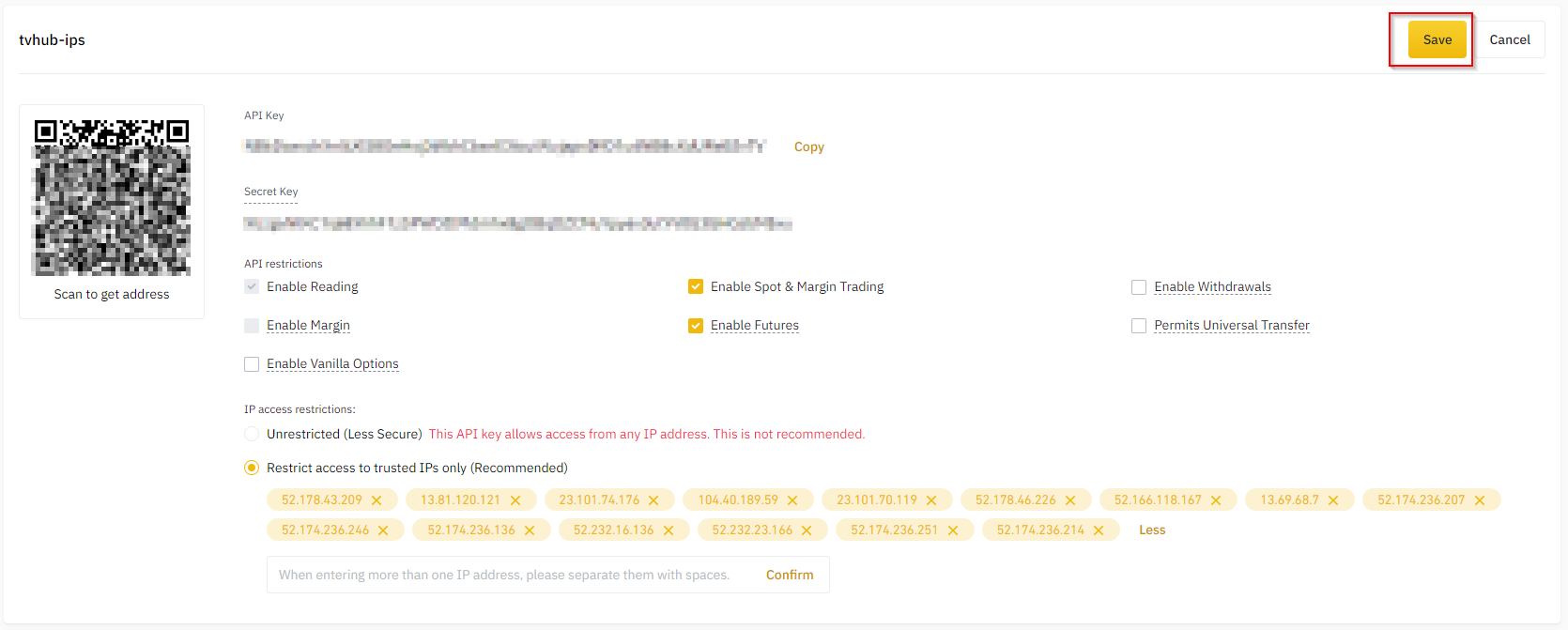
- Edit restrictions:
- Restrict access to trusted IPs only — paste TVH IPs (see Webhook URLs & IP Whitelist).
- Enable Enable Spot & Margin Trading.
- Leave Enable Withdrawals ❌ off.
- Save Key + Secret to TVH at Account → Settings → API Keys.
Binance Futures USD-M
| Field | Value |
|---|---|
| Exchange identifier | binance-futures |
| Webhook URL | https://binance.tv-hub.org — same as Binance Spot, different from all other exchanges |
| Symbol format | BTCUSDT, ETHUSDT (same as Spot) |
| Margin | USD-margined perpetuals (USDT, USDC, BNFCR collateral) |
| Max leverage | up to 125× (per-pair tier) |
| Hedge Mode | ✅ via "hedgeMode": true |
| Permissions required | Read + Enable Futures |
| Sub-account support | ✅ via named apiKey field |
| Demo path | ✅ Demo Account checkbox — routes the key to Binance's paper-trading endpoint. The binance-futures-testnet identifier is the alternative, see Testnets tab. |
Webhook URL — same Binance subdomain as Spot:
Binance IP whitelist — paste these into the key's IP-restriction field:
20.194.185.150 20.191.169.179 20.191.172.69 20.48.71.250 20.191.172.206 20.191.173.63 20.191.174.156 20.191.175.88 20.78.104.150 20.78.105.3 20.78.105.95 20.78.105.134 20.78.105.150 20.191.175.195 20.78.105.154 20.78.105.162 20.78.105.172 20.78.105.244 20.78.106.67 20.78.106.119 20.78.106.130 20.48.71.143 20.78.106.137 20.78.106.149 20.78.106.151 20.191.173.152 20.78.106.157 20.78.106.166 20.46.190.72 20.78.106.172 20.43.67.38 13.69.68.7 52.174.236.207 52.174.236.246 52.174.236.136 52.232.16.136Example payload (hedge mode long):
{
  "token": "your-tvh-token",
  "exchange": "binance-futures",
  "pair": "BTCUSDT",
  "isMarket": true,
  "isBuy": true,
  "units": 1,
  "unitsType": "percentWallet",
  "leverage": 10,
  "marginType": "isolated",
  "hedgeMode": true
}
On Binance, hedge mode is driven by hedgeMode: true (and closeLong / closeShort for side-specific exits). The positionSide field is OKX-only — it has no effect on Binance. See Futures options for leverage, marginType, and hedgeMode semantics, and Hedge Mode for the full picture.
API key creation
The flow is identical to Spot, with one change: enable Futures.
- Account → API Management → Create API → System generated.
- Pass email + 2FA.
- Edit restrictions:
- IP-restrict to TVH IPs.
- Enable Futures ✅
- Leave Withdrawals ❌ off.
- Save Key + Secret to TVH, picking
binance-futuresin the Exchange dropdown.
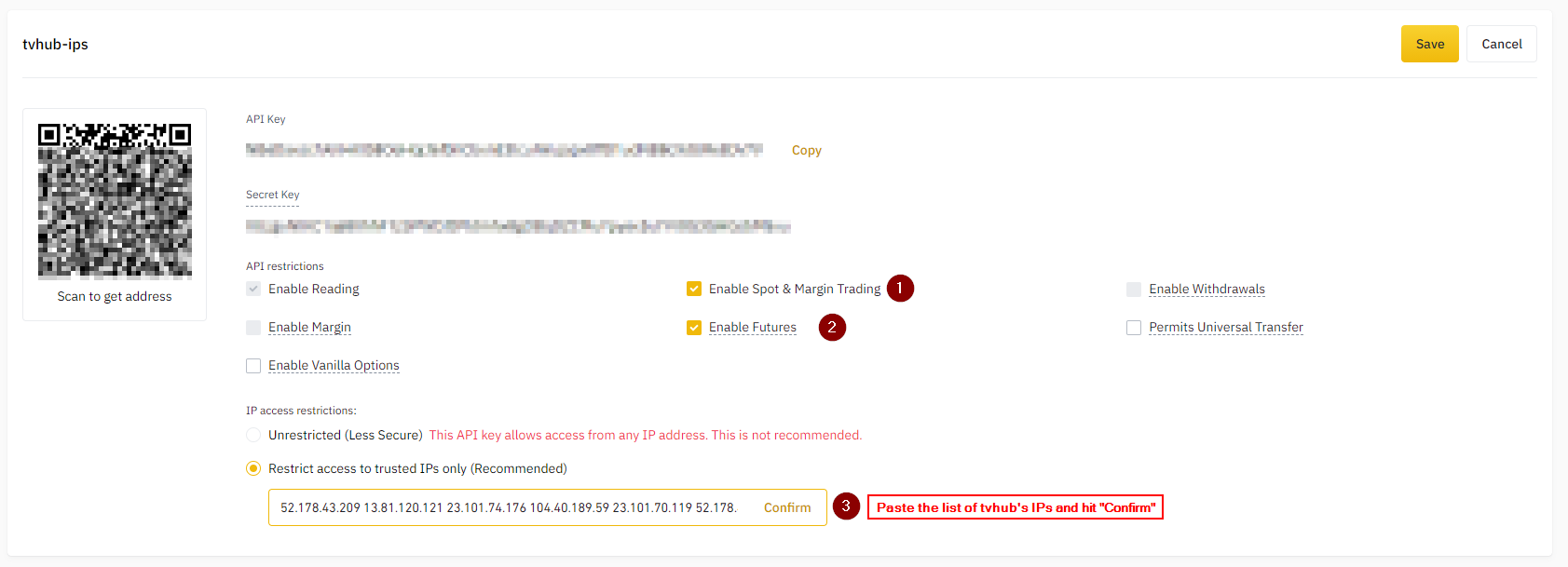
A Spot-only API key cannot trade futures and vice versa. If you want both, either enable both on one key, or create two separate keys and add both to TVH (you'll see binance and binance-futures as separate dropdown entries).
BNFCR collateral mode
Binance Futures supports BNFCR (Binance Funding Coin) as collateral alongside USDT/USDC. From TVH's perspective:
- Sizing fields like
percentWalletuse the wallet's current asset balance, regardless of which stablecoin you're using - If your futures wallet is denominated in BNFCR, sizing math operates on BNFCR balance
- Symbol stays
BTCUSDT— BNFCR is collateral, not the contract type - Demo-mode symbol info is fetched live from the demo exchange info endpoint because demo and live can carry different symbol configs
Binance Futures Coin-M
Coin-margined contracts are denominated and settled in the underlying coin (BTC, ETH, BNB, …) instead of USDT.
| Field | Value |
|---|---|
| Exchange identifier | binance-futures-coin |
| Webhook URL | https://binance.tv-hub.org |
| Symbol format | BTCUSD_PERP (perpetual), BTCUSD_251226 (quarterly) — note the underscore |
| Contract multiplier | 100 USD (BTC pairs), 10 USD (alts) — affects size scaling |
| Margin | Coin-margined (your collateral is the asset itself) |
| Max leverage | up to 125× (per-pair) |
| Hedge Mode | ✅ |
| Permissions required | Read + Enable Futures |
| Sub-account support | ✅ via named apiKey field |
| Demo path | ❌ Demo Account checkbox is not available for Coin-M, use binance-futures-coin-testnet instead |
Webhook URL:
Binance IP whitelist — paste these into the key's IP-restriction field:
20.194.185.150 20.191.169.179 20.191.172.69 20.48.71.250 20.191.172.206 20.191.173.63 20.191.174.156 20.191.175.88 20.78.104.150 20.78.105.3 20.78.105.95 20.78.105.134 20.78.105.150 20.191.175.195 20.78.105.154 20.78.105.162 20.78.105.172 20.78.105.244 20.78.106.67 20.78.106.119 20.78.106.130 20.48.71.143 20.78.106.137 20.78.106.149 20.78.106.151 20.191.173.152 20.78.106.157 20.78.106.166 20.46.190.72 20.78.106.172 20.43.67.38 13.69.68.7 52.174.236.207 52.174.236.246 52.174.236.136 52.232.16.136Example payload:
{
  "token": "your-tvh-token",
  "exchange": "binance-futures-coin",
  "pair": "BTCUSD_PERP",
  "isMarket": true,
  "isBuy": true,
  "units": 1,
  "unitsType": "absolute",
  "leverage": 5,
  "marginType": "isolated"
}
Coin-M contracts size in contracts, not coins. A BTC contract = 100 USD of notional value. Setting "units": 1 means 1 contract = 100 USD of BTC exposure. Read the Binance contract spec for each pair before going live.
Symbol format reference
| Pair | Perpetual | Quarterly |
|---|---|---|
| BTC | BTCUSD_PERP | BTCUSD_251226 (settles 26 Dec 2025) |
| ETH | ETHUSD_PERP | ETHUSD_251226 |
| BNB | BNBUSD_PERP | — |
API key
Same as USD-M (enable Futures permission). No separate "Coin-M" toggle — one Futures permission covers both contract types.
Binance Testnets
Binance offers two parallel paths to risk-free trading: the Demo Account checkbox (available for Spot + USD-M Futures) and separate testnet sites (the only path for Coin-M). Testnet environments have their own websites and their own API keys.
For the full step-by-step demo setup with screenshots, see Demo Accounts → Binance.
| Variant | TVH identifier | Testnet site |
|---|---|---|
| Futures USD-M Testnet | binance-futures-testnet | testnet.binancefuture.com |
| Futures Coin-M Testnet | binance-futures-coin-testnet | testnet.binancefuture.com (Coin-M section) |
| Spot Testnet | ❌ Not supported in TVH | n/a |
For Spot and USD-M, the Demo Account checkbox is the simpler path (no separate website + key required). Use the testnet identifier when you need a clean separate environment (e.g. for copy-trading test runs).
How testnets differ from live
- Separate accounts — your live API key won't work on the testnet site
- Separate balances — testnet gives you free test-USDT and test-BTC; no real funds
- Separate order books — prices follow live with a delay; liquidity is thin
- Same symbol format and same payload shape — only the
exchangeidentifier changes - Same Hedge Mode + leverage + margin-type behaviour
Setup
- Go to testnet.binancefuture.com and create an account (separate login from live Binance).
- Generate an API key on the testnet site — Key + Secret.
- Add to TVH at Account → Settings → API Keys:
- Exchange dropdown: pick
binance-futures-testnet - Paste Key + Secret
- Do not tick the Demo Account checkbox here — the testnet identifier already routes to the testnet endpoint. The checkbox is for the parallel Demo path on the live
binance/binance-futuresidentifiers.
- Exchange dropdown: pick
- In your TradeCommand payload, set
"exchange": "binance-futures-testnet". - Webhook URL stays the same as live Futures:
https://binance.tv-hub.org.
Example testnet payload:
{
  "token": "your-tvh-token",
  "exchange": "binance-futures-testnet",
  "pair": "BTCUSDT",
  "isMarket": true,
  "isBuy": true,
  "units": 0.01,
  "leverage": 5,
  "marginType": "isolated"
}
Common Binance quirks
- Position Mode must be set first. Before your first trade in Hedge Mode, switch the Binance Futures account from One-way to Hedge Mode in the Binance UI. TVH's
hedgeMode: truewill fail if the account is still on One-way. - Margin type is per-pair AND per-account. Switching from Isolated to Cross on BTC doesn't affect ETH. TVH sets it on every trade if
marginTypeis specified, but the change can fail mid-position if you already have an open position on that pair. - Sub-account trading uses one TVH API key per sub-account — see Sub-accounts below.
- One key, one Futures contract type. A Coin-M and USD-M position both count against the same Futures-permission key. You don't need separate keys for the two.
Sub-accounts
Binance sub-accounts are routed via the named apiKey field — one TVH API key per sub-account:
-
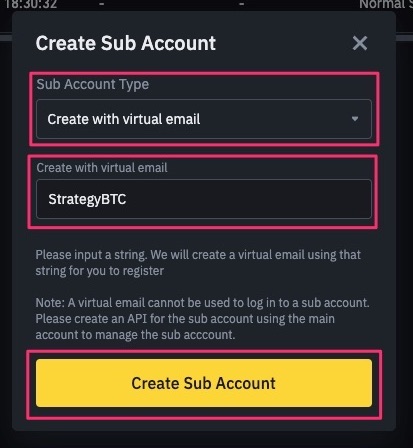
In Binance, open Sub Accounts and click + Create Sub Account — pick Create with virtual email and give it a label like
StrategyBTC.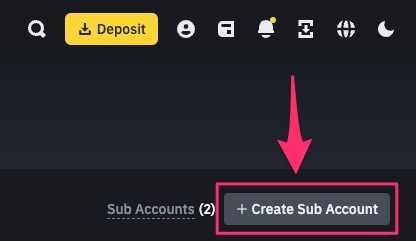
-
A virtual-email sub-account cannot be logged into directly, so create its API key from the main account (manage the sub-account's API from the master UI).
-
Add that key to TVH with a descriptive name, then target it from your payload via
"apiKey": "<TVH key name>".
Feature support
| Feature | Spot | Futures USD-M | Futures Coin-M |
|---|---|---|---|
| Hedge Mode | n/a | ✅ | ✅ |
useFixedSize (quote sizing) | ✅ | ✅ | ✅ |
useEntireAccountBalance | ❌ | ❌ | ❌ |
| Multiple TPs | ✅ | ✅ | ✅ |
| Trailing Stop | ✅ | ✅ | ✅ |
| Scaled Orders | ✅ | ✅ | ✅ |
| Limit Order Chasing | ✅ | ✅ | ✅ |
| Sub-Accounts | ✅ | ✅ | ✅ |
Full matrix: Exchange Quirks Reference.
Related
- Common Setup — universal 4-step flow
- Webhook URLs & IP Whitelist — Binance Futures uses a different subdomain
- TradeCommand Futures options —
leverage,marginType,hedgeMode - TradeCommand Sizing —
unitsType,percentWallet, BNFCR collateral - Exchange Quirks Reference — symbol formats, demo support, feature matrix