Hyperliquid — Perps + Spot
Hyperliquid is the on-chain venue in the TVH lineup. It is not an exchange account with a password: you trade from a wallet, and TVH signs orders with an API wallet (Hyperliquid calls it an agent wallet) that you authorise from your main wallet. That difference shapes everything on this page — the credentials are an address and a private key, the API wallet expires by itself, and there is no subscription to pay if you approve the builder fee.
- 2 exchange identifiers:
hyperliquid(Perps),hyperliquid-spot(Spot) - Credentials are a main wallet address + an API wallet private key, not a key/secret pair
- The API wallet expires after 180 days at the latest and must be given a name
- Free to use by approving the TVH builder fee — 0.01% per fill on perps, 0.03% on spot
- 4% off Hyperliquid's own fees with our referral code — claimable on an existing account under 10,000 USDC of volume
- Symbol format:
BTC(perps, bare coin name) ·HYPE/USDC(spot, slash separator) — TradingView tickers likeHYPEUSDC.Pare mapped for you - Minimum order value: 10 USDC, on both markets, and it is exact
- Spot has no stop loss of any kind — the exchange has not enabled trigger orders there
- Demo via the Demo Account checkbox (routes to the Hyperliquid testnet), both markets
- Both identifiers use
https://alerts.tv-hub.org
Webhook URL
Both Hyperliquid markets use the default endpoint:
API key creation
Hyperliquid does not issue API keys. You create an API wallet, keep its private key, and authorise it from your main wallet. The API wallet can trade your account but can never withdraw — withdrawal permission stays with the main wallet alone.
-
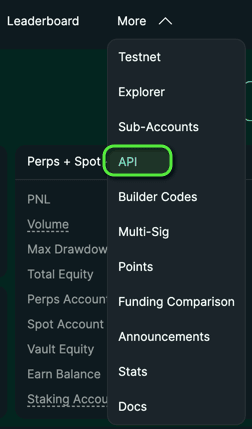
Log in at app.hyperliquid.xyz and open the API page, or find it under More → API.
-
Give the API wallet a name (for example
tvhub), click Generate, then Authorize API Wallet.
-
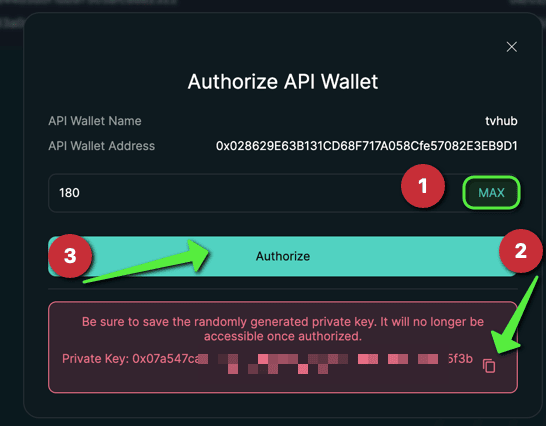
In the dialog: click MAX for the longest life Hyperliquid allows (180 days), copy the private key, then click Authorize and sign in your wallet.
-
Open the account menu in the top right corner and copy your main wallet address — the address you deposit to, not the API wallet address from the dialog.

-
Add them to TVH at Account → Settings → API Keys:
- Main wallet address field → the address from step 4
- API wallet private key field → the private key from step 3
- Pick
Hyperliquidin the Exchange dropdown. One key covers both markets.
The dialog shows the private key once, above the Authorize button, and Hyperliquid does not show it again afterwards. An API wallet whose private key you did not keep is unusable — you can only generate a new one.
Hyperliquid does not list unnamed API wallets, so TVH cannot read back when an unnamed one expires and cannot warn you before it dies. Naming it costs one field and buys the expiry pill on your key list.
One key, both markets
Unlike every other exchange in TVH, Hyperliquid Perps and Hyperliquid Spot share a single API key entry. You add it once; the exchange field in your TradeCommand decides which market a signal hits. The same is true of the builder fee approval — one signature covers both.
The API wallet expires
Hyperliquid switches every API wallet off after 180 days at the latest, regardless of use. This is the exchange's own deadline and is separate from how long TVH considers the key valid. Your key list shows both: the Status column is TVH's, the pill under the exchange name is Hyperliquid's.
When that date arrives, create a new API wallet on Hyperliquid, then delete the key in TVH and add it again with the new private key. The main wallet address does not change, so the builder fee approval survives — it belongs to the address, not to the API wallet.
Free trading via the builder fee
Hyperliquid lets you route a small share of your trading fee to a "builder". Approving TVH as your builder is what makes the key free to use — there is no subscription to buy and nothing to prove.
| Perps | Spot | |
|---|---|---|
| Builder fee per fill | 0.01% | 0.03% |
| Signed upper limit | 0.03% (one signature covers both markets) |
You sign the approval with your main wallet — the API wallet cannot sign it. Do it in the add-key form, or later from the key list with the Approve button. You only pay when a fill happens, and you can revoke the approval on Hyperliquid at any time; the key then falls back to the 7 day trial or your subscription.
For taker fills, Hyperliquid's own fee plus the builder fee still lands at or below the equivalent trade on Bybit.
4% off Hyperliquid's own fees
Separate from the builder fee, and they stack: our referral code takes 4% off what the exchange charges you, while the builder fee is what makes the TVH key free.
- New account — sign up through our referral link and the code is applied for you.
- Existing account — you can still claim it as long as you have traded less than 10,000 USDC in volume. Open the referrals page, click Enter Code and enter
TVHUB.

Past that, Hyperliquid stops accepting a referral code on the account, and the only route to the discount is a fresh account. If you are close to it and want the discount, add the code before your next trades.
Variants
- Perps
- Spot
Hyperliquid Perps
| Field | Value |
|---|---|
| Exchange identifier | hyperliquid |
| Webhook URL | https://alerts.tv-hub.org |
| Symbol format | BTC, ETH, HYPE — bare coin name |
| Margin | USDC-collateralised, one-way mode only |
| Max leverage | Per symbol, roughly 3× to 40× |
| Margin type | isolated (default) or cross — see the casing note below |
| Sub-account support | ✅ Add the sub-account address as its own key — see Sub-accounts |
| Demo support | ✅ Demo Account checkbox → Hyperliquid testnet |
Example payload:
{
  "token": "your-tvh-token",
  "exchange": "hyperliquid",
  "pair": "BTC",
  "isMarket": true,
  "isBuy": true,
  "units": 0.01,
  "leverage": 5,
  "marginType": "ISOLATED"
}
marginType casing is strict hereHyperliquid expects the exact string "ISOLATED" or "CROSS". Every other exchange normalises the value, so lowercase works there — on Hyperliquid, send the uppercase form. A null field defaults to isolated. See Futures Options — margin type.
Hyperliquid marks certain markets as isolated-only. Asking for cross margin on one of those is refused by the exchange, not by TVH.
Hyperliquid Spot
| Field | Value |
|---|---|
| Exchange identifier | hyperliquid-spot |
| Webhook URL | https://alerts.tv-hub.org |
| Symbol format | HYPE/USDC, PURR/USDC — slash separator |
| Quote assets routed | USDC, USDH, USDT0, USDE only |
| Max leverage | n/a (spot) |
| Sub-account support | ✅ Same as perps |
| Demo support | ✅ Demo Account checkbox → Hyperliquid testnet |
Example payload:
{
  "token": "your-tvh-token",
  "exchange": "hyperliquid-spot",
  "pair": "HYPE/USDC",
  "isMarket": true,
  "isBuy": true,
  "units": 50,
  "unitsType": "percentBalance"
}
Hyperliquid has not enabled trigger orders on its spot market: "Placing trigger orders is not enabled on spot trading yet." A signal carrying a stop loss still executes its entry, the stop-loss part is refused, and the refusal is written to your Activity Log. Trailing stops and move-to-break-even are refused for the same reason. Nothing is emulated client-side, so a spot position opened with a stop in the signal is open and unprotected.
Take profit is not affected — on spot it is a resting limit sell, not a trigger.
Hyperliquid's spot market carries many more quote assets than the four above, but everything else is routed to the perp path by the underlying library and will not trade as spot. TVH refuses those pairs with an explanation instead of sending them, and the symbol dropdown in the Trade Command Builder does not offer them.
Symbol format
The canonical form is the exchange's own spelling: a bare coin name on perps (HYPE), a slashed pair on spot (HYPE/USDC). The Trade Command Builder fills that in for you.
You do not have to send it, though. TVH maps the symbol before anything reaches the exchange, so a TradingView ticker pasted straight off the chart works: send HYPEUSDC.P to a perp signal and it trades the HYPE perp.
Perps
Candidates are tried in this order and the first one that exists on the exchange wins:
- the symbol unchanged — a perp whose name happens to look like a pair still wins over any rewrite
- without a trailing
.P— TradingView's perpetual suffix describes the chart, not the order - everything before the last
/or-—HYPE/USDCandHYPE-USDCboth giveHYPE - minus a trailing
USDC,USDTorUSD—HYPEUSDCgivesHYPE
So HYPE, HYPE.P, HYPEUSDC.P, HYPE-USDC, HYPE/USDC and HYPEUSD all reach the same perpetual.
Spot
- contains a
/→ taken as is -swapped for/when what follows is a routable quote asset- a known quote suffix split off without a separator —
PURRUSDC→PURR/USDC - otherwise
/USDCappended — a barePURRbecomesPURR/USDC - resolved against the exchange's own list, and the canonical spelling from there is what gets sent
What the mapping does not decide
The market comes from the exchange field, never from the symbol. HYPE/USDC sent to hyperliquid trades the HYPE perp, because that identifier is the perp market. Pick the identifier for the market you want; the symbol only has to name the asset.
Matching ignores case, but the exchange's spelling is what gets sent. That is what keeps the k-prefixed perps (kPEPE, kSHIB, kBONK, …) reachable — upper-casing the input, as some adapters do, would lose them.
When nothing matches, the error names every form that was tried, and if the symbol exists on the other Hyperliquid market it tells you which identifier to use instead.
See also: Symbol format reference.
Prices and sizes
There is no fixed tick size. A price is valid when it satisfies both of Hyperliquid's rules at once: at most 5 significant figures, and at most 6 − szDecimals decimal places on perps (8 − szDecimals on spot), where szDecimals is the size precision of the asset. TVH rounds to the nearest valid price for you. A price that breaks the rule is rejected with Price must be divisible by tick size.
The minimum order value is 10 USDC on both markets, and the boundary is inclusive — exactly 10 is accepted, 9.99 is not. There is no minimum quantity. Sizes below the minimum are rejected by the exchange, so keep percentage-based sizing in mind on small accounts.
Sub-accounts
Hyperliquid sub-accounts are addresses your main wallet controls, not separate logins. TVH trades whichever address sits in the key, so a sub-account needs nothing special:
- Create the sub-account on Hyperliquid and fund it from your main account.
- Add a second API key in TVH with the sub-account address in the Main wallet address field, and the same API wallet private key.
- Give it a name you will recognise, and point signals at it with the
apiKeyfield.
The builder fee is approved by a wallet signature, and a sub-account has no wallet of its own to sign with. A key on a sub-account address therefore runs on the 7 day trial or your subscription, even when your main account is approved. If free trading matters more than the separation, trade from the main address.
Account modes
Hyperliquid accounts run in one of three modes, and the mode decides how your collateral is held:
| Mode | Hyperliquid's name | What it means |
|---|---|---|
| Manual | default | Separate balances per market. Hyperliquid recommends this for automated trading |
| Unified Account | unifiedAccount | One balance per collateral asset; perps margin out of it |
| Portfolio Margin | portfolioMargin | Spot and perps merged; HYPE, BTC and others count as perp collateral |
This is how Hyperliquid holds collateral, not something TVH can split. If you trade both markets from one unified account, percentage-based sizing on each market sees the same pot — two 50% positions are 100% of your balance, not 50%. Use Manual mode if you run bots on both markets, or size one of them with absolute units.
An API wallet cannot transfer between your spot and perp balances. If a spot signal fails for lack of USDC while your perp balance is full, move the funds yourself on Hyperliquid — the error message names the perp balance so you can see what happened.
Common Hyperliquid quirks
- The private key is shown once. Before authorisation, above the Authorize button. Miss it and the API wallet is dead weight.
- The API wallet expires on its own. 180 days maximum, whether you use it or not. See the key expiry section.
- Unnamed API wallets are invisible to us. Hyperliquid does not list them, so TVH cannot show or warn about their expiry.
marginTypecasing is strict."ISOLATED"/"CROSS", not lowercase.unitsType: "percent"is not recognised. Like KuCoin and Coinbase, the Hyperliquid adapter rejects the legacy value. SendpercentBalanceorpercentWallet. See Sizing.- No hedge mode. Hyperliquid supports one-way position mode only; a
hedgeModerequest is logged and ignored. - No market orders under the hood. Hyperliquid has no true market order — TVH sends an IOC limit with a slippage buffer instead. Fills behave like a market order; the order type in your Hyperliquid history will read as a limit.
- Spot buys and sells watch different balances. A spot buy needs the quote asset (USDC), a spot sell needs the base asset. There is no margin to borrow against.
- A sub-account key cannot be free. The builder fee is approved by a wallet signature, and a sub-account has no wallet to sign with. See Sub-accounts.
Feature support
| Feature | Perps | Spot |
|---|---|---|
| Market & Limit orders | ✅ | ✅ |
| Multiple TPs | ✅ | ✅ |
| Stop Loss | ✅ | ❌ Not available on the exchange |
| Trailing Stop | ✅ | ❌ |
| Move SL to break-even | ✅ | ❌ |
| DCA / Scaled Orders | ✅ | ✅ |
| Limit Order Chasing | ✅ | ✅ postOnly by default |
updateCurrentLimitOrder | ✅ | ✅ |
| Hedge Mode | ❌ One-way only | n/a |
| Sub-Accounts | ✅ Own key per address | ✅ Own key per address |
| Demo Account checkbox | ✅ | ✅ |
Full matrix: Exchange Quirks Reference.
Related
- Common Setup — universal flow
- Limit Order Management — chasing and repositioning
- Stop Loss — what is wired where
- Exchange Quirks Reference