Debug a Failed Trade Alert
Your TradingView alert fired but no trade appeared? Start with TVH's Activity Log.
Step 1 — Check Activity Log
Go to your Activity Log and open the latest signal. It shows the parsed JSON, the exchange response, and the error message when something is rejected.
No entry at all usually means TradingView sent the alert to the wrong webhook URL, or something is fundamentally wrong with the setup. In that case, check TradingView's own alert log to confirm the alert actually fired. Open the Log tab in TradingView's right-hand alerts panel:
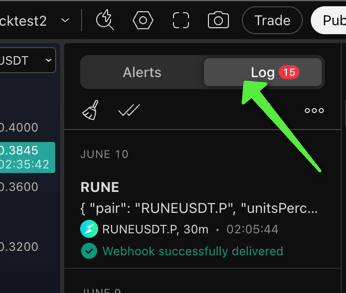
If you see the alert, hover over the entry to expand the full message. Confirm it contains a valid trade command, with the placeholders resolved to real values:
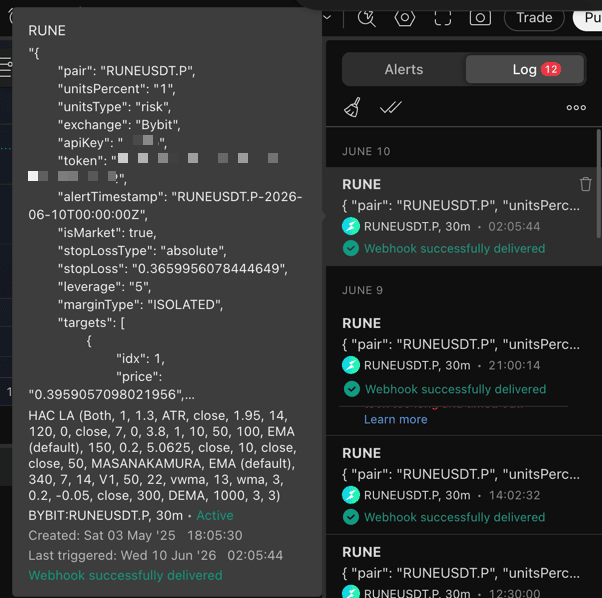
If the message is empty, truncated, or still shows literal {{...}} placeholders, the problem is on the TradingView side, not TVH.
TradingView only waits about three seconds for a response before it reports a delivery failure. In most cases the webhook has already reached TVH and executed; TradingView just gave up waiting for the acknowledgement. Check your Activity Log for the real result. If you also run Email Backup, the e-mail catches the rare case where the webhook genuinely did not arrive.

Step 2 — Match the error
| Log entry | Likely cause | Fix |
|---|---|---|
401 Unauthorized or “Invalid token” | Wrong TVH user token | Copy the token from Account → Settings and paste it into token. |
| “API key not found” | apiKey does not match the dashboard name | Match the API-key label exactly, including case. |
| “Unknown symbol” or “Invalid instrument” | Pair format does not match the exchange | Check Exchange Quirks. BTCUSDT and BTC/USDT are not the same. |
| Exchange rejection such as “Insufficient margin” | Size, leverage, or key permission issue | Reduce unitsPercent and confirm the API key has trading permission. |
| No Activity Log entry | Wrong webhook URL | Copy the URL again from Webhook URLs. |
[ServerError.Unauthorized] -2015: Invalid API-key, IP, or permissions for action. | The exchange key has IP whitelisting on, but the wrong TVH IPs are allowed (or none). Most often the default IP set was whitelisted when the key actually needs the Binance set. | Whitelist the correct TVH IPs on the exchange. Binance Spot and Futures use the Binance IP set, everything else uses the default set. See Webhook URLs & IP Whitelist. |
Order's position side does not match user's setting. Code: -4061 | Classic Binance mismatch: your account is in hedge mode but the trade is one-way, or vice versa. | Set your Binance account to the matching mode (one-way or hedge), or enable the hedge mode option in TVH so the payload matches. See Hedge Mode. |
Step 3 — Check the common gotchas
If the basic fixes do not explain it, read 15 Common TradeCommand Mistakes. Start with:
postOnlybehavior on limit ordersstrategyCommentvalues that close instead of open- missing
alertTimestampon retried alerts