Set Up, Customize, and Share Your Affiliate Link
- Enable the program once from Account → Affiliate → Create Affiliate Link.
- Optionally customize the slug to your nickname or brand — but be aware that doing so breaks any link you've already shared.
- Once you reach Tier 2, the split slider unlocks so you can rebalance kickback vs. user discount at any time.
This page walks you through the practical setup: enabling the program, copying your link, customizing the slug, sharing it, and adjusting the split once you reach Tier 2. For tier mechanics and earnings logic see Affiliate Overview & Tiers.
Step 1 — Enable the program
- Sign in to your TVH account.
- Open Account → Affiliate page (
/Identity/Account/Manage/Affiliate). - Click Create Affiliate Link.
The program is now active on your account. No review, no waiting period — your link is generated immediately.
Step 2 — Copy your link
Your default link uses a system-generated identifier and follows this pattern:
https://www.tv-hub.org/r/<your-id>
Click the copy button next to the link to put it on your clipboard. It's ready to share as-is.

Step 3 — Customize the link (optional)
A system-generated ID works, but most affiliates prefer a memorable slug — your nickname, channel name or brand. Click Customize Link on the affiliate page:

Enter your preferred slug. Lowercase letters, numbers and underscores are accepted — e.g. johndoe, crypto_signals_x, traderbob:
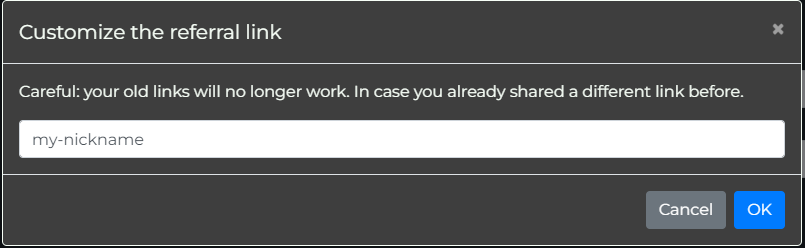
Save it, and your new branded link goes live immediately:

Once you customize, the previous link stops working. Any link you've already shared on social media, in a video description, or in a pinned tweet will return a 404. Re-share the new link everywhere before counting on the change.
Best practice: pick a slug once, early, before you start promoting. Treat it as permanent.
Step 4 — Share the link
When someone clicks your link, they land on the TVH registration page with your referral tracked in the background:
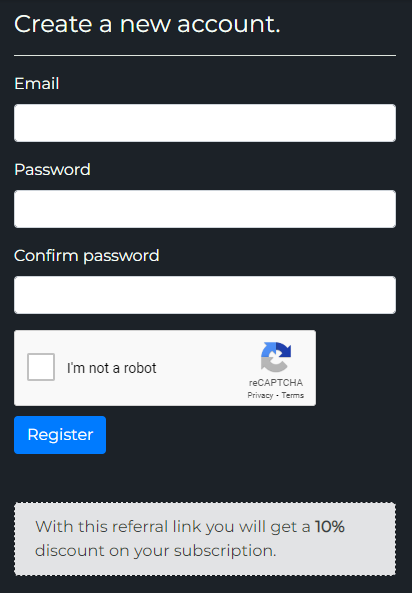
If you've configured a user discount (Tier 2+ split), it shows in an info box on the same page — so prospective users see the deal before they sign up. This is what makes the discount side of the split a real conversion lever, not just a number on your dashboard.
Step 5 — Customize the split (Tier 2+ only)
Once you've reached Tier 2 (10 or more referred subscriptions), the split slider unlocks. From your affiliate page, click Change next to the current split:

Slide between two extremes:
- 0% kickback / max user discount — your share goes entirely to the user as a price reduction.
- Max kickback / 0% user discount — your share goes entirely to you.
The total stays fixed at your tier rate (30% for Tier 2, 35% for Tier 3). Save your choice:

The new split applies only to new sign-ups after the change. Users who registered under your previous split keep their original discount for the lifetime of their account. You can't retroactively change deals you've already offered.
This is intentional: it means you can experiment with the slider without worrying about breaking trust with users you've already onboarded.
Best practices for sharing
Five channels that consistently produce TVH referrals. None of them require a large audience — what matters is matching the channel to the audience's intent.
- YouTube / Twitch — put the link in the video description and a pinned comment. Mention the discount (if you've configured one) in the video itself.
- Twitter / X — pin a tweet with your link and the discount. Mention TVH in tweets about trading setups, but never lead with the link — write something useful first.
- Telegram / Discord — pin the link in your trading community's general channel. Add it to the community's "resources" or "tools" section if there is one.
- Blog / website — in-content contextual links (mentioning TVH when relevant) plus a sidebar widget or footer link for steady passive traffic.
- Email signatures — low-effort, always-on. Every email you send becomes a potential referral.
What NOT to do
These will get your affiliate account suspended and earnings clawed back:
- Bidding on TVH brand keywords in paid ads — running Google Ads on "TradingView Hub", "TV-Hub" or close variations is against TOS. You're capturing traffic that was already searching for us; that's not referral, that's interception.
- Spamming Reddit, Discord or Telegram communities — drive-by link drops in unrelated channels damage TVH's reputation and yours. If a community doesn't allow affiliate links, don't post one.
- Promising returns or guarantees — never claim TVH "guarantees profits", "doubles your money" or any similar phrasing. TVH executes signals; it doesn't generate them. Misleading claims are grounds for immediate termination of your affiliate participation.
Tracking pre-registration vs post-registration
Two distinct mechanisms, depending on where the user is in the funnel:
- Pre-registration: cookie-based, 30-day window. When someone clicks your link, a cookie is set in their browser. They have 30 days to register and become attributed to you. If they clear cookies or sign up from a different device without clicking your link again, attribution is lost.
- Post-registration: permanent. Once a user signs up via your link, the attribution is written to their account record. From that point forward, every purchase and renewal is tracked to you regardless of cookies, devices or how much time passes.
Practical implication: the click matters more than the purchase timing. A user who clicks your link today, clears their cookies, and signs up in six months won't be attributed to you. But a user who clicks today, signs up tomorrow, and renews for the next five years counts for everything.
Next step
Once your link is live and you have a few sign-ups, head to Stats & Payout to read the dashboard and request your first payout.