Track Stats and Request Payout
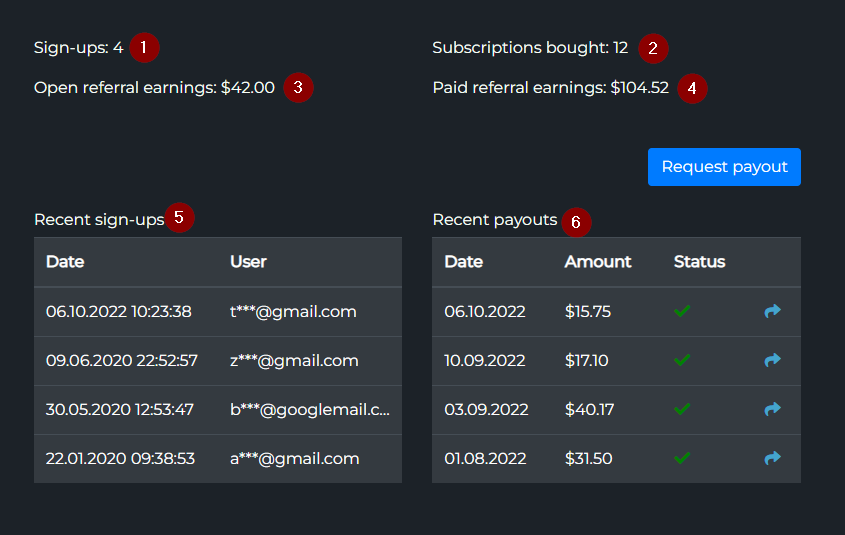
- The Affiliate dashboard shows six headline metrics — sign-ups, subscriptions, open earnings, total paid, recent sign-ups, recent payouts.
- Request payout anytime you have $15+ open earnings. Choose BTC, ETH, USDT or other supported coins.
- Processing takes 1-2 business days. Once paid, you get a transaction link to the block explorer.
This page covers everything that happens after you've shared your link: reading the dashboard, requesting payouts, tracking transactions, and the tax/refund edge cases. For setup and link customization, see Setup, Customize, Share.
Affiliate dashboard
Your dashboard lives on the same TVH affiliate page where you created the link. It updates in near real-time as new sign-ups and subscriptions roll in:
Stats explained
Six KPIs make up the dashboard. Read them in this order — each builds on the previous:
| # | Metric | Meaning |
|---|---|---|
| 1 | Total Sign-ups | Number of users who registered via your link (lifetime). |
| 2 | Total Subscriptions | Of those sign-ups, how many bought a TVH subscription. |
| 3 | Open Earnings | Referral earnings ready to request. This is the balance you can withdraw. |
| 4 | Total Paid | Lifetime payouts you've already received. |
| 5 | Recent Sign-ups | Last 30 users with timestamps. Useful for matching a marketing push to results. |
| 6 | Recent Payout Requests | Last 30 payout requests with status (pending / paid). |
Conversion rate
A quick health check: roughly Total Subscriptions ÷ Total Sign-ups.
- 5–15% is typical for trading-platform affiliates.
- Below 5% suggests your audience is curious but not aligned — they sign up to look around, then never subscribe. Worth reviewing your messaging and targeting.
- Above 15% means your audience is pre-qualified. Consider doubling down on the channel that's producing them.
The dashboard doesn't display this ratio directly. Calculate it yourself from rows 1 and 2.
Requesting a payout
The minimum payout threshold is $15 in open earnings. Below that, the Request Payout button is disabled. No upper limit and no maximum frequency — you can withdraw any time you exceed the threshold.
Click Request Payout to open the payout dialog:
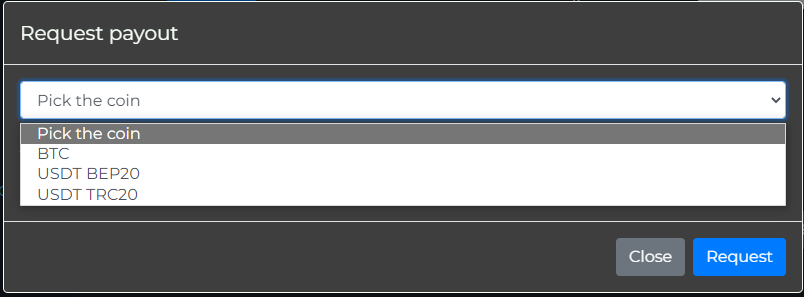
4-step payout request
- Click Request Payout on the affiliate page.
- Pick the coin — TVH supports BTC, ETH, USDT and several other major coins. Each request is independent, so you can switch between payouts.
- Enter your wallet address. Double-check it character-by-character. Blockchain transactions are irreversible — a typo means lost funds.
- Submit. Your request enters the pending queue.
After requesting
Right after submission, the request shows an hourglass icon in your payout history:
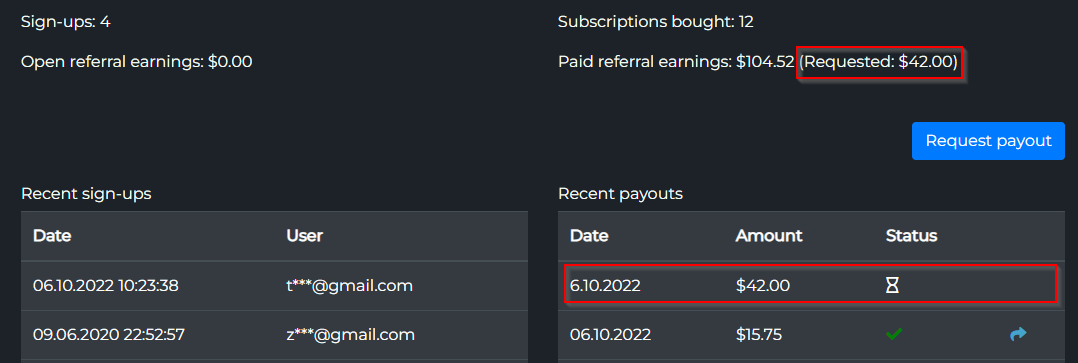
Processing takes 1–2 business days. Payouts are processed manually to add a fraud-check layer; this is the trade-off for letting any account request a payout without KYC.
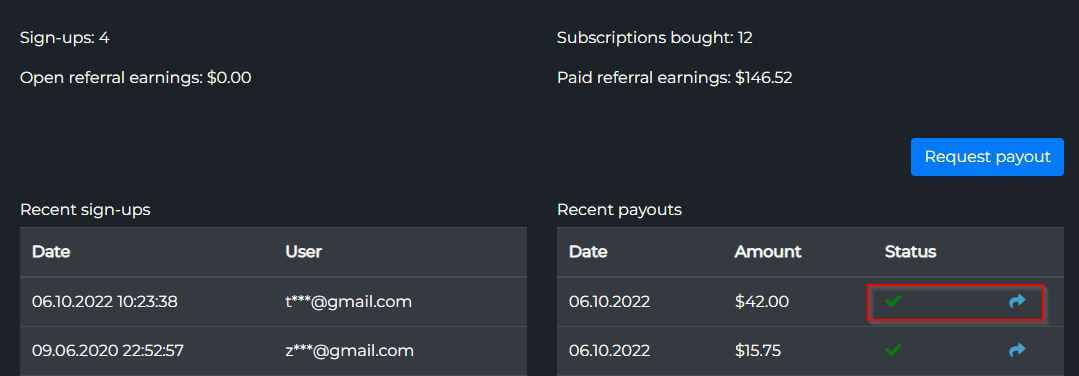
Once paid, the hourglass turns into a green checkmark and a transaction link appears next to it:
Tracking your transaction
Click the link icon next to a completed payout. It opens the block explorer for the coin you chose (mempool.space for BTC, Etherscan for ETH/USDT-ERC20, Tronscan for USDT-TRC20, etc.).
Verify:
- The receiving address matches the one you entered.
- The amount matches your expected payout (minus the network fee, if applicable).
- The transaction has at least one confirmation.
If the address doesn't match — or you spot any discrepancy — contact TVH support immediately with the transaction hash.
Tax considerations
A few things to keep in mind. None of this is tax advice; check with a qualified accountant in your jurisdiction.
- Affiliate earnings may be taxable income wherever you live. Treat it the same way you'd treat freelance income or commissions.
- TVH does not withhold taxes and does not issue tax forms (no 1099, no equivalent for other countries).
- You are responsible for reporting earnings to your local tax authority.
- Keep records — the dashboard's payout history is your primary documentation. Export or screenshot it periodically for your accounting records.
Frequently asked questions
How often can I request payouts?
Whenever your open earnings exceed $15. There's no monthly cap, no waiting period between requests. Many active affiliates request weekly or biweekly.
What if I sent the wrong wallet address?
The transaction is on-chain and irreversible. TVH cannot recover funds sent to a wrong address — neither can the blockchain. Always verify the address before submitting; consider sending a test from your wallet to itself first if you've never used the address.
Can I switch payment coins between payouts?
Yes. Each payout request is independent. You might take payout 1 in BTC and payout 2 in USDT — pick whichever has the lowest network fee or best fits your wallet setup at the time.
What happens if a referred user cancels their subscription?
Future earnings stop — you don't earn on renewals that don't happen. Earnings already in your Open or Paid balance are kept.
Does TVH's refund policy affect my earnings?
Yes, in one case. If TVH issues a refund for a subscription you earned a share on, the corresponding amount is clawed back from your Open earnings. Already-paid earnings are not reversed. In practice, refunds are rare — most cancellations are non-renewal at the end of the term, which doesn't trigger a clawback.