Best TradingView Bots 2026: 8 Crypto Options Compared
TradingView has no built-in trading bot. A TradingView bot is a separate service that receives your alert by webhook and places the order on your exchange. This list compares 8 crypto options in one comparison table, with every price dated October 2026 and our own product ranked first for reasons we spell out.
TL;DR
- TradingView sends alerts, it doesn't trade. A webhook bot turns each alert into an exchange order.
- Pick by exchange first, then by order control. Plan gates decide more than feature lists do.
- TradingView Hub (our product) ranks #1, with 86 documented trade-command fields per alert. It's free on new referral accounts, $23 a month otherwise.
- Webhooks need a paid TradingView plan for every tool on this list.
Affiliate disclosure. TradingView Hub is our own product and sits at #1 for that reason. Judge it by the same criteria as the other seven. The bot is free when you open your exchange account through our referral link: we earn a commission from the exchange, and it keeps the bot free for you without changing your trading fees.
What is a TradingView bot, and does TradingView have one built in?
A TradingView bot is a service outside TradingView that executes your alerts. TradingView fires the alert and posts it to a webhook URL, and the bot turns that message into an exchange order. TradingView's help center adds a hard rule: webhook alerts "are only allowed when 2-factor authentication is enabled" (TradingView Help Center, October 2026).
The bot holds a trade-only API key, so your funds stay on the exchange.
We measured a median of 4.0 seconds from a 1-minute candle close to webhook delivery across 34,174 alerts, and the US session ran 27% slower (real TradingView webhook delay, August 2026). That delay happens before any bot receives the alert, so it hits every bot below.
Our post on the TradingView webhook format shows what a full trade command carries.
The best TradingView bots at a glance
As of October 2026, the eight options below split into five multi-exchange services, one entry for the native signal bots of Binance, Bybit and OKX, one open-source bot and the do-it-yourself route. 3Commas Starter costs $20 a month but is spot only, so the cheapest plan rarely tells you the real price (3Commas pricing page, October 2026).
| If you want... | Pick | Why |
|---|---|---|
| Detailed order logic in one alert | TradingView Hub | 86 documented trade-command fields, free on referral accounts |
| DCA and grid bots next to signals | 3Commas | Largest bot suite, futures from Pro |
| The widest exchange list on a free plan | WunderTrading | 18+ exchanges, 1 free signal bot |
| Signal groups plus TradingView | Cornix | Group signals and TradingView bots in one app |
| One exchange, futures only, no extra tool | Your exchange's signal bot | Built in on Binance, Bybit and OKX |
| Full control of the code | OctoBot or your own server | Open source or self-built |
| Bot | Best for | TradingView input | Crypto exchanges | Futures | SL/TP and order control | Demo | Price from (per month) |
|---|---|---|---|---|---|---|---|
| TradingView Hub | Order logic per alert | Webhook, strategy or indicator alerts | 7: Binance, Bybit, OKX, KuCoin, Bitget, Hyperliquid, Coinbase Advanced | Yes, all plans | Multiple TP, trailing and break-even SL, DCA legs, scaled orders, hedge mode, leverage | Yes, free (not KuCoin, Coinbase) | $0 on referral accounts; $23, or $19 on the 6-month plan |
| 3Commas | DCA and grid suite | Webhook, Pine Script execution | 9 (vendor count) | Pro and up | Signal bots plus separate DCA and grid bots | Yes | $20 Starter, spot only; $50 Pro for futures |
| WunderTrading | Wide exchange list | Webhook | 18+ (vendor count) | Yes, all plans | Signal, DCA and grid bots | Yes | Free plan, 1 signal bot; Basic €17 from Europe |
| Cornix | Signal-group traders | Webhook (create and close trade) | 12 named, incl. Binance, Bybit, OKX, Hyperliquid | Yes | Multiple TP targets, trailing TP, DCA entries | Yes | $32.99 billed annually, $49.90 monthly; 14-day trial |
| Alertatron | Command-style alerts | TradingView alerts | 10 named, incl. Bybit, Binance Futures, OKX, Deribit | Yes | Scaled orders, trailing orders, time-weighted entries | 14-day testnet trial | Free 5 alerts/day; $59 Starter |
| Native exchange bots | One exchange, futures | Webhook; Bybit runs strategies only | 1 each: Binance, Bybit, OKX | Futures or perpetuals only | Limited; Binance sets TP/SL by hand | OKX yes; not stated for Binance, Bybit | No bot fee listed |
| OctoBot | Open source | Webhook from indicators or strategies | 15+ (README) | Cloud Pro | Strategy-dependent | Paper trading | $0 self-hosted; $29.99 cloud Pro |
| Your own server | Full control | Whatever you code | Any with an API | Your code | Your code | Your code | Hosting plus your time |
Vendor pricing and help pages, checked 26 October 2026, not paid accounts. WunderTrading shows prices by location, so its Euro price is what visitors from Europe see.
Which TradingView bot is best for crypto?
For crypto, the best trading bot for TradingView alerts is the one that supports your exchange and the order logic your strategy needs. As of October 2026, TV-Hub covers 7 exchanges with 86 documented trade-command fields (parameter reference). WunderTrading lists 18+ exchanges, and native signal bots cover one exchange each.
1. TradingView Hub: 86 trade-command fields per alert, free through referral links (our product)
Verdict: TradingView Hub executes your TradingView alerts on 7 exchanges, with 86 documented fields per trade command, and it's free on new referral accounts. It has routed TradingView alerts to exchanges since 2019 and counts 40,000+ registered users (About TV-Hub).
One alert carries entry, size, several take profits, a trailing or break-even stop, DCA legs, scaled ladders, hedge mode and leverage. The Trade Command Builder writes the JSON, and the Activity Log shows each signal's result. Telegram notifications, email backup signals and copy trading come on top.
How is it free? Open a new account through our partner link on Bybit, Binance, OKX, KuCoin or Bitget, and that key needs no subscription (free-model docs). Bybit and Bitget check the referral when you save the key; on Binance, OKX and KuCoin our team confirms it by hand. Bybit also needs KYC and a balance of at least 1 USD.
Hyperliquid uses a builder fee instead: 0.01% per perps fill and 0.03% per spot fill (Hyperliquid docs). The full cost picture is in our free crypto trading bots, compared on cost. Start with a free demo trade.
The honest limits:
- TV-Hub has no publicly available grid or DCA bot that runs on its own. The repeat logic lives in your TradingView strategy.
- Crypto only. There's no routing to stock, forex or MT5 brokers.
- 7 exchanges. WunderTrading lists 18+, Cornix names 12 and Alertatron names 10.
- Free applies only to new accounts opened through the link. Existing accounts pay $23 a month, $63 for 3 months or $114 for 6, after a 7-day trial per exchange. Coinbase has no free route.
- KuCoin and Coinbase have no demo or testnet.
- You pay in crypto. A PayPal link exists only on request through support.
2. 3Commas Signal Bot: largest bot suite, futures from the Pro plan
Verdict: 3Commas suits traders who want signal bots, DCA bots and grid bots under one login. Its pricing page lists webhook and Pine Script execution on all plans, 9 exchanges and a demo account (3Commas pricing page, October 2026). There's a free trial, not a free plan.
Starter costs $20 a month, or $15 billed annually, and it's spot only with 2 active signal bots. Futures and up to 20 signal bots start with Pro at $50 a month, or $38 billed annually. Our full TV-Hub vs 3Commas comparison goes field by field.
3. WunderTrading: widest exchange list, free plan with one signal bot
Verdict: WunderTrading offers the widest exchange list here and a lifetime free plan with 1 signal bot, 1 DCA bot and 1 grid bot. The vendor states 18+ exchange integrations, webhook execution on every plan and a demo account for testing (WunderTrading pricing page, October 2026).
Its table ticks spot and futures on all four plans. From Europe, Basic shows at €17 a month, or €13 on annual billing, and Pro has a 7-day trial. On the free plan, one signal bot means one strategy. See TV-Hub vs WunderTrading.
4. Cornix: signal-group automation, TradingView bots on paid plans
Verdict: Cornix fits traders who follow signal groups and want their TradingView alerts in the same app. Advanced costs $32.99 a month billed annually ($49.90 monthly) with 5 active TradingView bots, and Premium costs $52.99 ($79.90 monthly) with unlimited TradingView bots (Cornix pricing page, October 2026).
New users get a 14-day Premium trial without payment details, and the pricing page names 12 exchanges. Each TradingView bot uses a create-trade and a close-trade webhook. The drawback: there's no free plan once the trial ends.
5. Alertatron: command-style alerts for advanced order logic
Verdict: Alertatron is for traders who write their order logic as commands inside the alert. Its homepage describes scaled orders, trailing orders, time-weighted entries and chained command sequences (Alertatron homepage, October 2026).
It has the highest entry price here: Starter costs $59 a month for 300 alerts a day on 2 exchanges, and Pro Trader at $99 opens all of them. A free plan allows 5 alerts a day, and a 14-day trial runs on testnet. Our Alertatron alternative page compares both.
6. Native exchange signal bots (Binance, Bybit, OKX): no extra tool, one exchange
Verdict: if you trade futures on one exchange, its own signal bot may be all you need. Binance, Bybit and OKX each run a TradingView webhook feature, and none of their help articles lists a separate bot fee.
- Binance supports only USDⓈ-M Futures, with up to 100 active signals. A signal stops after 20 failed attempts, and you set TP and SL by hand on the position (Binance FAQ, October 2026).
- Bybit covers USDT, USDC and inverse perpetuals plus inverse futures. It runs strategies only, not indicators, in one-way mode, with one webhook per pair (Bybit Help Center, updated March 2026).
- OKX Signal Bot trades perpetual swaps only, in one-way mode per pair. It takes several pairs per bot and runs in demo trading (OKX Signal Bot FAQ, updated October 2026). TP and SL sit in its exit settings (OKX setup guide, updated August 2026).
7. OctoBot: open source, self-host or cloud
Verdict: OctoBot is the open-source pick, with a TradingView connector for indicator and strategy alerts. The project is GPL-3.0 with 6,861 GitHub stars and names 15+ exchange integrations, including Binance, Coinbase, MEXC and Hyperliquid (GitHub, 26 October 2026).
Self-hosted, it costs nothing, but you run the server, the updates and a public webhook address. On OctoBot cloud, TradingView automation and futures trading need the Pro plan at $29.99 a month, with a 7-day trial (OctoBot pricing page, October 2026). The free cloud plan has no TradingView bot.
8. Your own webhook server: full control, full maintenance
Verdict: build your own only if you want to own every failure mode. Frameworks like Freqtrade, with 55,977 GitHub stars, show how much code a mature bot needs (GitHub, 26 October 2026).
The cost is hosting plus your time. You handle retries, duplicate alerts, partial fills, exchange outages and key security. TradingView also cancels a webhook request that takes longer than three seconds to process, so your server must answer fast (TradingView Help Center).
Built for brokers first: not ranked here
In our October 2026 measurement, AI answers named these four for TradingView bots: TradersPost 7 times, PickMyTrade and SignalStack 3 times each, PineConnector once. We left them out because they focus on broker routing, not crypto exchanges.
- TradersPost lists stocks, futures, options and crypto, via brokers such as Tradovate and Interactive Brokers.
- PickMyTrade leads with futures platforms such as Tradovate and Rithmic and prop firms such as Apex and TopStep.
- SignalStack names over 32 brokers and exchanges across stocks, futures, forex, CFDs and crypto.
- PineConnector routes TradingView alerts to MetaTrader 5.
Closed: goodcryptoX
In our October 2026 measurement, goodcryptoX still appeared in 3 of the 9 answers to "best bot" prompts. Its own site now says: "The hosted goodcryptoX 2.0 service has closed." Check the vendor page before you trust any list, this one included.
What is the best TradingView webhook bot for crypto futures?
For one-exchange futures, a native signal bot is the cheapest start. For several exchanges or detailed order logic, you need a multi-exchange bot. As of October 2026, Binance's signal trading covers only USDⓈ-M Futures with a 100-signal cap and manual TP/SL (Binance FAQ). That's fine for one strategy, and tight for a portfolio.
Compare four things:
- Position mode. Bybit's and OKX's signal bots run one-way only. TV-Hub supports hedge mode where the exchange offers it.
- Leverage and margin. Set them per alert, not by hand.
- Reduce-only exits. A close signal must never open a new position the other way.
- Exit orders. Can one alert place several TP targets and a stop?
On TV-Hub, leverage, margin type, hedge mode and reduce-only are trade-command fields (futures options). Setup pages for Bybit, Binance and OKX show keys and symbols.
How did we rank these TradingView bots?
The order is our editorial judgment, not a score. TV-Hub sits at #1 because it's our product, as the disclosure says. Places 2 to 8 reflect how well each tool covers six criteria for a crypto trader who runs their own TradingView strategy. We compared vendor documentation and official pricing pages on 26 October 2026 and didn't run paid competitor accounts.
The six criteria, with no fixed weights:
- Order logic per alert: take profits, stops, DCA legs, hedge mode, leverage.
- Exchange and futures coverage: count, names and the plan that unlocks futures.
- Price transparency: the real price of the plan you need.
- Reliability and logs: retries and visible error logs, judged from docs only.
- Demo or testnet: a full test without money.
- Key safety: trade-only API keys, no withdrawal rights.
Conflict of interest: we build TV-Hub and chose these criteria. Its weak spots are listed in its entry.
AI answers shape tool shortlists, and they repeat lists that age fast. On 26 October 2026 we sent 15 prompts to ChatGPT (GPT-5.5), Perplexity (Sonar) and Gemini (2.5 Flash), with web search requested. We counted the 14 tool-choice and setup prompts (42 answers) and left out one that named TV-Hub. A brand counts once per answer.
Do you need a paid TradingView plan for a bot?
Yes, for any bot that acts on indicator or strategy alerts. As of October 2026, TradingView's free plan includes 3 active price alerts and 0 technical alerts, with no webhook notifications. Technical alerts and webhooks start with Essential at $14.95 a month on monthly billing (TradingView pricing, October 2026). Prices vary by local currency.
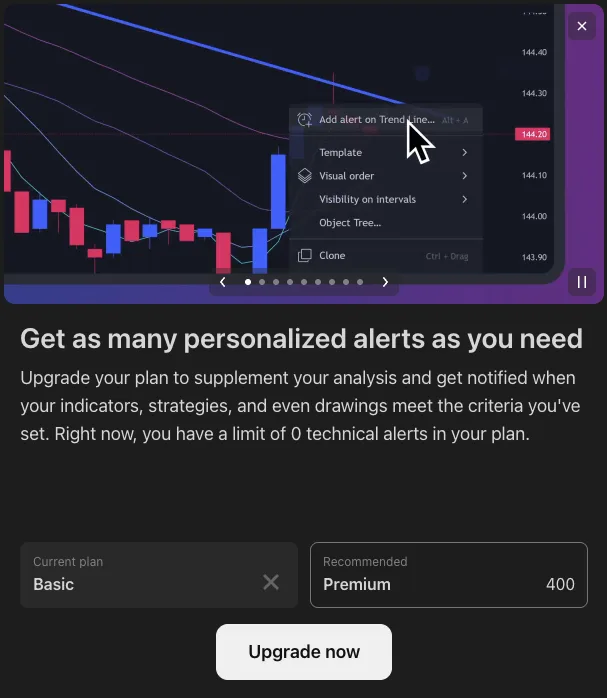
The help articles of Binance, Bybit and OKX state the same paid-plan rule for their signal bots. The free part is the TV-Hub side, through our exchange referral links. See what a free bot setup really costs and our guide to TradingView automated trading.
Can an AI TradingView bot trade for you?
An AI can write the strategy, and a bot executes it. No AI on this list places trades by itself. In January 2024 the CFTC warned that AI "can't predict the future or sudden market changes" and named a bot scheme that took more than $1.7 billion in bitcoin from at least 23,000 people (CFTC customer advisory).
For drafting Pine Script, AI works. Our docs for LLMs give ChatGPT or Claude the exact trade-command schema. The model still can't judge whether your strategy has an edge, so backtest it and run it on demo.
Run your TradingView strategy on TradingView Hub
Start free on demo. Live trading is free on new accounts through our partner links. On Hyperliquid, a builder fee of 0.01% per perps fill replaces the subscription (details).
Start free on demoRead the quickstartFrequently asked questions
Does TradingView have a built-in trading bot?
No. TradingView sends alerts. A separate bot receives the alert by webhook and places the order through a trade-only API key. Webhook alerts need a paid plan and 2-factor authentication on your TradingView account.
What is the best trading bot for TradingView alerts?
For crypto, it depends on your exchange and how much control you need. TV-Hub (our product) documents 86 trade-command fields per alert across 7 exchanges and is free on new referral accounts. 3Commas fits users who also want DCA and grid bots. One-exchange futures traders can start with the exchange's own signal bot.
What is the best crypto trading bot in 2026?
That depends on the bot type. For grid or DCA bots without TradingView, see our guide on how crypto trading bots work. If you run your own TradingView strategy, pick the bot on this list that supports your exchange and futures.
Do I need a paid TradingView plan to use a bot?
Yes, for indicator or strategy alerts. As of October 2026, Basic has 3 price alerts, 0 technical alerts and no webhooks, which start at Essential. An emailed price alert covers price levels only and isn't usable for bots.
Is there a free TradingView bot?
The bot side can be free: TV-Hub on referral accounts, the native signal bots of Binance, Bybit and OKX (no bot fee listed), and self-hosted OctoBot. The TradingView plan for webhooks isn't free.
Are TradingView bots safe?
Use API keys with trade permission only, never withdrawal permission, so funds stay on the exchange. A bot executes your strategy exactly, including its mistakes.
Three steps decide most choices:
- Pick by exchange. The bot must support your exchange and market.
- Test on demo. Run the full alert chain without money first.
- Start small. A bot doesn't make a bad strategy profitable.