Webhook Endpoints — Execute Trade Signal
A TVH webhook endpoint accepts a TradeCommand JSON payload and turns it into a trade on an exchange. This page is the wire reference for the two variants — queued and classic. For the URLs to paste into a TradingView alert and the IP whitelist, see Webhook URLs & IP Whitelist.
- Queued (
POST /) is the default. It deduplicates, retries on transient failures, and absorbs exchange rate-limit bursts, at the cost of a small queue-hop delay. Use this unless you have a specific reason not to. - Classic (
POST /api/ExecuteTradeSignalClassic) skips the queue and executes inline — faster, but no retry and no dedup. Use only for scalping when you have confirmed you need the lower latency. - Both variants exist on both base URLs:
alerts.tv-hub.orgfor everything except Binance,binance.tv-hub.orgfor all Binance markets. - The body schema is the full TradeCommand. Most setups use 6–10 fields.
Endpoint variants
| URL | Base | Queue | When to use |
|---|---|---|---|
https://alerts.tv-hub.org/ | alerts | ✅ | Default. All exchanges except Binance. |
https://alerts.tv-hub.org/api/ExecuteTradeSignalClassic | alerts | ❌ | Low latency, scalping. Accept no-retry, no-dedup. |
https://binance.tv-hub.org/ | binance | ✅ | All Binance markets (Spot, USD-M & Coin-M Futures). |
https://binance.tv-hub.org/api/ExecuteTradeSignalClassic | binance | ❌ | Binance, low latency. |
Use the Binance host for Binance, the default host for everything else. The copy-paste URLs and IP whitelist are in Webhook URLs & IP Whitelist.
Request — single trade
| Method | POST |
| Content-Type | application/json or text/plain |
| Body | A single TradeCommand object |
The minimum useful payload requires five fields:
| Field | Purpose |
|---|---|
token | Your TVH User Token (from Account → Settings). Treat it like a password. |
exchange | Exchange identifier (e.g. binance, bybit-futures, kucoin). |
pair | Symbol on that exchange (e.g. BTCUSDT). |
isBuy / isSell / isClose | Direction flag for normal webhook/API commands. Use orderType only for TradingView strategy-alert templates. |
apiKey | The ApiKeyName you set when you added the exchange key in TVH. |
Plus sizing (one of unitsType + value, units, or positionSize). The full 85-field schema is in Trade Command → Parameter Reference.
Quick close
A close needs no sizing — just point it at the open position and set isClose:
{"pair":"ETHUSD","exchange":"Bitmex-Testnet","apiKey":"Key1","token":"YOUR_TOKEN","isClose":true}
This market-closes the current position on that pair and cancels its pending orders (SL, TPs, DCA limits). See Close & Cancel for partial closes and hedge-mode variants.
Request — batch (square-bracket syntax)
Send multiple commands in a single webhook by wrapping them in an array:
[
  {"token":"...","exchange":"binance","pair":"BTCUSDT","isBuy":true,"apiKey":"K1","unitsType":"percent","unitsPercent":1},
  {"token":"...","exchange":"bybit","pair":"ETHUSDT","isBuy":true,"apiKey":"K2","unitsType":"percent","unitsPercent":1}
]
The queued endpoint enqueues each entry independently. The classic endpoint executes them in parallel. Cross-ref: Features → Batch & Timing.
Code examples — single trade (queued)
- curl
- Python
- Node.js
curl -X POST https://alerts.tv-hub.org/ \
-H "Content-Type: application/json" \
-d '{
  "token": "YOUR_TOKEN",
  "exchange": "binance",
  "pair": "BTCUSDT",
  "isBuy": true,
  "isMarket": true,
  "unitsType": "percent",
  "unitsPercent": 1,
  "apiKey": "BinanceKey1",
  "alertTimestamp": "BTCUSDT-1716364800"
}'
import requests
payload = {
"token": "YOUR_TOKEN",
"exchange": "binance",
"pair": "BTCUSDT",
"isBuy": True,
"isMarket": True,
"unitsType": "percent",
"unitsPercent": 1,
"apiKey": "BinanceKey1",
"alertTimestamp": "BTCUSDT-1716364800",
}
r = requests.post("https://alerts.tv-hub.org/", json=payload, timeout=10)
print(r.status_code, r.text)const axios = require('axios');
(async () => {
const payload = {
token: 'YOUR_TOKEN',
exchange: 'binance',
pair: 'BTCUSDT',
isBuy: true,
isMarket: true,
unitsType: 'percent',
unitsPercent: 1,
apiKey: 'BinanceKey1',
alertTimestamp: 'BTCUSDT-1716364800',
};
const { data, status } = await axios.post(
'https://alerts.tv-hub.org/',
payload,
{ headers: { 'Content-Type': 'application/json' }, timeout: 10000 },
);
console.log(status, data);
})();Test with Postman
Any HTTP client works. In Postman: set the method to POST, the URL to a webhook endpoint, the body to raw, and paste your TradeCommand. A 200 OK means the signal was accepted (on the queued endpoint, check the Activity Log for the execution result; the Classic endpoint returns the result directly — see below).
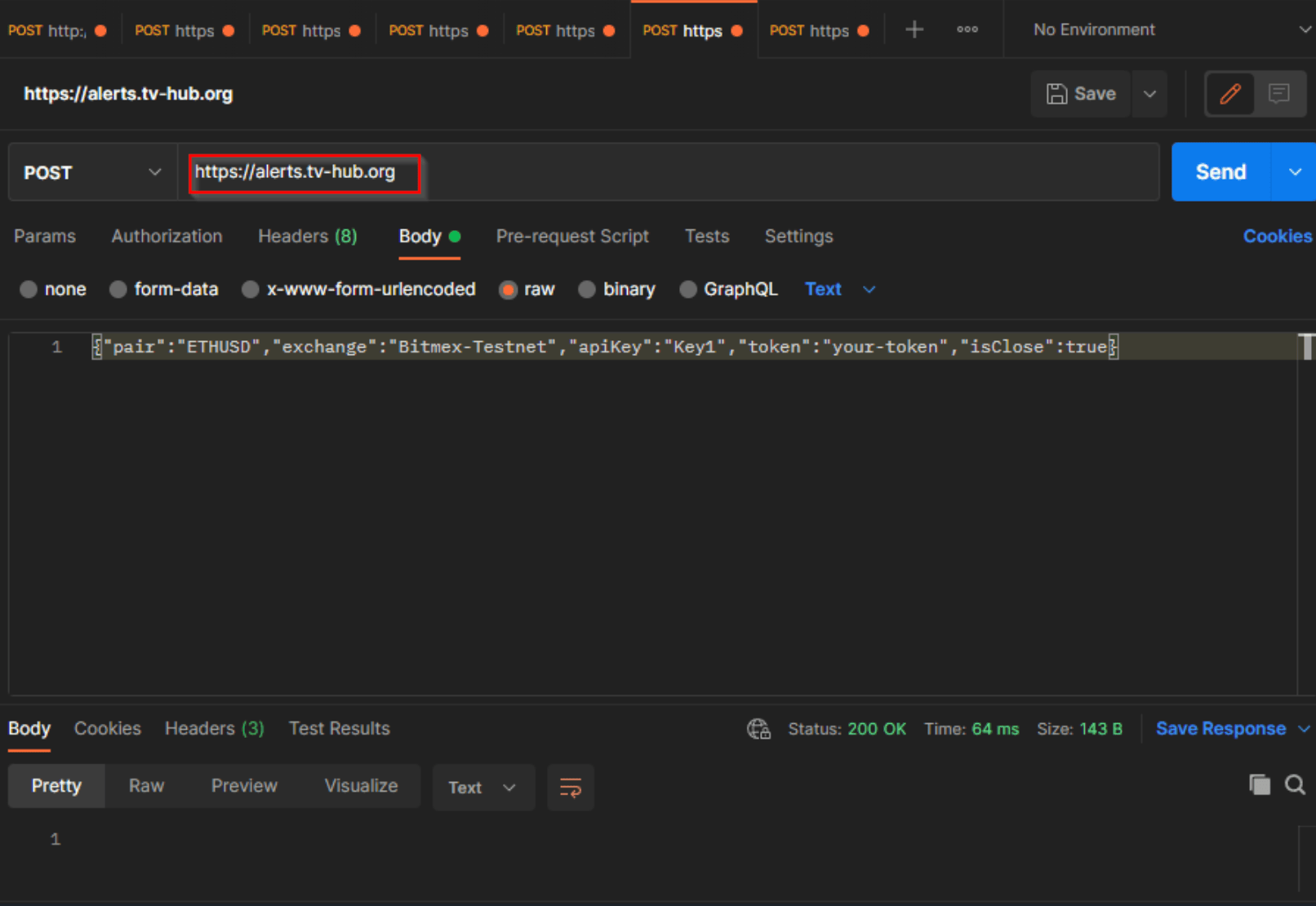
The example above is a minimal close command — {"pair":"ETHUSD","exchange":"Bitmex-Testnet","apiKey":"Key1","token":"your-token","isClose":true}.
Code examples — classic (low latency)
The body is identical. Only the URL changes.
The Classic endpoint runs synchronously, so its response body carries the actual outcome — a human-readable success string, or the exchange's error message if the trade was rejected. The queued endpoint instead returns immediately with an empty body, and its result only appears in the Activity Log.
- curl
- Python
- Node.js
curl -X POST https://alerts.tv-hub.org/api/ExecuteTradeSignalClassic \
-H "Content-Type: application/json" \
-d '{
  "token": "YOUR_TOKEN",
  "exchange": "bybit",
  "pair": "BTCUSDT",
  "isBuy": true,
  "isMarket": true,
  "unitsType": "percent",
  "unitsPercent": 1,
  "apiKey": "BybitKey1"
}'
import requests
r = requests.post(
"https://alerts.tv-hub.org/api/ExecuteTradeSignalClassic",
json={
"token": "YOUR_TOKEN",
"exchange": "bybit",
"pair": "BTCUSDT",
"isBuy": True,
"isMarket": True,
"unitsType": "percent",
"unitsPercent": 1,
"apiKey": "BybitKey1",
},
timeout=10,
)
print(r.status_code, r.text)const axios = require('axios');
(async () => {
const res = await axios.post(
'https://alerts.tv-hub.org/api/ExecuteTradeSignalClassic',
{
token: 'YOUR_TOKEN',
exchange: 'bybit',
pair: 'BTCUSDT',
isBuy: true,
isMarket: true,
unitsType: 'percent',
unitsPercent: 1,
apiKey: 'BybitKey1',
},
);
console.log(res.status, res.data);
})();Code examples — batch
- curl
- Python
- Node.js
curl -X POST https://alerts.tv-hub.org/ \
-H "Content-Type: application/json" \
-d '[
  {"token":"YOUR_TOKEN","exchange":"binance","pair":"BTCUSDT","isBuy":true,"isMarket":true,"unitsType":"percent","unitsPercent":1,"apiKey":"BinanceKey1"},
  {"token":"YOUR_TOKEN","exchange":"bybit","pair":"ETHUSDT","isBuy":true,"isMarket":true,"unitsType":"percent","unitsPercent":1,"apiKey":"BybitKey1"}
]'
import requests
batch = [
{"token": "YOUR_TOKEN", "exchange": "binance", "pair": "BTCUSDT",
"isBuy": True, "isMarket": True, "unitsType": "percent",
"unitsPercent": 1, "apiKey": "BinanceKey1"},
{"token": "YOUR_TOKEN", "exchange": "bybit", "pair": "ETHUSDT",
"isBuy": True, "isMarket": True, "unitsType": "percent",
"unitsPercent": 1, "apiKey": "BybitKey1"},
]
r = requests.post("https://alerts.tv-hub.org/", json=batch, timeout=10)
print(r.status_code, r.text)const axios = require('axios');
(async () => {
const batch = [
{ token: 'YOUR_TOKEN', exchange: 'binance', pair: 'BTCUSDT',
isBuy: true, isMarket: true, unitsType: 'percent',
unitsPercent: 1, apiKey: 'BinanceKey1' },
{ token: 'YOUR_TOKEN', exchange: 'bybit', pair: 'ETHUSDT',
isBuy: true, isMarket: true, unitsType: 'percent',
unitsPercent: 1, apiKey: 'BybitKey1' },
];
const res = await axios.post('https://alerts.tv-hub.org/', batch);
console.log(res.status, res.data);
})();Response
A successful webhook returns 200 OK. The body is typically empty for the queued endpoint (the trade is now in the queue, no result yet) and contains a human-readable status message for the classic endpoint (executed inline so the result is known).
HTTP/1.1 200 OK
Content-Length: 0
For the queued endpoint, 200 OK means "signal accepted into the queue". The actual exchange call happens asynchronously inside the queue worker. Check the Activity Log in the TVH dashboard for the execution outcome. For the classic endpoint, 200 OK does mean "exchange responded successfully" — but the body carries the human-readable result.
Error responses
| Status | Meaning | Notes |
|---|---|---|
400 Bad Request | Malformed body, unknown user, parsing failure, sizing inconsistent | The body is a plaintext error message. Inspect it. |
401 Unauthorized | Not used for webhooks (token is in body). | — |
403 Forbidden | Subscription expired and ApiKey is past its trial window. | Renew or extend. |
422 Unprocessable Entity | Currently surfaces as 400 with a descriptive message. Reserved. | — |
500 Internal Server Error | Server-side issue. Auto-retried by the queued endpoint. | Inspect Activity Log. |
For the full mapping of error bodies to causes, see Error Codes.
Queued vs Classic — when to use which
| Property | Queued (/) | Classic (/api/ExecuteTradeSignalClassic) |
|---|---|---|
| Retry on 5xx exchange errors | ✅ (retries field, default 1) | ❌ |
Deduplication via alertTimestamp | ✅ | ❌ |
| Rate-limit backpressure | ✅ (queue throttles) | ❌ |
| Order preserved within a chain | ✅ | ⚠️ Best-effort |
| End-to-end latency | Higher (queue hop) | Lower (inline) |
| Failure visibility | Activity Log only | Response body + Activity Log |
Default recommendation: queued. Switch to classic only when you have measured the latency and confirmed the trade-offs are acceptable.
Idempotency
Set alertTimestamp on every webhook to opt into deduplication. The lock is keyed on (token, apiKey-or-exchange, alertTimestamp) and the lock row is written on first processing.
The lock is not a 5-minute sliding window. Once written it lives forever. A duplicate payload, same token, same apiKey/exchange, same alertTimestamp, produces the same lock key. TVH recognises it as a duplicate and silently drops it.
Recommended Pine pattern: alertTimestamp="{{ticker}}-{{timenow}}" — unique per bar per symbol. See Trade Command → Timing & Idempotency.
If alertTimestamp arrives as the literal string {{ticker}}-{{time}}, meaning TradingView did not substitute the placeholder, the server replaces it with a fresh GUID before the signal lands in the queue. The same happens when alertTimestamp is empty.
This guarantees a 200 OK but defeats deduplication: every call gets a unique GUID, so a duplicate alert from a misconfigured Pine template will re-trade instead of getting dropped by the lock. The receiver does not warn you when this fallback fires.
Always send a real, substituted value in production. Pine pattern: alertTimestamp="{{ticker}}-{{timenow}}".
Activity Log
Every webhook call appears in the TVH dashboard Activity Log within a few seconds, including:
- The full request body
- The user token resolved to a username
- The trade result (success / failure / skipped due to duplicate)
- Any error message from the exchange
- Latency from receipt to exchange response
Filter by exchange, pair, status, or date range. Activity Log is the source of truth for diagnosing webhook problems — the HTTP response alone is rarely enough because trade execution is asynchronous for the queued path.
Webhook signing / HMAC
Not supported. The token field in the body is the only credential. If you need to prove that a webhook payload originated from a trusted source, that constraint lives on your side — TVH does not generate or verify HMAC signatures. TLS is mandatory (all endpoints reject plaintext HTTP).
Cross-references
- Full body schema: Trade Command → Parameter Reference
- Idempotency mechanics: Trade Command → Timing & Idempotency
- Pine alert setup: Pine Script → Alerts Setup Basics
- Exchange-specific quirks: Exchanges
- Error responses: Error Codes