Official TVH Boilerplate Pine Strategy
We maintain a Pine v5 strategy template on GitHub. It already contains the TVH webhook integration — every input you would normally hand-code (exchange, sizing, SL/TP, DCA, leverage, margin mode) is exposed as a TradingView input setting. Drop your entry logic in, get a TVH-ready strategy in under five minutes.
- Repo:
tradingview-hub/tvhub-boilerplate-strategy - One file:
tvhub-boilerplate-strategy.pine— paste into Pine Editor, save, add to chart. - The reference strategy is Parabolic SAR + Regression Channels + Supertrend; replace the entry conditions with your own.
- Alert Message:
{{strategy.order.alert_message}}— same dispatch pattern as on Strategy Alerts.
What you get
Open the boilerplate and you find:
- A complete TV-Hub input-settings section (token, exchange, pair, sizing, leverage, margin, take-profit ladder, stop-loss, trailing, DCA, advanced flags).
- Runtime
buy_command,sell_command, andclose_commandstrings — assembled from the inputs at every bar. No JSON to hand-write. - A demonstration strategy (Parabolic SAR + Regression Channels + Supertrend) wired with
strategy.entry/strategy.close_allcalls that already passalert_message=. - Visual confirmation: every signal plots on the chart so you can sanity-check before going live.
- Compatible with
{{strategy.order.alert_message}}— one TradingView alert handles every event.
Step-by-step setup
-
Open the file. Visit the GitHub repo and open
tvhub-boilerplate-strategy.pine. Click Raw, then copy the full contents. -
Open Pine Editor in TradingView. Bottom panel → Pine Editor → New → Empty strategy.
-
Paste and save. Replace the empty template, click Save (
Ctrl+S), name it (e.g. "TVH Boilerplate v1"). -
Add to chart. Click Add to chart. The strategy plot appears on the active symbol.
-
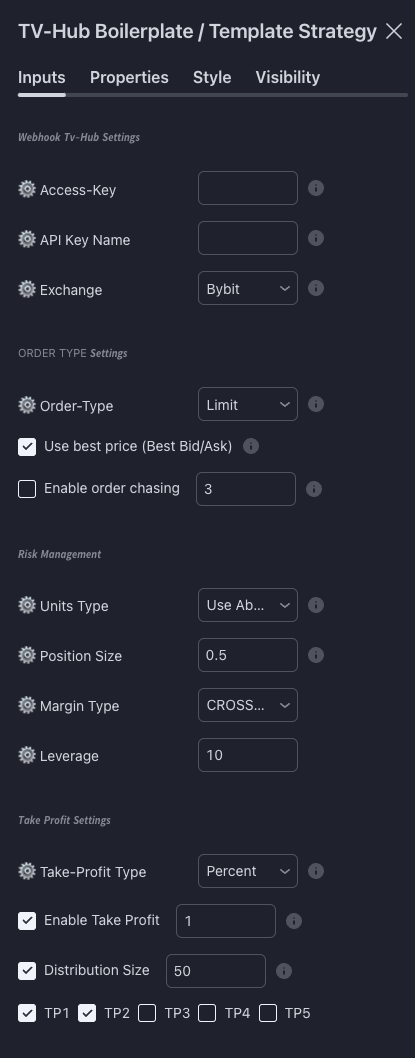
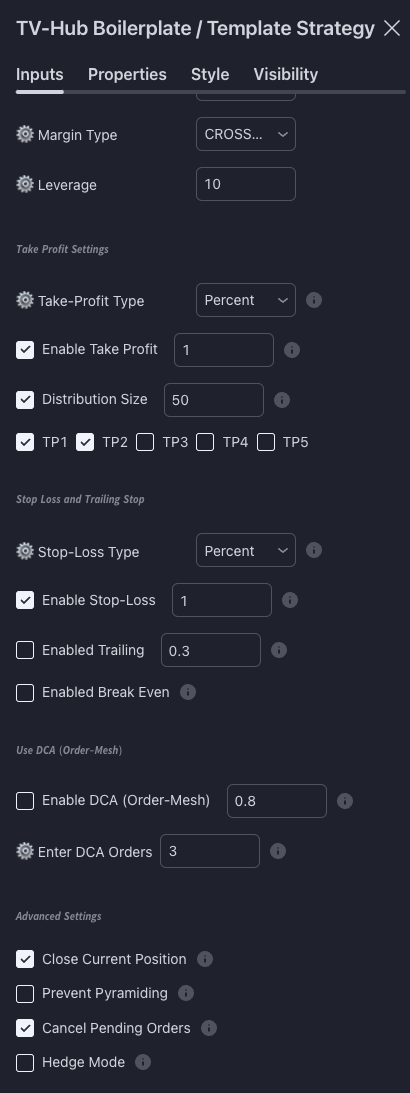
Configure the inputs. Click the gear icon next to the strategy name in the chart. Fill in:
-
Replace the entry condition. Scroll down past the input section to the "Open orders" block. The default uses the demo PSAR/Regression strategy. Replace
buySignalandsellSignalwith your own conditions (see Customising the entry logic below). -
Create the TV alert. Bell icon → Create Alert → Condition = your strategy. Tick Webhook URL, paste the TVH endpoint. Message: literally
{{strategy.order.alert_message}}. -
Smoke test. Run on the 1-minute chart of a low-cap pair you do not mind hitting. Watch the TVH Activity Log to confirm receipt.
Input fields reference
These are the inputs exposed in the current boilerplate (tvhub-boilerplate-strategy.pine, extracted directly from the GitHub source):
Webhook TV-Hub Settings
| Input | Type | Notes |
|---|---|---|
Access-Key | string | Your TVH user token. Find it on the Account & API Keys page. |
API Key Name | string | The label of the API key as saved on TVH (e.g. binance-main). |
Exchange | enum | Bybit, Bybit-Testnet, Binance, Binance-Futures, Binance-Futures-Testnet, Bitmex, Bitmex-Testnet, OKX. |
Order Type
| Input | Type | Notes |
|---|---|---|
Order-Type | enum | Market or Limit. |
Use best price (Best Bid/Ask) | bool | When Limit, sets limitPriceType:"bestPrice". |
Enable order chasing | bool | When Limit + Best Bid/Ask, turns on chaseLimitOrder:true. |
Order chasing interval | float (sec) | Default 20 s. Min 1 s, total chase count fixed (180 → 1h budget at default). |
Risk Management
| Input | Type | Notes |
|---|---|---|
Units Type | enum | Use Fixed Size (USD), Use Absolute Value, Use Percent (Available), Use Percent (Wallet), Risk. |
Position Size | float | Interpreted per Units Type — see the Sizing page. |
Margin Type | enum | CROSSED or ISOLATED. Lowercase on the wire (cross / isolated) — the boilerplate handles the casing. |
Leverage | int | 1–125. Defaults to 10. |
Take Profit
| Input | Type | Notes |
|---|---|---|
Take-Profit Type | enum | Percent or Absolute. |
Enable Take Profit + Distance | bool + float | Master toggle + first-target distance (e.g. 0.3 = 0.3 %). |
Distribution Size | bool + float | When on, splits the position across enabled TPs by percentage. |
TP1 … TP5 | bool | Enable additional ladder rungs. Each rung's distance is set per row. |
Stop Loss and Trailing
| Input | Type | Notes |
|---|---|---|
Stop-Loss Type | enum | Percent or Absolute. |
Enable Stop-Loss + Value | bool + float | Master toggle + SL distance. |
Enabled Trailing + Value | bool + float | Trailing stop percent (Pine's trailingPercent). |
Enabled Break Even | bool | Adds break-even SL movement (exchange support varies — see Stop Loss). |
DCA Order Mesh
| Input | Type | Notes |
|---|---|---|
DCA distance % | float | Spacing between DCA legs. |
Enter DCA Orders | int | Number of additional limit legs (1–10). |
Advanced
| Input | Type | Notes |
|---|---|---|
Close Current Position | bool | Closes opposite-side positions on a flip. Maps to closePosition:true. |
Prevent Pyramiding | bool | Blocks stacking same-direction entries. |
Cancel Pending Orders | bool | Cancels pre-existing limit orders before placing the new one. |
Hedge Mode | bool | Sets hedgeMode:true (used by Binance Futures). Bybit hedge is account-level and ignores this flag. |
The complete dropdown list lives in the source — when in doubt, open the Pine file and read the input.*(...) declarations directly.
Customising the entry logic
Scroll past the input section. You will see a comment block:
//==============================================================================//
//======================= End TV-Hub Input Settings ============================//
//==============================================================================//

//==============================================================================//
// The following strategy is just for demonstration purpose.
// Start to build your own trade logic here.
//=========================|====|====|====|====|====|===========================//
Below that, the demo defines:
buySignal  = ...   // PSAR / Regression / Supertrend combination
sellSignal = ...
And lower down:
if buySignal
    strategy.entry("Long",  strategy.long,  alert_message=buy_command)
    // ... TP/SL bookkeeping ...

if sellSignal
    strategy.entry("Short", strategy.short, alert_message=sell_command)
    // ... TP/SL bookkeeping ...
To plug in your own logic, replace only the buySignal / sellSignal expressions. The strategy.entry(...) lines and the entire input section above stay untouched.
Minimal replacement — EMA crossover:
// Replace the demo signals near the bottom of the file.
fast       = ta.ema(close, 9)
slow       = ta.ema(close, 21)
buySignal  = ta.crossover(fast, slow)
sellSignal = ta.crossunder(fast, slow)
With that one swap, every input on the gear icon now drives an EMA-crossover bot through TVH.
Updating the boilerplate
The repo evolves. Watch it (GitHub → Watch → Releases only) to get notifications when a new version ships. Releases include:
- New input fields (e.g. when TVH adds a new trade-command parameter).
- Bug fixes in the JSON assembly.
- Compatibility tweaks for new Pine versions.
Upgrade procedure:
- Save your customised strategy under a versioned name (e.g.
My Strategy v3 - 2026-05). - Copy the new boilerplate from GitHub.
- Diff against your saved version. Re-apply your
buySignal/sellSignalblock. - Save as a new version. Re-attach the alert.
Contributing
Pull requests are welcome — typo fixes, new input options, new exchange entries in the dropdown. Open an issue first for larger changes. See the repo's readme.md for contribution guidelines.
Next
- Strategy Alerts — how
{{strategy.order.alert_message}}works under the hood. - Strategy Alerts → closed-source automation — when you cannot edit the Pine code at all.
- Strategy Cookbook — eight stand-alone templates that bypass the boilerplate.