Broadcast a Signal — Fire to All Followers
- Broadcasting is one field:
broadcastSignalon yourTradeCommandJSON. Set it to the signal source ID (a GUID) and every active follower receives the trade. - Use the Trade Command Builder's Broadcast Trade switch to wire it up visually. It generates a JSON payload that includes the field.
- Followers' Copy Trade configs override size/leverage. Pair, direction, order type, DCA, trailing — all come from the broadcast.
- Close commands (
isClose,cancelAll, close-long, close-short) broadcast too. One close fires close orders on every follower's account.
You have a Signal Source, you have at least one Copy Trade (yours or a follower's). This page is how you actually fire trades into the channel.
The mechanism: adding broadcastSignal: "<source-id>" to your TradeCommand JSON tells the TVH backend "after executing this trade on my account, replay it on every active follower of this signal source". That is the whole protocol.
Step-by-step
Step 1 — Open the Trade Command Builder
Pick the exchange you trade on and open its Trade Command Builder (the same page you would use for any regular trade — see Trade Command Builder UI).
Step 2 — Activate the Broadcast Trade switch
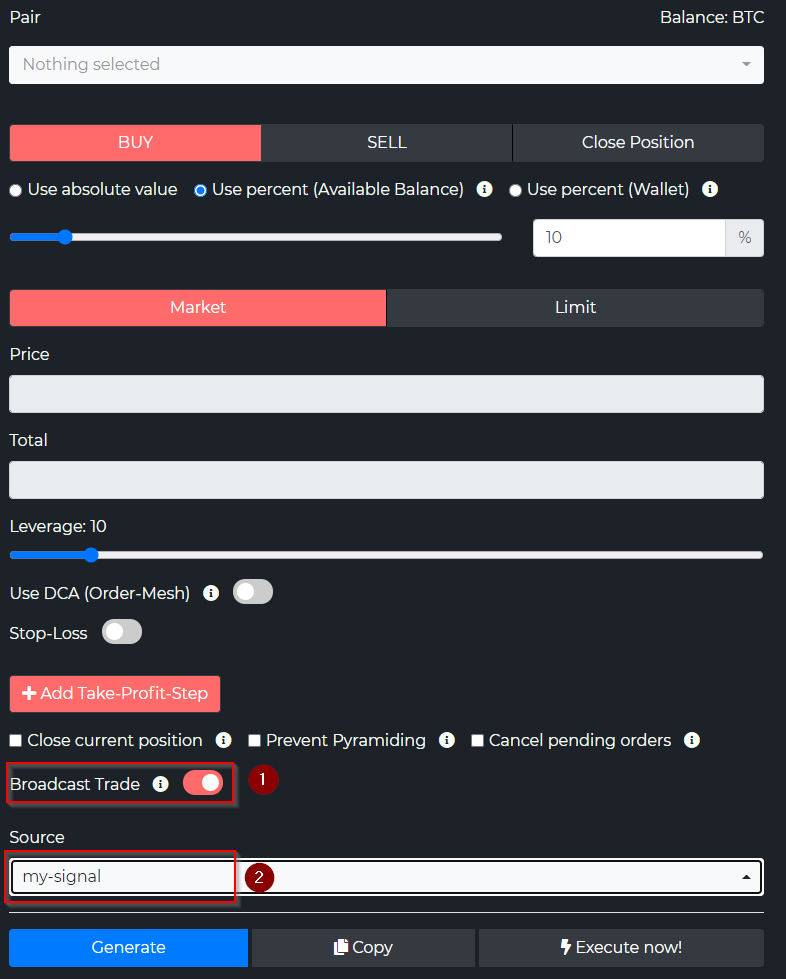
Scroll to the bottom of the builder, below the order-option checkboxes, and flip Broadcast Trade on (1). A Source dropdown appears (2) listing every Signal Source you own.
Step 3 — Pick the signal source
Select the signal source you want this trade to broadcast to in the Source dropdown. It shows the names; under the hood the form stores the source's GUID.
Step 4 — Configure the trade as normal
Build your trade the way you normally would: pair, direction, size, SL, TPs, DCA, trailing stop, hedge mode — every field in the parameter reference is available.
These values become the defaults for followers. Any follower whose Copy Trade does not override a field will use what you set here.
Step 5 — Click Generate
The generated JSON includes a broadcastSignal field with the source's GUID. The rest of the payload is a plain TradeCommand — see TradeCommand Anatomy for the structure:
{
  "exchange": "binance",
  "pair": "BTCUSDT",
  "isBuy": true,
  "isMarket": true,
  "unitsType": "percent",
  "unitsPercent": 5,
  "leverage": 5,
  "stopLossType": "percent",
  "stopLossPercent": 2,
  "broadcastSignal": "SIGNAL_SOURCE_ID",
  "token": "YOUR_TVH_TOKEN"
}
Step 6 — Paste into TradingView
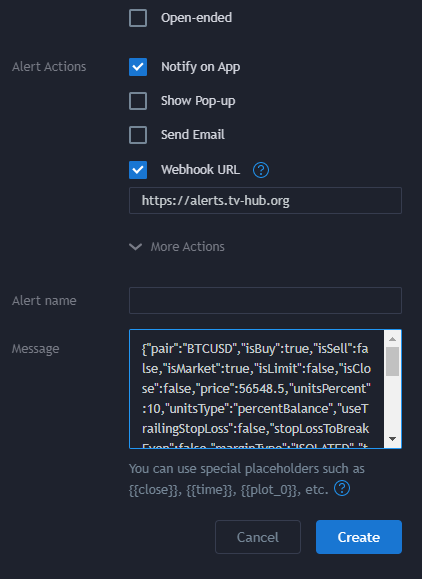
Paste the JSON into your TradingView alert's Message field exactly as you would for a normal trade. Enable Webhook URL and set it to the TVH endpoint that matches the exchange you broadcast from (the provider account fires the trade first, so the endpoint follows your exchange):
- All exchanges except Binance:
https://alerts.tv-hub.org - Binance (Spot & Futures):
https://binance.tv-hub.org— use this whenever the broadcast trades a Binance pair.
Then click Create. The full endpoint list, the low-latency Classic variants, and the matching IP whitelists are on Webhook URLs & IP Whitelist.
When the alert fires:
- Your account executes the trade with the values you set.
- The backend resolves the
broadcastSignalGUID to a list of active followers. - Each follower's Copy Trade template is merged with your broadcast (override rules in Follow a Signal).
- Each follower's exchange order goes out using their own API key.
What followers receive vs. what they override
This is the exact field-by-field mapping a broadcast applies on the follower side.
| Field on the broadcast | Behavior on the follower side |
|---|---|
pair | Always taken from broadcast. Followers cannot override the symbol. |
isBuy / isSell / isClose | Always taken from broadcast. |
isMarket / isLimit / orderType | Always taken from broadcast. |
closeLong / closeShort / cancelAllDca / cancelAllOrders | Always taken from broadcast. Close commands fully cascade. |
useDca / dcaPercent / dcaOrderCount | Always taken from broadcast. |
useTrailingStopLoss / trailingStopLossPercent / stopLossToBreakEven | Always taken from broadcast. |
preventPyramiding / reduceOnly / hedgeMode / workingType / delay | Always taken from broadcast. |
useScaledOrders and scaled-order fields | Always taken from broadcast. |
stopLoss / stopLossPercent / stopLossType | Follower's value wins if non-zero, otherwise broadcast's value is used. |
targets | Follower's value wins if non-empty, otherwise broadcast's targets are used. |
units / unitsPercent / unitsType / leverage / marginType | Follower's values win, except when follower's unitsType: "signalSource" — then broadcast's sizing is inherited. |
maxExposureMultiple | Follower's value wins if set, otherwise broadcast's value is used. See Max Exposure Multiple. |
apiKey / token | Follower's own. The follower's TVH Token is automatically injected, the follower's API key is used for execution. |
The cleanest summary: followers own size and risk caps; the provider owns everything else.
Broadcasting + your own trade execution
When you fire a broadcast trade, your own account executes it too. The default flow is always:
- Trade hits your account first — your API key, your exchange.
- Then it broadcasts — same payload (minus your token/API key) re-keyed for each follower.
There is no "broadcast-only, do-not-execute" toggle in the schema. If you want a broadcast that does not touch your own books, the workaround is to use a separate signal-provider account whose API key is set to read-only or pointed at a paper-trading exchange.
Sending close signals to followers
The close cascade is one of the most useful properties of broadcastSignal. Any trade that closes a position also closes it on every follower.
| Close action you fire | What followers receive |
|---|---|
orderType: "close" (full close) | Position closes on every follower account. |
usePartialClose: true with a partialCloseValue | Partial close fires on each follower (their position size, your percentage). |
closeLong: true / closeShort: true (hedge-mode close) | Hedge-mode-specific close fires on each follower. |
cancelAll: true / cancelAllOrders: true | All pending orders cancelled on each follower. |
cancelAllDca: true / cancelAllDcaOrders: true | DCA-tagged orders cancelled. |
To send a close-only broadcast to followers, build a TradeCommand with the close fields set, attach broadcastSignal, and fire it from a TradingView alert (or from the /api/trade endpoint directly).
Stopping a broadcast stream
If you want to stop new signals from going out:
- Disable the TradingView alert — instant stop, easiest path.
- Remove
broadcastSignalfrom your Trade Command Builder — the next trade you fire only executes on your own account. - Delete or pause the Signal Source — pause requires you to remove the field from every active strategy. Delete also revokes follower access.
Existing positions on follower accounts stay open when you stop broadcasting. Followers manage their own exits unless you fire a close broadcast. This is why you should never go silent mid-trade without warning your followers — they may not know your strategy's exit rule.
Latency considerations
Broadcasting adds overhead — the backend has to read your trade, look up followers, render per-follower commands, and queue execution on each follower's exchange.
Expect roughly 1-5 seconds of added latency between your fill and the follower's fill in normal conditions. Whether that matters depends on your trade profile:
| Trade profile | Suitable? | Notes |
|---|---|---|
| Swing / position | ✅ | A few seconds is rounding error on hour+ holds. |
| Scalping (5-15 min holds) | ✅ | Generally fine. Followers may see modest slippage on volatile pairs. |
| HFT / sub-second | ❌ | Not suitable. The fan-out plus exchange round-trip blows past your edge. Use private endpoints, not copy trading. |
Latency is dominated by the slowest follower's exchange round-trip, not by TVH itself. A follower on a sluggish exchange does not slow down faster followers — broadcasts fan out in parallel — but a follower's own fills may show slippage compared to the provider's fill.
Pine snippet for broadcasting
The simplest way to broadcast from a Pine strategy: include the broadcastSignal field in your alert message.
//@version=5
strategy("Broadcast Example", overlay=true)

// Replace with your real signal source GUID
sourceId = "SIGNAL_SOURCE_ID"
token    = "YOUR_TVH_TOKEN"

buyMsg = '{"exchange":"binance","pair":"BTCUSDT","isBuy":true,"isMarket":true,' +
         '"unitsType":"percent","unitsPercent":5,"leverage":5,' +
         '"stopLossType":"percent","stopLossPercent":2,' +
         '"broadcastSignal":"' + sourceId + '","token":"' + token + '"}'

sellMsg = '{"exchange":"binance","pair":"BTCUSDT","isClose":true,' +
          '"broadcastSignal":"' + sourceId + '","token":"' + token + '"}'

longCond  = ta.crossover(ta.ema(close, 9), ta.ema(close, 21))
shortCond = ta.crossunder(ta.ema(close, 9), ta.ema(close, 21))

if longCond
    strategy.entry("Long", strategy.long, alert_message=buyMsg)

if shortCond
    strategy.close("Long", alert_message=sellMsg)
See Pine Script — Strategy Alerts for the full pattern with multi-position and risk management.
Next steps
- Make sure followers know how the override hierarchy works → Follow a Signal — How override works
- Lock down the risk side before going live → Risk Management
- Need the full schema for
broadcastSignaland every other field? → TradeCommand Parameter Reference