Create a Signal Source
- A Signal Source is a named channel you own. Each broadcast trade you fire references this channel by its ID.
- Create one from Account → Copy Trading → Manage Signals → Add signal.
- Required fields: name, supported pairs, exchange, description. Description supports Markdown.
- Until you create a Copy Trade (your own subscription) or invite followers, nothing happens — the source is just a container.
A Signal Source is just metadata: a name, a description, and a record in the database. The interesting work happens when you wire a broadcastSignal field into your TradeCommand (see Broadcast a Signal) and when subscribers create Copy Trades against it.
Step 1 — Open Manage Signals
Sign in to TVH, click your avatar in the top right, and pick Account → Copy Trading. Open the Manage Signals tab (1) and click Add signal (2).

If the Manage Signals tab does not appear, your subscription tier may not include copy trading. Check the pricing page or Account & API Keys for tier details.
Step 2 — Fill in the signal form
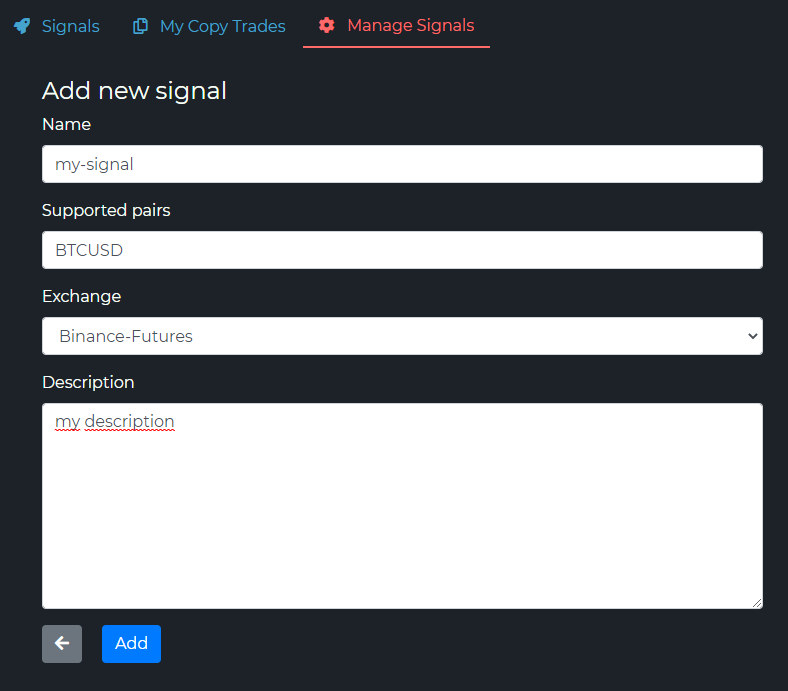
| Field | What to put | Notes |
|---|---|---|
| Signal Name | Short, descriptive (Scalping BTC, ETH Swing 4H) | Appears to followers in their Signals tab. |
| Supported Pairs | Free-text list (BTCUSDT, ETHUSDT, SOLUSDT) | Descriptive only — TVH does not enforce this. Followers can still receive any pair you broadcast. |
| Exchange | The exchange YOU execute on | Followers can still copy on a different exchange, as long as their exchange uses the same pair format. |
| Description | Strategy summary | Markdown is supported. You can include external links to your Telegram, YouTube, or a strategy doc. |
The Exchange field is informational. It tells followers "I trade this on Binance Futures, so I quote sizes in BTCUSDT futures contracts" — but a follower on Bybit Futures can still copy as long as Bybit lists BTCUSDT. See Follow a Signal — Cross-exchange for the details.
Step 3 — Add
Click Add. The signal now appears in your Manage Signals list with its own row — name, exchange, pairs, and the #Follower / #Invitations counters (both at 0 for now). At this point only you can see it — there are no followers yet.

Each Signal Source gets a unique ID (a GUID). You will need that ID when you wire up broadcasting in the Trade Command Builder — but you do not need to type it manually. The Trade Command Builder shows a dropdown of all your signal sources.
What to put in the description
The description is the only place followers learn what your signal does before they subscribe. Keep it specific. Good descriptions usually cover:
| Element | Example |
|---|---|
| Strategy overview | "EMA-200 + RSI divergence on the 1H." |
| Timeframe | "Scalping (5-15m holds)" / "Swing (1-3 days)" / "Position (weeks)". |
| Trade frequency | "~3-5 setups per week on BTC, ETH only." |
| Best market conditions | "Range-bound markets. Pauses during news weeks." |
| Risk profile | "Conservative — fixed 1% balance per trade, hard 2% SL." |
| Contact / community link | A Telegram channel, YouTube, or notion doc. |
| What followers should override | "I trade at 5x leverage. Lower it if you prefer." |
The clearer the description, the fewer support questions you will get from confused followers.
Edit or delete a signal
Both actions live in the same Manage Signals tab next to each row:
- Edit — change the name, pairs, exchange, or description. Editing does not touch existing follower configurations. Their Copy Trades keep working.
- Delete — removes the signal AND revokes all follower access. Followers' Copy Trade configs become unreachable. Use with care.
If you simply want to pause broadcasting for a while, do not delete the signal — just stop adding broadcastSignal to your TradeCommand (or disable the TradingView alert). Followers' subscriptions stay intact.
Next steps
You have a signal source, but no trades will broadcast yet. To make it work you need:
- Follow a Signal — create at least one Copy Trade against this source. Yes, even if the source is your own and you want to mirror trades to your second account, you need a Copy Trade for the follower side.
- Share with Others — optional. Invite other TVH users by email so they can build Copy Trades too.
- Broadcast a Signal — wire the
broadcastSignalfield into your realTradeCommandJSON. This is what actually fires the fan-out when a TradingView alert triggers.