Share Your Signal with Others
- Sharing happens via email invitations. You enter recipients' TVH-registered emails; they see your signal appear in their Signals tab.
- Invitations grant access, not subscription. Followers still need to build their own Copy Trade before they receive broadcasts.
- Bulk invites: comma-separated emails in one go.
- Revoke any time. Existing follower Copy Trades go dormant until you re-invite.
The invitation system is the only way to give someone access to your signal — there is no public discovery, no marketplace listing, no shareable link. You control the guest list.
Prerequisites
Before inviting:
- Recipients must have TVH accounts. Active subscription or trial both work. They cannot accept an invitation if they have not registered.
- You need their registered email address. TVH matches invitations by the email on file. If they registered with
alice@gmail.comand you invitealice@yahoo.com, the invitation stays unmatched.
Step-by-step
Step 1 — Open Invitations
From Account → Copy Trading → Manage Signals, click the number in the #Invitations column of the signal you want to share.
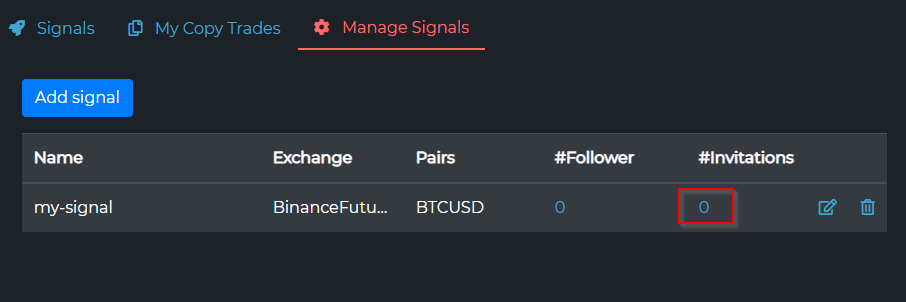
Each signal has its own invitation list — invitations are scoped per signal, not per account.
Step 2 — Open the invitation form
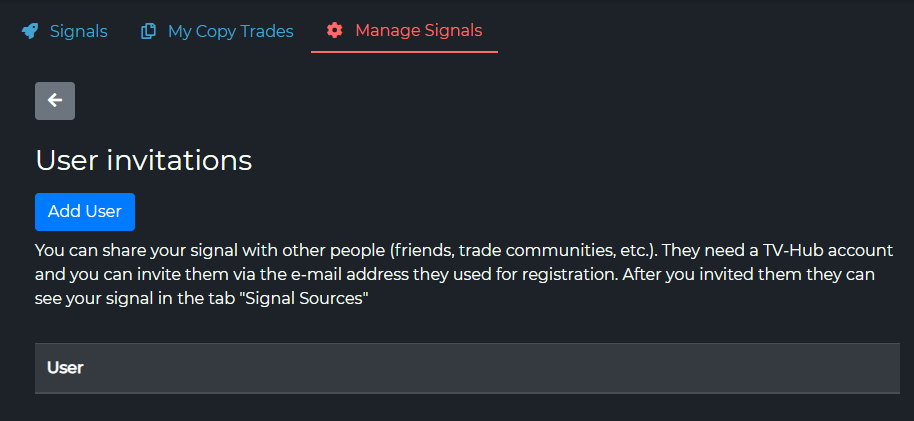
The User invitations page opens with an Add User button and an empty user table. Click Add User.
Step 3 — Invite one or more users
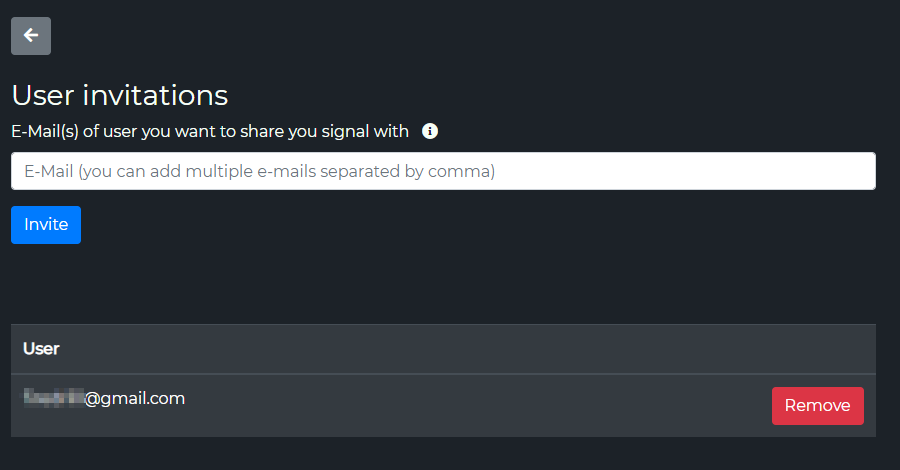
An email field appears. Enter the recipient's TVH-registered email and click Invite. For bulk invites, paste several emails separated by commas:
alice@example.com, bob@example.com, carol@example.com
Invited users show up in the User table below, each with a Remove button. TVH matches each email against the user database, so a typo or an unregistered address simply will not appear.
Step 4 — Recipient sees the signal
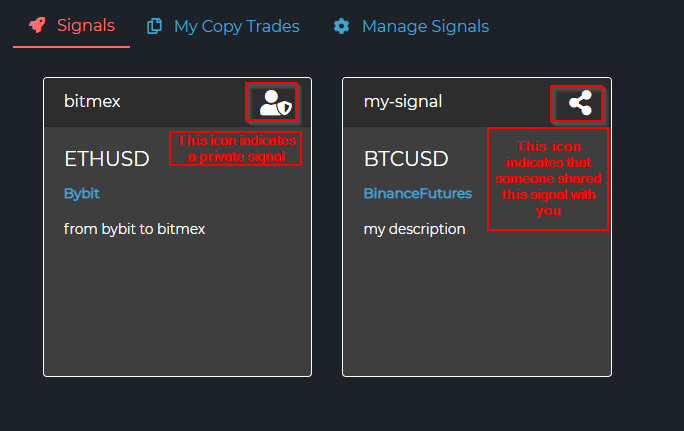
In their account, the invited user opens the Signals tab. Your signal now appears alongside any signals they created themselves — distinguished by a share icon in the card's top-right corner (versus the private icon on their own signals).
Step 5 — Recipient subscribes
The recipient follows the standard Follow a Signal flow: open the signal → create a Copy Trade → configure size/leverage → generate.
You do not see when they subscribe. From the provider's side, the invitation is binary: they have access or they don't. The actual subscription happens on their end.
Bulk invites
Paste a comma-separated list to add many followers at once:
trader1@example.com, trader2@example.com, trader3@example.com
There is no hard cap on emails per submission, but very long lists are slower to process. For lists of 100+ followers, split into batches of 20-30 to keep the form responsive.
Revoking access
Find the user in the Invitations table and remove them.
| Effect | Detail |
|---|---|
| Their access vanishes | The signal disappears from their Signals tab on the next page load. |
| Their Copy Trade goes dormant | Existing Copy Trade configurations are preserved, but broadcasts no longer arrive. The follower's full TradeCommand string stays in the database. |
| Re-invitation re-enables | If you add them back, their Copy Trade resumes receiving broadcasts with the same config — nothing needs to be rebuilt on their side. |
Removing a user is the right move when:
- They stopped paying (if your signal is paid).
- They are misusing the signal (sharing JSON outputs, public attacks on the strategy).
- They opted out themselves.
Privacy and ethics
Followers see less than you might think, and that is intentional.
| Followers can see | Followers cannot see |
|---|---|
| Your signal's name, description, and supported pairs | Your account balance, equity curve, or PnL |
| Your broadcast trades as they execute | Trades you fire without broadcastSignal |
| The exchange you trade on (declared field) | Other signals you might be following |
| Default SL/TP that you broadcast | Your API keys, TVH Token, or any account secrets |
A few things you should communicate clearly to followers, since the platform does not do it for you:
- Strategy and pairs — what you trade and how often.
- Risk profile — average position size, leverage you use, typical drawdown.
- Pauses — when you stop trading (holidays, news weeks). The platform does not auto-notify followers when you go quiet.
- Strategy changes — if you swap from scalping to swing, tell people.
These belong in your signal description, your Telegram group, or wherever you communicate with subscribers.
If a user cannot be found
The two common causes:
- They have not registered on TVH yet. Ask them to sign up first — your invitation will only match an existing account.
- Wrong email. Double-check the spelling. Email matching is case-insensitive but typo-sensitive.
There is no "invite-and-onboard" link. Recipients need a TVH account before the invitation lands.
Next steps
- Set up the broadcast side so your trades actually fan out → Broadcast a Signal
- Make sure followers understand the override model → Risk Management
- Cross-link this signal in your Telegram or community → see the description field tips in Create a Signal